Welcome to our community

Be a part of something great, join today!

  • Hey all, just changed over the backend after 15 years I figured time to give it a bit of an update, its probably gonna be a bit weird for most of you and i am sure there is a few bugs to work out but it should kinda work the same as before... hopefully :)

RCX vs Color

Jed Shepherd

Well-known member
Joined
Mar 12, 2011
Messages
83
Reaction score
0
Points
0
Location
Brisbane, Australia
Ok im not asking which is better as per the title. Im just stuck on a few issues im hoping can be cleared up.

Firstly.
If i use color to correct how does the whole de-bayer thing work? Does the red tab in color have the debayer options?(Not using mac at the moment so cant check)

Secondly, Using the new redgamma2 and redcolor2, are these rcx based only or again part of the color abilities?

Third. When doing vfx work i understand that the footage stops being RAW as such and cant use the rcx gamma and color options?
If so, do you just bring the footage back into the chosen corrector and match as best as possible?

Lastly. Im not 100% on the whole rec.709 stuff. Is there a global LUT that has rec.709 gamma applied to it or is there a number that people use to correct the gamma?
Part 2. I read a lot about LUT's being used so the image looks the same across platforms. Does that mean the master is exported without a rec.709 lut applied and then when its burnt to dvd, blu-ray or made into a DCP that something like rec.709 is applied during that process?
Sorry if this question sounds stupid but ive read a fair bit and it gets more confusing the more i read.

Thanks
 
I'm still in the learning process as well but here is Color as I understand it:

There is no option to select how Color debayers your footage - if is automatically set to a full debayer. The problem with color is that it is an 8-bit system which does affect the level of quality you are able to get out of a color render. (I don't think RCX has this issue, I hope someone will come in an correct me if I'm wrong - A Red Rocket card will also remove this limitation from Color and help you output a much better image.)

Redcolor2 and redgamma2 are included in color, but it's recommended you use redlogfilm and redcolor2 for correction in either program and I agree. The redlogfilm, redcolor2 combination gives you much more control over your image and allows you to produce a much better result, with much less headache.

VFX work does use an image that isn't RAW, but that's not necessarily a bad thing. I recommend you apply a base grade that will apply across all your images (both those being sent out for VFX work and those that aren't). You should output to a format that will hold as much info as possible (problematic for color as an 8-bit system, less so if you have a RedRocket card). A DPX file is probably your best bet here - but I've used Prores 4x4 for VFX work and been just fine. You should talk to your VFX artists and find out what they prefer.
After the VFX work is done you can bring that image back into your color correcter and apply your look to the composited image.

LUTs are something that I'm still trying to wrap my head around as well, but as I understand them the difference between rec.709 and DCP isn't the gamma applied to it, it's the color gamut available to you in the image. All of the footage I work with is for TV so I work on a monitor that's been calibrated to a rec.709 color space and simply output from there. I'd be interested to hear from some of the colorists here who do corrections that are viewed in multiple formats though as it's something that I'd really like to experiment with as well.

Hope this helps you out a bit, and I hope some more experienced colorists can come in and verify or correct me and maybe add some more about LUTs as well.
 
Hi

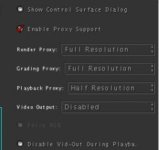
Color is supporting full or half debayer over the "Settings tab" (see the atatched image)

Color is made to ba a 10-bit grader. Originally made to work just with DPX
Whether you can monitor more than 8 bits, is dependant on your monitoring setup/displaycard (like an AJA or Black Magick with SDI out to a +8 bit monitor...)

If you have a Rocket, the rendering/debayering is even accelerated by that, these days.

The only thing of importance you don't get in the RedRoom in Color these days, are the curves.

If Color now sends the image in "float" out of the RedRoom, that is less of an issue. Haven't tested for that in a while.

Cheers

Gunleik
 

Attachments

  • Screen shot 2011-03-27 at 21.04.04.jpg
    Screen shot 2011-03-27 at 21.04.04.jpg
    9.1 KB · Views: 0
Thanks Gunleik!

I didn't realise the 8-bits in color only had to do with monitoring and not rendering. If you go down a little farther on the settings page you have an option to select internal pixel format as well up to floating point (I assume this is 32-bit), do you know if it's recommended to use these options, or is it best to stick with 10-bit given that is how Color was designed to operate?

EDIT: I stumbled across an old thread of Gunleik's where he did some pretty extensive RCX vs Color tests: http://reduser.net/forum/showthread...nder-debayer-noise-test-when-preparing-images
It's a very informative and useful read, even though as I understand it the Red Team disagrees on the suggestion of grading from a first-pass DPX rather than from RAW, no matter the bit-depth of the DPX...
 
Maybe this will help you in your choice of workflow as well, but on my machine half debayer renders sharper than full debayer. I'm not really sure why this is...

2K 16:9 (from 4K 16:9) out of color - Full Debayer
F803x.jpg

2K 16:9 (from 4K 16:9) out of color - Half Debayer
rL6Ws.jpg
 
Hi.

That old thread should be allowed to die a peacefull dead. A lot has happened with both RCX and Color since then... :-))

I am not sure if the Red team disagrees totally as to the benefits of RAW vs uncompressed. Social Network was done uncompressed amongst others, and from what I have read about Pirates, it looks like it might have followed a similar route.
The main benefit of going uncompressed, is that everyone in a larger organisation can be good at what they do and don't have to have a concept of how to treat the RAW files.

The second-most important benefit, is that one locks into a fixed base for the grade and finnishing of the material.

In a one-man shop/small and RED-focused organisation, RAW grading may often be as good. There isn't really a definite answer to that question IMHO.

Also - of course - it depends a bit on skillsets and tools involved.

Main point, though - is that with the latest Color plugin update, Color has become a much more viable option, and for grading, Color is a much better tool than RCX.

RCX is very valuable for a lot of stuff, but not the best option for a final grade...

Colors handling of LUT's is also an issue that you may or may not be happy with. BUT the mere fact that it accepts LUTs is a great boon for Color.

Cheers!

Gunleik
 
Regarding sharpness of half vs. full debayer: there has been a lengthy thread about this recently somewhere here in the workflow section and it has been settled (more or less) that this is perceived sharpness due to some harshness in the half debayer. True resolution is better in full, but it looks softer – many might say more 'filmic'. But you can always go with what suits you and your client…
 
Regarding sharpness of half vs. full debayer: there has been a lengthy thread about this recently somewhere here in the workflow section and it has been settled (more or less) that this is perceived sharpness due to some harshness in the half debayer. True resolution is better in full, but it looks softer – many might say more 'filmic'. But you can always go with what suits you and your client…

I'll look for that thread, thanks Uli! Luckily my currrent project is for SD delivery so I have some time to look it up :)


Hi.

That old thread should be allowed to die a peacefull dead. A lot has happened with both RCX and Color since then... :-))

I am not sure if the Red team disagrees totally as to the benefits of RAW vs uncompressed. Social Network was done uncompressed amongst others, and from what I have read about Pirates, it looks like it might have followed a similar route.
The main benefit of going uncompressed, is that everyone in a larger organisation can be good at what they do and don't have to have a concept of how to treat the RAW files.

The second-most important benefit, is that one locks into a fixed base for the grade and finnishing of the material.

In a one-man shop/small and RED-focused organisation, RAW grading may often be as good. There isn't really a definite answer to that question IMHO.

Also - of course - it depends a bit on skillsets and tools involved.

Main point, though - is that with the latest Color plugin update, Color has become a much more viable option, and for grading, Color is a much better tool than RCX.

RCX is very valuable for a lot of stuff, but not the best option for a final grade...

Colors handling of LUT's is also an issue that you may or may not be happy with. BUT the mere fact that it accepts LUTs is a great boon for Color.

Cheers!

Gunleik

Thanks for taking the time to share Gunleik, I really appreciate the fact that you're willing to take the time to do these unbiased tests and share the results - I've learned a lot by following your posts :)
 
Thanks

If any, thank those who hire me, though.
I do the tests as part of my work, but hve an agreement with some that as I have to do the writeup anyhow, that they can be public.
That way we can get second-thoughts on some of our conclusions which is useful for everyone...

And maybe others find them useful. That's just an added bonus.

Cheers!

G
 
Color is a lot more powerful than many people give it credit for. With the "Advanced" tab in the Primary room and the curves, I've fixed some shots that would've been deemed unusable in the past. It lacks a few features that other CC software packages have, but for most projects I love working with it.

Many thanks to Gunleik for all the valuable info he shares in this forum - it is much appreciated.
 
One thing to be aware of is that Color defaults to *NO* sharpening. Depending on your tastes this is either a good thing or a bad thing. Well, not bad, since you can always add sharpening.
 
Back
Top