Neil Shelley
Active member
- Joined
- Sep 21, 2012
- Messages
- 27
- Reaction score
- 0
- Points
- 0
Hey everyone!
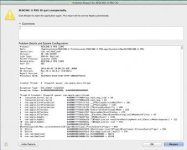
I recently updated to Red Cine X 30 and have been encountering issues where the program "Quits Unexpectedly" while trying to transcode a batch of clips. I am currently using the normal Red Rocket (not the Red Rocket-x) via a Magma Thunderbolt enclosure connected to my 15 inch Retina MBP, 2.3 Ghz i7, with 16gb of Ram. Basically, whenever I have the RR connected, which the program does "see" via grey-highlighted rocket icon, RCX is just plain very unstable, and becomes more unstable the more I use it. I'll first try to transcode 10 4k clips, and it will crash half way through. Then I will reboot, and try again with it crashing quicker. I will then reboot and try once more with it crashing while simply playing back footage. I'm not sure if it'll be of much help, but I've attached a screen shot of the "quit unexpectedly" message I receive whenever RCX crashes.
The odd thing here is that when I do not have the RR connected, my laptop seems to handle a majority of my footage just fine. I have real time playback for 4k footage at 12:1 when set to half res, and very respectable transcoding times. I have not tested with a lower compression ratio yet, but I do have quite a bit of buffer time. My playback and transcode times without the rocket connected seem to be better than before my RCX upgrade to build 30. RCX runs very stable now, while my transcoding speeds seem to be at least real-time or faster.
Is anyone else having a similar experience with the new RCX and/or their Red Rocket card? If anyone could offer any advice or insight I'd greatly appreciate it! Thanks!
I recently updated to Red Cine X 30 and have been encountering issues where the program "Quits Unexpectedly" while trying to transcode a batch of clips. I am currently using the normal Red Rocket (not the Red Rocket-x) via a Magma Thunderbolt enclosure connected to my 15 inch Retina MBP, 2.3 Ghz i7, with 16gb of Ram. Basically, whenever I have the RR connected, which the program does "see" via grey-highlighted rocket icon, RCX is just plain very unstable, and becomes more unstable the more I use it. I'll first try to transcode 10 4k clips, and it will crash half way through. Then I will reboot, and try again with it crashing quicker. I will then reboot and try once more with it crashing while simply playing back footage. I'm not sure if it'll be of much help, but I've attached a screen shot of the "quit unexpectedly" message I receive whenever RCX crashes.
The odd thing here is that when I do not have the RR connected, my laptop seems to handle a majority of my footage just fine. I have real time playback for 4k footage at 12:1 when set to half res, and very respectable transcoding times. I have not tested with a lower compression ratio yet, but I do have quite a bit of buffer time. My playback and transcode times without the rocket connected seem to be better than before my RCX upgrade to build 30. RCX runs very stable now, while my transcoding speeds seem to be at least real-time or faster.
Is anyone else having a similar experience with the new RCX and/or their Red Rocket card? If anyone could offer any advice or insight I'd greatly appreciate it! Thanks!