Welcome to our community

Be a part of something great, join today!

  • Hey all, just changed over the backend after 15 years I figured time to give it a bit of an update, its probably gonna be a bit weird for most of you and i am sure there is a few bugs to work out but it should kinda work the same as before... hopefully :)

RC-X does not match export, gamma/black level issue?

Bill Moore

Member
Joined
Sep 7, 2010
Messages
6
Reaction score
0
Points
0
Location
Pittsburgh
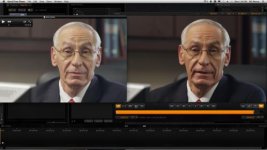
I have been having a heck of a time with this, and it has already affected several jobs and is just destroying my sanity. See the attached screenshot. On the right is the image graded in RC-X, and on the left is what it looks like when I export to ProRes HQ. It's like the gamma or black levels aren't correct. This also happens with other flavors of ProRes. I'm using build 487, but it has been doing this to me for the last several builds. I'm on OS 10.6.7, Final Cut Pro 6. I've tried opening them in QT7 and QTX, same thing. In FCP they are darker, I suppose due to the 1.8/2.2 gamma conversion, but they still look nothing like RC-X and when I send them back out to h264 which is my delivery on all of my projects, it's washed out again. I've found similar posts on reduser, but the solutions that worked for them haven't worked for me.

Please help?

RC-X Build 487
OSX 10.6.7
FCP 6.0.6
 

Attachments

  • Screen shot 2011-09-05 at 2.08.11 PM.jpg
    Screen shot 2011-09-05 at 2.08.11 PM.jpg
    19.2 KB · Views: 0
I have achieved the best results by turning off both gamma correction and SMPTE levels in RCX. Almost exact match in FCP, though I do tend to do minor corrections.
 
I turned off SMPTE, but I do not see an option for gamma correction. Where would I find that?
 
Hey Bill,

It's in the Video Setup button under the QuickTime Setup button.
screen.jpg
 
Ah. I do not have that option, I also do not have access to 4444, because I am running FCP 6. Is there a way to upgrade to the new ProRes codecs without installing FCP7?
 
Ah. I do not have that option, I also do not have access to 4444, because I am running FCP 6. Is there a way to upgrade to the new ProRes codecs without installing FCP7?

...if I understand what you are saying here, the gamma correction setting is in the "setup" window in Redcine-X Pro.

If you know someone who has FCP 7, you could copy their codec list onto your system.
 
Not to be a pain, but how would one do that? I do have access to a FCP7 machine. I've opened the Application contents, but I don't see anything referencing 'codecs'.
 
You should go to your Library/QuickTime. Copy the QuickTime's folder to the same location on your machine. But please do a backup first, just in case something wrong happens.
 
Back
Top