Welcome to our community

Be a part of something great, join today!

  • Hey all, just changed over the backend after 15 years I figured time to give it a bit of an update, its probably gonna be a bit weird for most of you and i am sure there is a few bugs to work out but it should kinda work the same as before... hopefully :)

Raw Look

Let me make sure I understand the question -

You shot on your Epic with the RAW feed through your monitor, now when you watch the footage (presumably on an edit suite or RED Cine-x) it appears different?

If this is the case - what you are seeing is whatever 'look' / meta data you have assigned to the cam footage (colour space, gamma space, saturation, WB, Tint, ISO, etc) In RED Cine-x you can remove the look / meta data - so all you see is the RAW recorded image.
 
There is no magic button if that's what you're asking. The RAW view on the monitor is a representation of what theoretically the sensor is seeing. It tries to show the spectrum in a reasonable viewable image. So, it actually has it's own curve or look applied. But this look is not accessible outside the camera. You have to grade it as such and the best place to start in my opinion would be RedLogFilm gamma and Color set to RedColor2.
 
The raw is there in RedCine-X. Over on the right, where all your sliders and parameters are, on the top right hand corner of ever set of options there are two buttons, M and D.

M = Metadata. It's what your camera's Metadata was set to. This is *not* Raw, but it is the Kelvin and Tint and ISO etc., etc. that you had your camera set to. If you had teh Raw view turned on, however, you were not seeing this stuff applied.

D = Default. As in Raw. If you go down the list and click all the D's, you'll set everything to "raw".

You can do this to one clip, save the look, and then apply the look to all of your clips, so that you don't have to go clip by clip clicking D D D D D....

NOTE: The D doesn't seem to do anything for Color and Gamma, so set those as you'd like.

These buttons are also SUPER useful over your viewing window. If you hold down the M, you'll see what the image looked like with the Camera Metadata (i.e. what was seen on set) and if you hold down D you'll see what the camera sensor actually saw. I use this constantly while DITing, in order to A/B the image and help me see what the camera saw, what the DP/Director saw, and what I've tweaked the image to.
 
I would set gamma to RedLogFilm as a starting point if I wanted to get the image to look like the RAW view.


While RedLogFilm is truly Raw, I don't think that's what you're likely to see in the camera's monitor when you have the Raw look enabled. It looks to me that the Raw look uses whatever Color and Gamma settings you have selected, and then sets every other Metadata parameter to the defaults. I know that if I have my Kelvin to 5600, Tint at 0, ISO at 800, and no curve on my Scarlet, and then switch from Normal to Raw, there's no change; depending on how Paolo was shooting, he may need to select a Gamma that is not RedLogFilm in order to get the look that he's after, even though that's the one that is actually "raw" for the gamma.
 
While RedLogFilm is truly Raw, I don't think that's what you're likely to see in the camera's monitor when you have the Raw look enabled. .

RedlogFilm is not "truly Raw," at least not if the term "Raw" is to actually mean something. It is a Cineon based gamma curve that is designed to resemble a film scan so that post production can be carried out in familiar existing processing pipelines. "Truly RAW" means linear light, because that is what the sensor captures. The "Raw" monitor setting on Red cameras is created with a different gamma curve that is intended to show all information that was captured without forcing it to be properly displayed on a typical HD monitor. It is not meant to be looked at in terms of a "proper" image, it is purely a technical exercise, regardless of the fact that some people seem to like what it looks like for specific situations. It does not represent photographic reality, and it does not represent a Cineon curve.

Graeme, if you've got some time, please step in and stop this madness.... :001_unsure:
 
Yeah Graeme has exhausted this subject already. Any way you slice it, you are applying a curve to the image for you to make any sense of the image. RLF simply gives you the flattest of the bunch.
 
0111001010100010101101011010001111100101010101011000100011100110001101010101101011010101010110010101010101010101010101010101101010101010101010101010101010101010101111110101000101010101111110101010111111100001010100100001001110001010101101001010111100101110011111000101110101101001110001011010101101001010110100101010101001010101010100101010101010101011010101010101001010101010010101010101001010010101000101010010101010101010101010101010101010101010101010101101001010010101001010101010010100101010101010001010101010101010100101010101010101010101000101010010100110101010101010101010101001010101010101010

Man isn't that a beautiful sunset! (in RAW of course)
 
RedlogFilm is not "truly Raw," at least not if the term "Raw" is to actually mean something. It is a Cineon based gamma curve that is designed to resemble a film scan so that post production can be carried out in familiar existing processing pipelines. "Truly RAW" means linear light, because that is what the sensor captures. The "Raw" monitor setting on Red cameras is created with a different gamma curve that is intended to show all information that was captured without forcing it to be properly displayed on a typical HD monitor. It is not meant to be looked at in terms of a "proper" image, it is purely a technical exercise, regardless of the fact that some people seem to like what it looks like for specific situations. It does not represent photographic reality, and it does not represent a Cineon curve.

Graeme, if you've got some time, please step in and stop this madness.... :001_unsure:

There's no need to beg for any madness to stop; I readily admit when I'm wrong and eat crow.

However, I thought the whole point of RedLogFilm is that there is no curve applied; that what the sensor sees is debayered and output (it's certainly not *actually* raw, since the image has to be debayered in order to look like anything other than a grid of green, red, and blue pixels). There are a lot of LUTs out there, floating around, that take a Log image, and transform it into something resembling a film stock; some of these were made by doing a bunch of analysis on a specific film stock, and how it reacts to light. I'm young enough that I've never processed film, so chalk that up to specific inexperience in that I haven't done so first hand, but I thought that film without much processing looked higher contrast than a raw (debayered) image.
 
http://www.red.com/learn/red-101/redlogfilm-redgamma

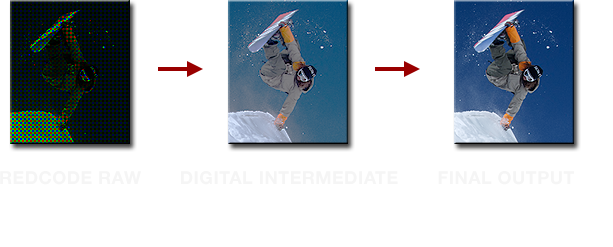
In this article there is an image of what RAW really is (linear data from the sensor before being processed, with no meaning to our visual system)

redlogfilm-workflow.png


It's unfortunate that the camera menus designate by RAW, what should have been called from the beginning something else (FLAT or SIMULACRUM come to mind).
It just perpetuates this ongoing madness.
 
While RedLogFilm is truly Raw, I don't think that's what you're likely to see in the camera's monitor when you have the Raw look enabled. It looks to me that the Raw look uses whatever Color and Gamma settings you have selected, and then sets every other Metadata parameter to the defaults. I know that if I have my Kelvin to 5600, Tint at 0, ISO at 800, and no curve on my Scarlet, and then switch from Normal to Raw, there's no change; depending on how Paolo was shooting, he may need to select a Gamma that is not RedLogFilm in order to get the look that he's after, even though that's the one that is actually "raw" for the gamma.
I'm pretty sure RAW view does not change depending on Color or Gamma settings, as it has a both a colorspace and gamma of its own. Also, it at least used to match ISO at 320, not 800.

And since RAW view looks fairly flat and RLF is a fairly flat look to start with, that's what I would recommend.

There's no need to beg for any madness to stop; I readily admit when I'm wrong and eat crow.

However, I thought the whole point of RedLogFilm is that there is no curve applied; that what the sensor sees is debayered and output (it's certainly not *actually* raw, since the image has to be debayered in order to look like anything other than a grid of green, red, and blue pixels). There are a lot of LUTs out there, floating around, that take a Log image, and transform it into something resembling a film stock; some of these were made by doing a bunch of analysis on a specific film stock, and how it reacts to light. I'm young enough that I've never processed film, so chalk that up to specific inexperience in that I haven't done so first hand, but I thought that film without much processing looked higher contrast than a raw (debayered) image.
Like Mike pointed out, the actual RAW data captured by the sensor is linear. RLF is what you get after applying a log curve to the data. Mike has two excellent posts on his site about log gamma (1, 2), which you can check out in addition to Paulo's RED 101 link.
 
Last edited:
http://www.red.com/learn/red-101/redlogfilm-redgamma

In this article there is an image of what RAW really is (linear data from the sensor before being processed, with no meaning to our visual system)

redlogfilm-workflow.png


It's unfortunate that the camera menus designate by RAW, what should have been called from the beginning something else (FLAT or SIMULACRUM come to mind).
It just perpetuates this ongoing madness.

Real raw is actually monochromatic.
 
Pretty sure the same way to get the same look that you get in "RAW view" is to set your ISO to 320 and WB to 5000K. Not sure about Gamma curve, probably RedGamma3.
 
Back
Top