Welcome to our community

Be a part of something great, join today!

  • Hey all, just changed over the backend after 15 years I figured time to give it a bit of an update, its probably gonna be a bit weird for most of you and i am sure there is a few bugs to work out but it should kinda work the same as before... hopefully :)

RAID 5 Speed Issues

Jason Samuel

Well-known member
Joined
Mar 7, 2010
Messages
241
Reaction score
0
Points
0
Hey REDUsers!

I just set up a RAID 5 with 8 - 2TB Drives. I'm using an Areca 1680ix-12 RAID Controller with a 16 Bay SAS Expander Enclosure. I set up the RAID 5 last night. Took several hours to build the RAID (which I know is normal).. I just ran AJA System Test to check the speed of the RAID and I'm not getting the results that I expected on the READ side..

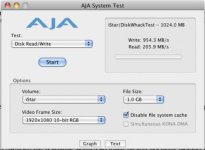
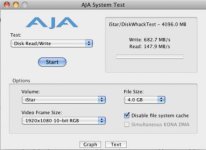
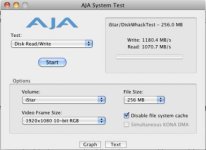
When I select 128MB or 256 MB as the Test File Size, I get excellent WRITE/READ results...

When I select anything 512 MB or over, the WRITE speeds is great, but I get READ speeds of 140 MB/s - 200 MB/s... Shouldn't this be much faster?

Also, it seems to hang sometimes in the middle of the READ test. Not at all during the WRITE.

I only know a little bit about RAID Setups. I set the RAID up in the Areca Utility. RAID 5 w/ stripe size of 128kb, which I think was the highest it would allow me.

Maybe I didn't set something up correctly. Any help or insight you could give me would be greatly appreciated.

I'm on an 8 Core Mac, 20 GB RAM, and the hard drives are Hitachi 2TB 0F10311 7200 RPM Drives.

Thanks,
Jason
 

Attachments

  • Screen shot 2010-05-01 at 2.09.01 PM.jpg
    Screen shot 2010-05-01 at 2.09.01 PM.jpg
    15.6 KB · Views: 0
  • Screen shot 2010-05-01 at 2.08.44 PM.jpg
    Screen shot 2010-05-01 at 2.08.44 PM.jpg
    15.9 KB · Views: 0
  • Screen shot 2010-05-01 at 2.10.47 PM.jpg
    Screen shot 2010-05-01 at 2.10.47 PM.jpg
    15.5 KB · Views: 0
What kind of results are you getting in real-life applications? How long save a copy of a big .mov on the RAID (same settings) back to the RAID as another file name?

-michael zaletel
 
Hey Michael,

I haven't really used it in real-life applications yet.. I wanted to get it all set up and working properly before I trusted it enough to put into use...
 
Are you using enterprise quality drives? I'm not familiar with the model numbers you posted, but I know that enterprise drives are built so that they spin down less often so that the striped data can be read and written more efficiently.

Not sure if that might be causing your issue or not.

Tim
 
Dear Jason,

Make sure you have the latest and greatest drivers and firmware updates for your RAID. I use ATTO SCSI-3 and SAS RAID controllers, and there are relatively frequent updates to address updates and changes in the OS. My custom-made SCSI-3 RAID used to hang ALL the time and a late firmware update cleared that right up.

- Jordan
 
I'm not using enterprise drives.. I'm using the newest Hitachi Non-Enterprise 2TB 7200 RPM drives. I've done my research and a lot of companies use these for their RAIDs. I think these are the drives that CalDigit Uses for their HDPro RAID setups.
I'm starting over from scratch and re-initializing the RAID 5 with some new settings that I really hope will help. But any further suggestions would still help me out a lot! Will check the firmware as soon as the RAID finished building.
 
Still only getting about 200 MB/s READ speed.. Not sure what could be wrong but I really don't know much about setting up a RAID system.
 
We had a similar situation with an Areca 1280ml. we did a firmware update on the raid card and it solved the problem.
Your vendor should be able to talk you through that process
JB
 
go into about this mac details and look
at the pci bus sction how fast the pci linkspeed is

if the card is running at 1x speed this is the problem

8 drives on raid 5 or 6 configuration shold give you
at least 280 to 300 mbps

best ones
vudeoconsulting at mac dot com
 
Thanks everyone.. I spoke with Areca and we think maybe 1 of my hard drives was bad... I just bought a new one and once again am re-initializing the RAID.. Let's hope this works.. and thank you everyone for your input!

What should my speeds be for an 8 Drive RAID 5? READ and WRITE?
 
Hey Jason,

I am a tech support at Areca and I'd be happy to help you out with your issue. I am not sure if you talk to me or our other techies but just from the reading the post, the benchmark result is not what it should've been. The read/write are usually less than ~100mb/s apart under normal condition. You should expect at least 800+ on both read and write for 16 drives under RAID6. It look like one or few drives is lagging the entire chain. Call me (714-961-0800) or email at jamesl@ArecaUS.com and I'll have it looked at.

- Areca controller with 8 x Hitachi ultrastar A7k2000 under RAID 5 should deliver ~810MB/s write and ~800MB/s Read under AJA benchmark, Hitachi ultrastar is one of the fastest drives right now (assuming all 7200rpm), but a recent test report from our lab demonstrate the new WD RE4 top that.

PS: Non-enterpise drives are definite ban for any RAID manufacture. I believe Caldigit uses the Hitachi ultrastar A7k2000 enterprise level HDD as no vendor wants to cost down on drives to reduce quality and performance, then later get sued/blamed/yelled for bad quality. (actually I take that back, you do see nonenterprise drive in some other branded system these days...)
 
Last edited:
First of all... a HUGE HUGE thanks goes out to James for helping me out today!! We basically determined that there was an issue with either the backplane or the power supply inside the enclosure I was using.. Drives were perfect and the SAS expander was fine.. But I decided to return the enclosure and get a new one from James over at CineRAID. THANKS THANKS THANKS!
 
Back
Top