Welcome to our community

Be a part of something great, join today!

  • Hey all, just changed over the backend after 15 years I figured time to give it a bit of an update, its probably gonna be a bit weird for most of you and i am sure there is a few bugs to work out but it should kinda work the same as before... hopefully :)

r3d trim export in redcine x pro settings

chorshid_mehraboon

New member
Joined
Jul 15, 2013
Messages
1
Reaction score
0
Points
0
hello,
i wonder if someone can tell me why my r3d trim export in redcine x pro , comes put without the Colorcoretion i made.
it exports only a r3d without rmd, so al the coretions i made are not included.
hope someone know the solution, thank u so much in advance
saludos
ashah
 
At a guess, I'd say R3D Trim is designed to literally just trim the R3D - in this sense, it's not an export to another format, so no colour correction is baked in. Your colour corrections only exist as metadata in the original RMD file.

Just copy the RMD file from the original to the corresponding folder of the trim, and the colour corrections will follow.
 
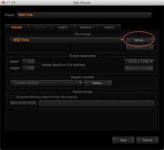
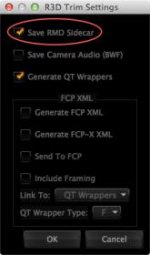
In your export preset, click "Setup…" and then select "Save RMD sidecar"
 

Attachments

  • Preset.jpg
    Preset.jpg
    10.5 KB · Views: 0
  • rmd_setup.jpg
    rmd_setup.jpg
    7.7 KB · Views: 0
hello Nick,
you seem to be at ease with trimmed R3D files, would you know how to trim files with an export of sound and image in same file ?
So far, trimmed files are separate sound in wav format + regular R3D
Thank you
 
Last edited:
hello Nick,
you seem to be at ease with trimmed R3D files, would you know how to trim files with an export of sound and image in same file ?
So far, trimmed files are separate sound in wav format + regular R3D
Thank you

Leon,

It's not possible to do an R3D trim with the sound embedded in the R3D.
 
Hello all,
I have i question related with trimming .r3d files, when trimming .R3d files is it possible to change the name of the trimmed clip to any different than the original?
i have tried but could´t get it.
 
Hello all,
I have i question related with trimming .r3d files, when trimming .R3d files is it possible to change the name of the trimmed clip to any different than the original?
i have tried but could´t get it.

Simple answer is "It is technically doable from a programming perspective, but you shouldn't so we won't let you"
 
Hi Gunleik,
Now at least i know that is not possible, you have your reasons, it was something i would like to do for a workflow with other software i´m testing.
I will have to try other way.
Thanks.
 
Back
Top