Welcome to our community

Be a part of something great, join today!

  • Hey all, just changed over the backend after 15 years I figured time to give it a bit of an update, its probably gonna be a bit weird for most of you and i am sure there is a few bugs to work out but it should kinda work the same as before... hopefully :)

R3D Thumbnail on Mac?

kesten migdal

Member
Joined
Apr 15, 2014
Messages
21
Reaction score
1
Points
3
Location
Berkeley, CA
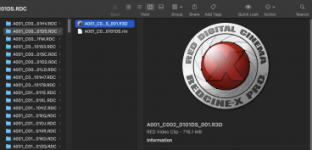
This is driving me crazy. I can't see my R3D thumbnails in Finder on my iMac Pro. I used to be able to, but now they're gone. Yes, I have the latest version of RED Player and RED CINE-X PRO. I can see the thumbnails on my Macbook Pro no problem, just not my iMac Pro. Any clues?
 

Attachments

  • Screen Shot 2021-09-29 at 6.11.22 PM.png
    Screen Shot 2021-09-29 at 6.11.22 PM.png
    56.6 KB · Views: 4
This is driving me crazy. I can't see my R3D thumbnails in Finder on my iMac Pro. I used to be able to, but now they're gone. Yes, I have the latest version of RED Player and RED CINE-X PRO. I can see the thumbnails on my Macbook Pro no problem, just not my iMac Pro. Any clues?
Apparently no one has any clue yet and this issue persists today
 
@Todd Sansom @kesten migdal Actually, we know why it doesn't work... What you need to do is replace the R3DQuickLookPlugin of RCXp>Library>QuickLook from a version *before* RCXp v53 (I think 52.2 was the last one that worked)... The irony is that it's so old now that the preview only works with footage captured on older sensors on MacOS Big Sur and earlier... 🫠

As for why RED never fixed it, it's likely because they've always had a really poor track record for follow-through (it's why they got the "always in beta"/"use their customers as testers" reputation that still kinda sticks). Hoping Nikon fixes that, granted it's arguably too late.
 
Last edited:
Back
Top