Patrick Justin
Member
- Joined
- Feb 22, 2012
- Messages
- 12
- Reaction score
- 0
- Points
- 0
Hey all,
I've emailed Red Support but maybe this is an issue someone has seen before.
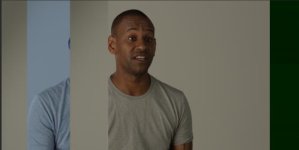
After wrapping on a shoot i've gone through the footage and one of my clips has distorted.
It's cut the image up vertically and shifted part of it to the left and made it a blue channel.
Heres a link to the screenshot.

https://postimg.org/image/r5xoab2ut/
My main concerns is how the corruption may have occurred and it's likelihood of recurring.
Happy to answer questions to help diagnose the issue.
The issue was only on one clip.
Screenshot is in log and was shot on a grey background.
Thanks in advance,
Patrick
I've emailed Red Support but maybe this is an issue someone has seen before.
After wrapping on a shoot i've gone through the footage and one of my clips has distorted.
It's cut the image up vertically and shifted part of it to the left and made it a blue channel.
Heres a link to the screenshot.
https://postimg.org/image/r5xoab2ut/
My main concerns is how the corruption may have occurred and it's likelihood of recurring.
Happy to answer questions to help diagnose the issue.
The issue was only on one clip.
Screenshot is in log and was shot on a grey background.
Thanks in advance,
Patrick