Welcome to our community

Be a part of something great, join today!

  • Hey all, just changed over the backend after 15 years I figured time to give it a bit of an update, its probably gonna be a bit weird for most of you and i am sure there is a few bugs to work out but it should kinda work the same as before... hopefully :)

R1 fails to boot up after build 31 upgrade

Shaun Au

Well-known member
Joined
Jan 2, 2007
Messages
65
Reaction score
0
Points
0
Website
www.shaunau.com
Guys,

I have an issue with my Red One with Mysterium sensor. After I upgraded the latest firmware(build 31), it fails to boot up. The firmware upgrade was successful. I performed it last weekend. Only want to turn on the camera to shoot something this weekend again. I never had this kind of problems before after major firmware upgrades. This is so strange.

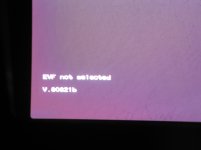
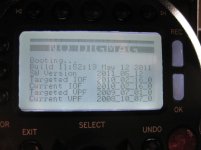
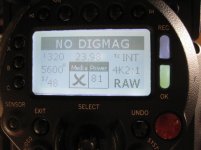
The LCD display on the backside of camera displays just the standard menu info, but there's no input in red EVF or LCD. The normal booting up procedure will have previews in EVF and LCD through lens after you turn on the power button. In my case, they're all black. EVF has a small text "EVF not selected" at the lower left corner(see attached photos). A few minutes after I turn on the power switch, the fan starts to run. Anyone knows what's going on?

Thanks.

Shaun

Update: I powered off and powered back on. The LCD reads different this time and it stays there.
 

Attachments

  • red_issue01.jpg
    red_issue01.jpg
    85.2 KB · Views: 0
  • red_issue02.jpg
    red_issue02.jpg
    65.6 KB · Views: 0
  • IMG_1377.jpg
    IMG_1377.jpg
    81.8 KB · Views: 0
Strange thing...

What I can think of:

1- Try to reset the camera to factory defaults (sometimes that solves strange problems). If that doesn't work:

2- The only thing I can recommend is that you try to reinstall the Firmware. Maybe, even the camera saying the upgrade was ok, there was something wrong. If this also doesn't work:

3- Try to downgrade to an older build (I also still have the Mysterium sensor, and I've kept with build 30.6.0, which works great for me).

Hope some of this can help, cheers!
 
Hi,

Is downgrade procedure same as upgrade? Just wan to be sure. My camera was working fine with build 30 before upgrading to 31.

The upgrading steps are following according to the read me text came with the build files. In my case, I would have to format my CF card with Build 31 because that's what is running now. Would that be a problem when I copy build 30 upgrade folder and downgrade from there?

* For Mysterium sensor based cameras, format a CF or SSD card using Build 20, 21, or a Beta Build 30. For Mysterium-X sensor based cameras, format a CF or SSD card using a Beta Build 30.

* Connect the CF or SSD card to your P.C or Macintosh via a CF or SSD card reader.

* Copy the folder called " upgrade " onto the CF or SSD card.

* Unmount the CF or SSD card from your computer (drag to the trash can).


* Ensure your camera is powered down.

* Insert the CF or SSD card into the CF or SSD card slot of your RED-ONE camera.

* Power up the camera.

* After booting up, the camera rear status display will report " New Firmware " and the RED-EVF or RED-LCD will report "A software update is available for your system"

* Press the joystick to confirm, and the rear status display will report " Upgrading "

* During the upgrade process, a blue progress bar will be visible on the RED-EVF or RED-LCD. This bar will continue for the duration of the upgrade, which is approximately five minutes.

* At the end of the upgrade process, the rear status display will report "O.K. Cycle Power" The RED-LCD or RED-LCD will report " Upgrade complete. Power cycle the camera to continue. "

* Power down the camera, wait five seconds, then power up the camera.


* Verify that the camera rear status display and or monitors report back -

PIN (value specific to camera) Build 30 Version 30.7.0

* Installation is now complete.


Shaun

Strange thing...

What I can think of:

1- Try to reset the camera to factory defaults (sometimes that solves strange problems). If that doesn't work:

2- The only thing I can recommend is that you try to reinstall the Firmware. Maybe, even the camera saying the upgrade was ok, there was something wrong. If this also doesn't work:

3- Try to downgrade to an older build (I also still have the Mysterium sensor, and I've kept with build 30.6.0, which works great for me).

Hope some of this can help, cheers!
 
Downgrade is the same procedure as upgrade.

The card you used for the build 31 upgrade would have been formatted with build 30, so you can use that. Just delete the folder called "Upgrade" from the root of the CF card, and replace it with the "Upgrade" folder from build 30.

If it all works again. Try redownloading the build 31 again from Red.com. There's a slight chance it may have got corrupted during download, although you said it did upgrade OK a week ago, so this probably wasn't the cause.
 
My CF card is already formatted with build 31 because I was going to record with it. So will this be an issue while downgrading?
 
It will either work or not work in terms of whether the camera sees the CF card as readable or needing formatting. So give it a try.

Failing that, maybe you have other cards you didn't format with 31.

I'm assuming you have already raised a support ticket with Red support?
 
Back
Top