Welcome to our community

Be a part of something great, join today!

  • Hey all, just changed over the backend after 15 years I figured time to give it a bit of an update, its probably gonna be a bit weird for most of you and i am sure there is a few bugs to work out but it should kinda work the same as before... hopefully :)

QUICK & EASY REDCINE X - FCP WORKFLOW

Mark Toia

Well-known member
Joined
Jan 23, 2008
Messages
4,142
Reaction score
0
Points
0
Location
Could be anywhere in the world today.
Thought I'd make this post easier to find.

I call this my "HOTEL ROOM" Work flow...

The secret for a speedy FCP work flow is once you go into FCP you stay there...

Here is a quick video of what you can get in a few seconds using REDLOGFILM / REDCOLOR2 PRO RES FILES...

http://www.zoomfilmtv.com.au/ftp/REDLOG_realtime_grading/Pro_res_in_real_time_(Car).mov
http://www.zoomfilmtv.com.au/ftp/REDLOG_realtime_grading/Pro_res_in_real_time_(Face).mov
http://www.zoomfilmtv.com.au/ftp/FCP_3way_colour_correct/colour_key_RED.mov
http://www.zoomfilmtv.com.au/ftp/Dynamic_range/REDMX_latitude_test..mov

Here is the road map.
quick_FCP_workflow.jpg


Sharings caring.

Enjoy.
 
Do it aaaaaaaall the time...
Alot of my work goes to cinema as well. I key from it, grade heavily, I really push it around.
RED is so clean, PRO RES has so much info... the two together give you far more than you need.

http://www.zoomfilmtv.com.au/ftp/Toia_latest/Bank_of_China_100years_1280.mov

You cannot tell the difference between a RAW, DPX, 4444 workflow when your done... :)

I do many workflows.. this is my quick "hotel room" work flow.. but when I get back and redo via Resolve or flame.. put side by side.. No difference at all.

Just sharing...

At the end of the day you have many ways to post.. this is just another option.
 
This is a good guide.

Now ... I'm gonna split some hairs by talking about edge cases.

I disagree with this workflow. I think its a 90% solution.

A good shooter that shoots how they mean to final will get good results with it, but the further that is from the case the less it will serve.

I prefer to use Resolve Lite for the start of my post (or Storm, but I haven't really tried that yet, when I did I had a key problem and I was too lazy to figure it out.)

So, with Resolve I can do a fast "one light" grade, and get close to the Rec709 look I want to deliver. Then I usually choose to output ProRes 4444 (which is overkill for some projects ... but it costs me little in the end, and I get better data if I need it.)

Now I post in FCP, and never ever use its color controls.

Historically I've sent clips to VFX from FCP, but I think I'll start doing that from Resolve. This is a preference - either will work.

Then I output to Resolve for final coloring. (I usually grade "full scale" not Rec 709)

When I finish in FCP as a last step I may apply the broadcast safe effect if needed.

The key difference is that by pushing my looks towards final in Resolve at the start of the process, I can readily avoid Final Cut's color processing and take full advantage of the flexibility of R3D. Then when I am done editing, I can finish picture in Resolve.

I also preserve the ability to reconform rather easily to R3D if need be.

So, most of the time my results would be identical if I switched to Mark's exact workflow, but in a very few cases I feel (keyword right there) that I work better with this workflow, and that I preserve more flexibility.

Now ... I also disagree with Mark about the quality of results using the "transcode early" type of workflow.

I believe that there is a demonstrable difference in image quality between an end to end R3D workflow and any transcode early workflow, like both presented here. (But also workflows that transcode to DPX or OpenEXR, etc.)

The question is if that difference matters to your project?

My response is that it only matters on theatrical finishing, and even then it matters only in a small minority of shots. Also any 4K finishing. Today these are edge cases really. You will know if you fit in the category that should spend the time and money to make an end to end R3D workflow work for you and wring out that last little bit.

So, for most shooters on most projects, transcode early style workflows will generate all the results they might want very easily.

Now I want to stress again that the workflow Mark has shared is solid and generates great results, but its not the absolute final word.
 
Now I want to stress again that the workflow Mark has shared is solid and generates great results, but its not the absolute final word.

Correct :)

I'm a resolve finisher as well for obvious reasons.

This option is a quick and reliable work flow for people that want a great end result and do not have a Resolve, Flame, Lustre, Baselight, Scratch etc at the finger tips or cannot afford to pay for post at that level..
This workflow is not the absolute final word. :))

I don't call it my "HOTEL ROOM" work flow for nothing. :))))))
However you can do huuuuge projects with it and I have sucessfully many many times.

Heres another couple of demos using this exact (crap) workflow. ;)

http://www.zoomfilmtv.com.au/ftp/Toia_latest/Toia_Zoom_GGi_1280.mov
http://www.zoomfilmtv.com.au/ftp/Toia_latest/Crunchox_1280_wide_2.1.mov
 
Mark,

I think the workflow you presented here is an excellent solution (one of many availble with RAW and all of teh software tools). It's a great, fast, quicka and dirty to start editing.

The question.

Do you tend to try to get back to the R3D for the final pass (in resolve, Apple Color, Baselight, Pablo, or others)?

4K half good effectively is throwing out about 75% of the picture information. So it's nice to do final renders from r3d whenever possible.

I have traditionally gone to 720P and then reconnected the r3d for "last pass renders. It's also a "hotel room" workflow, but it uses the full r3d resolution on the "final pass".

As always. Thanks for sharing.


David
 
Thank you Mark,


I will print your method and distribute it to everyone who rent the Red but is not familiar with it ! It is very reassuring method.


Olivier
 
...Now I want to stress again that the workflow Mark has shared is solid and generates great results, but its not the absolute final word...
Thats the beauty of the forum. There is no final word. It just grows and grows for all of us to learn.
Thanks Mark for that great post and I agree with Alex that most of us would be fine with your work-flow. I think we fall in this category since we dont deliver film (not yet) clips.
You guys keep up this workflow banter for us "just learning" full or part-time colorists ;)
 
Although Mark's workflow is mostly correct, I would have to point to a couple areas where you may want to experiment. I'll outline them here.

- The first is with the Quicktime settings. If you are going to film, then 24 would be the correct frame rate. If you are going to HD, then make sure to select 23.98.

- Also within QT settings, I have found that I prefer Gamma Correction set to "None". Also, I select the Chroma subsampling from 4:4:4 checkbox.

- Also experiment with debayering quality to make sure you are happy with it. Most of the time I think you will be happy with what Mark has suggested. There may be some material that is better served with a full debayer.

- In terms of RED color space, this is one that everyone should do their own experiments with. Try Red Color vs. Red Color 2. Also, if using Redlogfilm, understand what that means and where you are starting from. Many may find Redgamma or Redgamma 2 to be better starting points for their workflow. Always run through these on your own with your own footage to see what gets you the best results in the shortest amount of time. No doubt that Redcolor2 and REdlogfilm can be a powerful combo as Mark has suggested, but certainly not the only approach, so just keep that in mind as you play around.

- Everyone should download and try Resolve Light. Amazing that this is free. Essentially you have two really good 1 light tools at no charge between Resolve and Redcine-x. I also think it's important to learn it and when you've outgrown it, i.e. you know what you're doing enough that you start to find limitations, then move up to the full version and hopefully the roundtripping is going to continue to improve and streamline to the point where it's no big deal to take projects from any of the NLEs into Resolve. Obviously best results with come from colorists with a lot of experience but I also think many up and coming image makers will benefit from a tool like this, especially with the insanely good trackers which for me has always been kind of tough in an app like Color.

I've always liked Mark's "Keep It Simple" approach and obviously his results speak volumes, so just wanted to point out those couple of things.
 
The question.

Do you tend to try to get back to the R3D for the final pass (in resolve, Apple Color, Baselight, Pablo, or others)?

4K half good effectively is throwing out about 75% of the picture information. So it's nice to do final renders from r3d whenever possible.

David

Hi David,

I only go back to the R3D if I want more from the shot in the way of latitude (say if I under exposed or over exposed my shot) other than that no.. not really.
They same i did with 35mm film, I treat the R3D like my NEG. 9 times out of 10, I'd grade the onelight from my 35mm rushes and not go back to the film at all..
Worked then.. works now.. (probably better now that RED have REDLOGFILM).

I do have many more hi end work flows this is only one... but a lot of the time, my so called down and dirty workflow ends up on the big screen with little to no compromise.

The ad's you see in these links above are straight from this REDCINE X / FCP work flow as is..
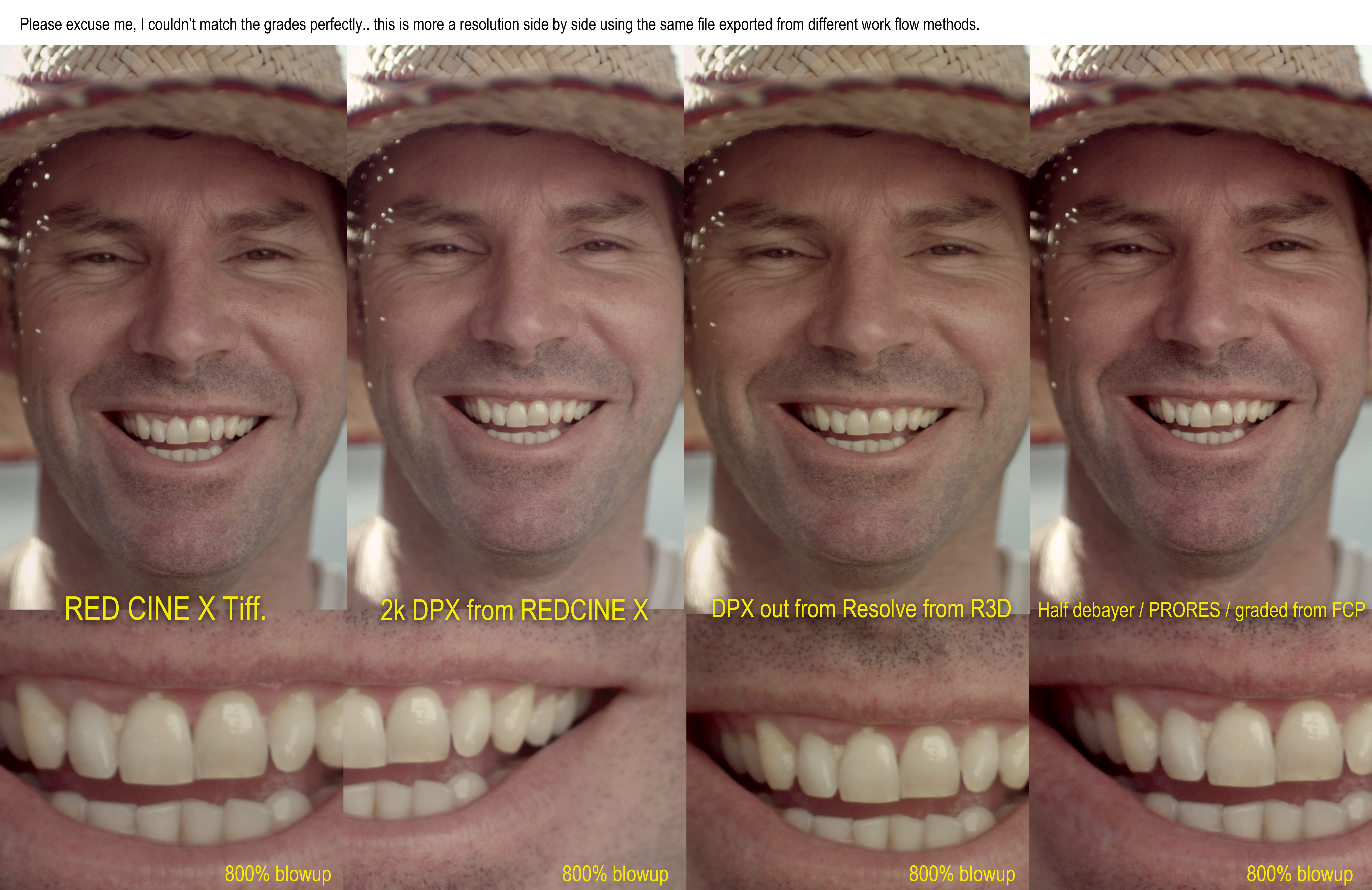
We do side by side tests all the time... (obsessively) if you would to blow my "HOTEL ROOM" work flow up 800% you may see some form of compression / noise etc compared to my Resolve finishes.. but, at 100%.. you'll be a better man than me if you can see it.

This all said.. this quick "down & dirty work flow has only been put up to help the people without the big tools like Baselight, Resolve and Scractch.. I'm only showing you all (mainly the have nots) what can be done without hi end post finishing tools.

So to all the pixiel purists out there.. this work flow is not for you, but more for the man/woman and child that want great results quickly and cheaply. nothing more..,

Hang on a sec.. Ill post a side by side we did a month back. ..
here ya go..

Sharing is caring. :))))

click link to see a 2000 pixel (JPG)
http://www.zoomfilmtv.com.au/ftp/JUNK/different_exports.jpg

different_exports.jpg
 
?... because it makes PRORES... ??

Put a KIPRO MINI on the back of the EPIC for $2000 and you have made your self an ALEXA. Plus you can get a LOG signal from the EPIC for better grading.

And all this still costs half as much and is still half the size.. And you can also get 5k RAW and HD PRO RES at the same time... ALEXA only does one or the other.

Just sharing.. :))))
 
Correct :)

I'm a resolve finisher as well for obvious reasons.

This option is a quick and reliable work flow for people that want a great end result and do not have a Resolve, Flame, Lustre, Baselight, Scratch etc at the finger tips or cannot afford to pay for post at that level..
This workflow is not the absolute final word. :))

I don't call it my "HOTEL ROOM" work flow for nothing. :))))))
However you can do huuuuge projects with it and I have sucessfully many many times.

Heres another couple of demos using this exact (crap) workflow. ;)

Don't call it crap!!! It's good stuff.

I know this is now the "hotel room" workflow, but for a good while this was THE workflow. Well, except it was RedCine and the older color science, but the same basic concept, and there were no options. And you are 100% right about this being suitable for big projects ... some fairly large productions use this workflow.

My motivation in writing is just to collect a bit more information and options.

The main thing I want to say is that, sort of like shooting a crappy camera, you have to nail your intent on set in order for it to work optimally.

On another note ... I think you mention in your body text above that this is an FCP 6&7 workflow. It didn't occur to me until today to mention that.

For FCP X the first steps in RedCine X are identical. When its time to bring the media over to FCP X though things change.

FCP X actually has some advantages though, for one if you render into a "log gamma" type space, like you wrote, FCP X will give better results than using the CC controls in FCP 6/7. That's because they tore the CC code out of Color and set it to float all the time.

Not that I am looking forward to using FCP X for any non-trivial CC, but the results are every bit as good as Color 1.5.
 
I love your bullshit-free, ego-free approach to makin' pretty pictures, Toia. Just sayin...


I remember the day I was asked to shoot 35mm film 1997... I shit myself!!! I was a stills photographer way back then.. I knew absolutely nothing about motion pictures cameras. I asked one fellow if could teach me... he rambled on for hours about how hard it was.. F-stops... mirror angles.. hair in the gate...scratched film.. blah blah blah.... Quite simply he was trying to make it look harder than what it was... I was shittin myself even more.. I was wondering what I got myself into and was inches away from pulling out of the job.

I thought I'd ask another person for a 2nd opinion, so I called a focus puller friend of a friend to come around the house and teach me how to use this bloody camera (ARRI 435).

He said, shout me a carton of beer (AUSSIE CURRENCY AT THAT TIME)... I swiftly said I'd shout you two of them if you could teach me everything I need to know tonight!... 1.5 beers later, I was all over it. I could not believe it was so easy to use. for years I thought it was some sort of black magic but in fact It was easier than the video cameras I was using at the time. I even loaded my own film for the job just for fun.
What scared me more than anything was the only copy of the rushes (The unprocessed film) was getting driven off to a lab 800 miles away for processing, then sent 800 miles back again for a one light telecine grade... I finally saw what I shot 3 days later!!! ... FUCK!!!!THE STRESS!!!...
I'm so glad those days are long gone for me. A film camera to me now is like a old foot pedal sewing machine my grandmother has buried in the attic.

But I must say, I shot 35mm for 10 solid years, using a multitude of different cameras and enjoyed it every moment.
But I have to say this. . "The KING is dead.. Long live the KING"...

From that day on I feel that I need to share the same no bullshit approach to film making to all that want to listen.
I gain nothing from sharing advice other than a smile.

Thanks Meryem. :)
 
Mark,

Excellent.

Thanks. I love this kind of mythbusting. I'm less of a pixel purist and more of a get it done the way it works bet for you.

Having the RAW is the big benefit for sure and if you are finsihing 1920x1080 then a little bump up to 2K in the theater isn't going to kill the image, when it has been well cared for from capture to finish.

The beauty of RED is that this tool is in the hands of many and (with a bit of talent and knowledge) it's possible for all of us.

David
 
Thanks for the tip, very much appreciated. I noticed you mentioned you finish at times in Davinci Resolve. I am thinking about starting to use Resolve myself and was wondering how you learned to use the program. Are there any good training books or anything like that out there? I have found random tutorials on youtube, etc. but nothing comprehensive.

Thanks
 
FXPHD and TAO of Color has some Resolve training.
 
Mark

Thanks for the tip mate. I tested and and find it very simple and effective approach with a quick result.
 
Back
Top