Welcome to our community

Be a part of something great, join today!

  • Hey all, just changed over the backend after 15 years I figured time to give it a bit of an update, its probably gonna be a bit weird for most of you and i am sure there is a few bugs to work out but it should kinda work the same as before... hopefully :)

Question about RED ISO in available light scenarios

Joined
Oct 17, 2012
Messages
23
Reaction score
0
Points
1
Location
Portland, OR
Hey folks, quick question about best ISO settings working in available light. My work involves shooting with the Scarlet MX on location for documentary films. Often I'm fighting to keep shooting as the sun goes down and find myself increasing the ISO to compensate for light loss, after stopping my lens as wide open as I can of course. Also, when shooting landscapes in bright sunlight where I am fighting to save detail in the sky, I normally would set my ISO as low as possible, thinking that would give me the cleanest, least noisy image. As a rule, my understanding was to keep ISO as low as possible to have as little noise as possible, and to bump it up when I need a brighter image.

However, after doing some research on how ISO works remapping middle grey with RED cameras, I feel like what I'm doing is incorrect. I understand how ISO 800 vs 100 will maintain detail in the highlights. But my question is about the low light scenario. If best practice to save detail in the shadows (or to push more of the dynamic range of the sensor into the shadows) is to lower the ISO from 800, then how can I "see" what I'm shooting on the monitor if I lower the ISO and darken the image? Also, how am I saving detail in the shadows as I've read, when I lower the ISO and my histogram crashes to the left? Am I not supposed to shoot for a balanced histogram?

What is your exposure strategy when fighting low light with the RED Scarlet MX?

Thanks for any help!
 
Good that you have found the research about the counter-intuitive nature about using ISO while shooting (raising it in bright scenarios and lowering it in dark scenarios). That research is relevant to one and only one goal: to get the best possible image by putting the right amount of light on the sensor.

You are asking a different question, which is "how do I get a good image when I cannot put the right amount of light on the sensor?" The simple answer is: you can't.

If you find yourself in a situation where you've opened up the aperture and the shutter to the max and you just don't have enough light, then you just don't have enough light. That doesn't mean you cannot shoot. It just means you're going to get a compromised image. At that point, you might as well raise the ISO to whatever level makes it easiest to monitor and focus. But remember, at that point YOU ARE NOT METERING. When you get back to your computer you can play with all sorts of tools to make the most out of what you did capture, and you can be safe in the knowledge that you couldn't have done better because you gave it all the aperture and shutter you had.

So, back to the basics: if you have enough light to push the ISO around in response to the light that's there, great! You'll get good, thick digital negatives and people will laud you as a hero. If you don't have enough light, then just open everything up and pray. It's not like photography where you can just open the shutter for half a second or 2 seconds or whatever. If you are shooting 24 fps, you have to shoot at least 1/24th of a second, and that's that.
 
It's very simple when working under low light. Leave the ISO at 800 and open iris all the way. This is as much light as the sensor can get, if your clipping, stop down, but you probably won't be because your shooting in low light. If you change the iso just remember 800 redlogfilm is what the sensor sees. Or just use gioscope. Expose to the right in lowlight situations.
 
What is your exposure strategy when fighting low light with the RED Scarlet MX?

Don't fight it, maybe? Instead, enjoy the darkness in (eventually big) parts of your frame?
As long as you rate at 250-320, and not pretend to raise blacks in post, noise will not be distracting. Sure you will need to put decent exposure somewhere. Bring an abat-jour to hard light a cheek's profile or hide a head lamp behind a branch. Better yet, plan before and bring proper light and grip equipment.
If you are talking about very poor, trivial light, better to use a Sony A7 or C300 to begin with, maybe? But then you loose the Scarlet MX mojo
 
Often in the film days, when shooting day exteriors at the very end of the day the DP would have to make the call that there was no more light to shoot, and that scene could not photographed. And then the company wrapped for the day, or moved on to coverage or another scene that could be lit and shot.

I think in the digital age, because you can crank the ISO in the camera or crank the brightness on the monitors and it looks like there is an acceptable image on what is essentially the video tap to the director, AD, and maybe even the producers, it's not nearly as easy to put your foot down and say 'we lost the light, we can't shoot anymore.' When in fact, there simply may not be enough light to keep shooting usable footage. It's a tough situation.
 
Great replies, thank you all. I understand that the RED Scarlet is not a low light monster by any means, but I'm merely hoping to work out how to best maximize the capabilities it does have.


Michael, you say that when you don’t have enough light “At that point, you might as well raise the ISO to whatever level makes it easiest to monitor and focus.” In this scenario aren’t you sacrificing the low end of your dynamic range just to be able to monitor properly? If you had an external monitor and could control the brightness of the image on that (via a LUT or just a brightness setting) would you then be able to put your ISO down around 300 to put more of the dynamic range of the camera into the shadows, giving you a better chance of capturing that detail?


As far as I understand, ISO is to a very large degree a value that you can change after the fact, but if you crush a black while recording, even if you change the iso you’re not going to get that lost information back.

Thanks again for all the helpful comments!
 
Changing ISO is not going to put more light onto the sensor, so it would not 'maximize the dynamic range of the camera' (whatever that means). The only thing you can do to get more exposure at that point is to use a faster lens, lower the shutter speed, lower the frame rate (and thus the shutter speed), or add more light. That's pretty much it.
 
Changing ISO is not going to put more light onto the sensor, so it would not 'maximize the dynamic range of the camera' (whatever that means). The only thing you can do to get more exposure at that point is to use a faster lens, lower the shutter speed, lower the frame rate (and thus the shutter speed), or add more light. That's pretty much it.

I think a better term would have been "optimize" (rather than "maximize"). Changing ISO doesn't put more light on to the sensor nor does it change the overall dynamic range. But the use of ISO to "fine tune" how that range is allocated is documented by RED here:

http://www.red.com/learn/red-101/iso-speed-revisited

Changing ISO basically allows you to affect how the dynamic range is allocated above or below middle grey, respective to which way you push it. ISO on RED just isn't like most other digital cameras; to me, it's counter intuitive, at least until you get used to it.
 
Great replies, thank you all. I understand that the RED Scarlet is not a low light monster by any means, but I'm merely hoping to work out how to best maximize the capabilities it does have.


Michael, you say that when you don’t have enough light “At that point, you might as well raise the ISO to whatever level makes it easiest to monitor and focus.” In this scenario aren’t you sacrificing the low end of your dynamic range just to be able to monitor properly? If you had an external monitor and could control the brightness of the image on that (via a LUT or just a brightness setting) would you then be able to put your ISO down around 300 to put more of the dynamic range of the camera into the shadows, giving you a better chance of capturing that detail?


As far as I understand, ISO is to a very large degree a value that you can change after the fact, but if you crush a black while recording, even if you change the iso you’re not going to get that lost information back.

Thanks again for all the helpful comments!

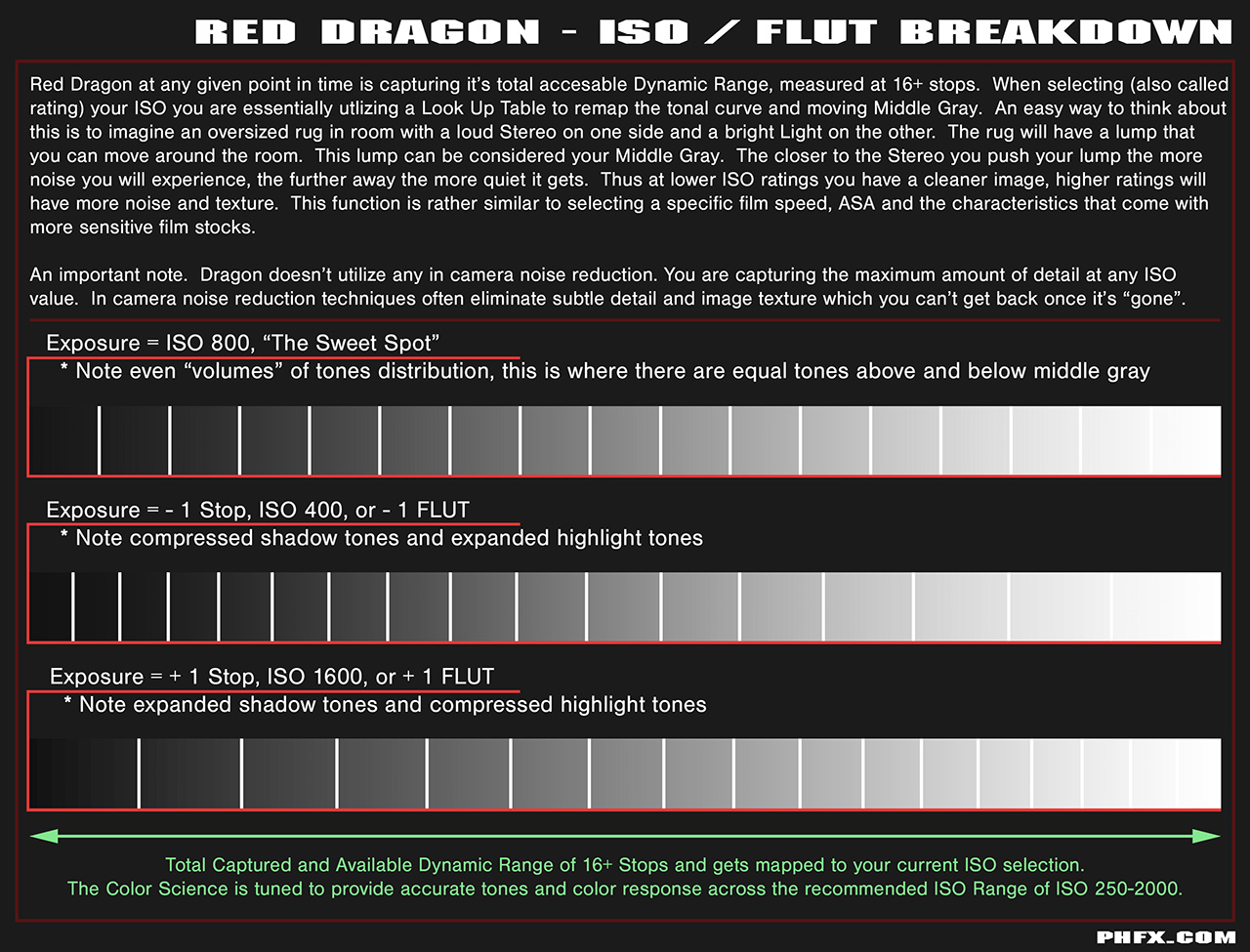
I'm guessing you're referring to this when talking about remapping the dynamic range:
phfx_redDragon_ISOFlutBreakdown.jpg


As stated by others, changing the ISO doesn't affect how much light your sensor is getting, only how it is mapped in the resulting image. Of course you will want to use the appropriate ISO for your scene to keep a balanced image or achieve the look you're going for, but if you only have natural light to work with then you have to go with what you've got. The sensor is always capturing its full dynamic range, regardless of ISO setting. So unless you have a way to add light to expose the image where you want you'll be capturing the same information regardless of ISO.

Yes, if you crush blacks in the RAW information, they're gone. That's where proper exposure comes in and watching those goal posts. And again, ISO helps you judge proper exposure, but it doesn't change the RAW data itself, so ISO alone will not save those crushed blacks.

Without more light, there's not much you can do to get a well exposed image, and you'll likely have to do more denoising in post.
 
Hey Phil, I think the question Matthew was asking (which I've always been kind of been unsure about too) is, can you crush a black, or clip a highlight, just by changing ISO (and thus remapping dynamic range in the "wrong" direction for a particular scene)?
 
Hey Phil, I think the question Matthew was asking (which I've always been kind of been unsure about too) is, can you crush a black, or clip a highlight, just by changing ISO (and thus remapping dynamic range in the "wrong" direction for a particular scene)?

I'm gonna jump in even though you asked phil specifically.

The answer is NO. not just with the ISO setting. You really have to look at your other tools. The stoplights and the goalposts and histogram to really understand what is being crushed or clipped. If you do not see a stoplight then nothing is clipping. Changing the ISO setting will not change that. If you see a full noise bar on the left of the histogram, well, that means a high percentage of your pixels are in noise or noisy. That one depends on the scene but you will also notice that ISO changes will not affect that.

Use RAW view as well. RAW is a baseline which represents 800ISO with DragonColor and RedLogFilm applied. Moving the ISO will not affect this RAW image either because it doesn't change the amount of light hitting the sensor which is what RAW view is showing you.

Those RED tools tell you everything at a glance. They are your friend.

I will also add that when you use ISO to RATE a scene (in normal scenarios and to move middle grey around based on the scene) then your strategy changes a bit. You still don't want to clip, but you are probably going to use aperture to control that.

In short, ISO, when used as described by the original poster is nothing more that digital gain and as you wind it up, it will not compensate for lack of light on that sensor plane and is not burned into the file, but don't trick yourself into thinking you are getting more. You will have to deal with that noise in post.

David
 
I always appreciate your input David! Thank you for responding!

I guess my my confusion has always come from the concept of stops above/below middle gray and how that relates to the actual dynamic range of a scene.

I you take 800 ISO as having 8 stops above and 8 stops below (for arguments sake), and you take a scene that has a bright object that is 8 stops above your chosen T-stop, it will not clip. Correct? Now, what happens when you move to ISO 400 or 1600?
 
For me, it seems like real world results contradicts the theory?
 
Push ISO to 1600 (makes image brighter in monitor), then You'll probably stop down the lens, to compensate.
But You're underexposing by a stop.
 
Šabović Adis;1591316 said:
Push ISO to 1600 (makes image brighter in monitor), then You'll probably stop down the lens, to compensate.
But You're underexposing by a stop.

Not if you rated the scene at 1600 ISO. :) You see what i mean? If you decide to rate a scene at 1600 ISO and adjust your Iris to where you want it for that rating, then you are not under exposing, you simply are making a choice to rate the scene at a higher ISO to move the middle grey and shift where that falls in the overall DR of the scene.

David
 
Not if you rated the scene at 1600 ISO. :) You see what i mean? If you decide to rate a scene at 1600 ISO and adjust your Iris to where you want it for that rating, then you are not under exposing, you simply are making a choice to rate the scene at a higher ISO to move the middle grey and shift where that falls in the overall DR of the scene.

David

I know, I know. :biggrin:
I was referring to his ISO 800 rating, and going up and down a stop.
 
I think a better term would have been "optimize" (rather than "maximize"). Changing ISO doesn't put more light on to the sensor nor does it change the overall dynamic range. But the use of ISO to "fine tune" how that range is allocated is documented by RED here:

http://www.red.com/learn/red-101/iso-speed-revisited

Changing ISO basically allows you to affect how the dynamic range is allocated above or below middle grey, respective to which way you push it. ISO on RED just isn't like most other digital cameras; to me, it's counter intuitive, at least until you get used to it.

Hi Terry :)

I'm going to have to disagree. Changing ISO in-camera in the Red system is basically the same as printing up or down in the lab. It doesn't have any effect on your negative, unless you decide to under/over-expose further as a result. If your negative or .r3d is mis-exposed to begin with, changing ISO (or in this analogy, your printer lights) is not going to help. The best way to ensure you get consistent results is to test and figure out what combination of ISO range + light levels + OLPF gives you acceptable noise levels and then stick to those settings.

If you shoot interiors at 320 IS0 and day exteriors at 800 ISO (or even worse change ISO shot to shot within a scene) in order to 'optimize' the dynamic range of the sensor, then you are going to end up with shots that have inconsistent noise levels. If that is the look you are after, then all is good. But usually it just means your shots won't match and thus won't cut well. For that reason, I'll generally pick one ISO for a given 'look' and just light for that as I find it leads to more consistently exposed negatives. Now, if you're losing the light at the end of the day, then your choice is between underexposing and getting a noisy image versus having no image at all. But we should be honest that this is a necessary compromise, not the ideal.
 
Šabović Adis;1591369 said:
I know, I know. :biggrin:
I was referring to his ISO 800 rating, and going up and down a stop.

I get it. Colorists might default the footage to 800iso red long film and not know you rated at 1600, but I know what you mean. I think when using the ISO in the way described in this thread I would be more apt to call it digital gain. The best thing you can do in low light scenes like the ones describes is use anything, even a couple of LED torches to pop some pocket lighting into the scene and if you can, use available to the max advantage.

David
 
Back
Top