Welcome to our community

Be a part of something great, join today!

  • Hey all, just changed over the backend after 15 years I figured time to give it a bit of an update, its probably gonna be a bit weird for most of you and i am sure there is a few bugs to work out but it should kinda work the same as before... hopefully :)

problems with green channel.....??

Paul Moss

Well-known member
Joined
Jan 26, 2007
Messages
185
Reaction score
0
Points
16
Location
Sydney, Australia
Had a commercial shoot last week, for a fashion label here in Sydney.
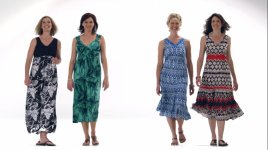
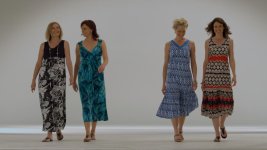
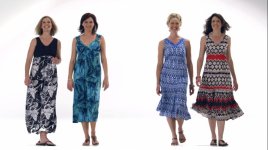
There were four models walking to camera, one of the dresses was meant to be aqua/emerald green colour (second from left)......see first image to see how it transcoded in FCP.....hard to tell if its a camera issue or from the transcode from FCP......??

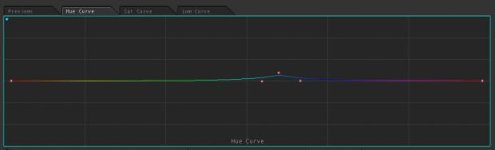
The Colourist did a small correction in Apple Colour.
Shot @ 3K @ 50fps & 36FPS - Build 30.6 - RED PRO PRIMES - 3200K

First frame is the incorrect colour on the dress second from left.
The next frame is the colour the dress is meant to be
See the tweak in Apple Colour to get it back to were it needed to be.
Any suggestions........?
cheers
Paul
 

Attachments

  • Before.jpg
    Before.jpg
    55.5 KB · Views: 0
  • After.jpg
    After.jpg
    55.4 KB · Views: 0
  • Screen shot 2010-11-26 at 11.15.58 AM.jpg
    Screen shot 2010-11-26 at 11.15.58 AM.jpg
    8.8 KB · Views: 0
Had a commercial shoot last week, for a fashion label here in Sydney.
There were four models walking to camera, one of the dresses was meant to be aqua/emerald green colour (second from left)......see first image to see how it transcoded in FCP.....hard to tell if its a camera issue or from the transcode from FCP......??

The Colourist did a small correction in Apple Colour.
Shot @ 3K @ 50fps & 36FPS - Build 30.6 - RED PRO PRIMES - 3200K

First frame is the incorrect colour on the dress second from left.
The next frame is the colour the dress is meant to be
See the tweak in Apple Colour to get it back to were it needed to be.
Any suggestions........?
cheers
Paul

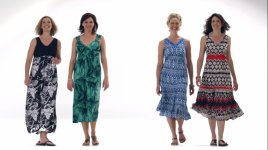
Sure... did you shoot a WB/grey card or MacBeth during the shoot? Accurate colors need accurate WB. Most people assume tungsten is 3200K. Tungsten lights can vary a great deal especially in Tint. Open REDCINE-X and WB to the card or chart. Then set REDcolor2 and REDgamma2 (or REDlogFilm). Pull down the blacks to get the bottom you want and then set saturation. If the colors are still off I'd be surprised.

If you don't see REDcolor2 and REDgamma2... go to Recon and find the link to REDCINE-X 351.

Hope that helps.

Jim
 
If you want to send me an R3D snapshot I'll take a look. Do you have a reference for the lighting you were using - best would be a chart under the light source, preferably a RED Cambook or DSC Chroma du Monde.

Colorimetry always goes back to the lighting. I know what the sensor is doing and I can look at the raw data, but the light, not being there myself, is always the missing piece of the puzzle.

Graeme
 
Jim,
I asked the colorist to do as you stated, there was a small improvement but the dress in real life is very green.
Colorist quote "it warmed things up, so taking some blue out has brought a bit of the green back into the dress but not enough to match"

Graham, i'll get him to supply me with some RAW footage & lighting details, no chart was shot on the day......:embarassed: ( By the way, I wasn't DP on this one....)

The first frame is off camera.
The second frame is White Balanced off B/G, and used RED color 2 & RED Gamma 2.
Last frame is graded final with Apple Color tweak.
 

Attachments

  • Final.jpg
    Final.jpg
    55.4 KB · Views: 0
  • Off camera.jpg
    Off camera.jpg
    44.7 KB · Views: 0
  • Redcolor2.0000401.jpg
    Redcolor2.0000401.jpg
    72 KB · Views: 0
What were the light sources in the shot?
 
Deanan,
From what ive been told everything was lit for 3200K.
And camera WB was set to 3200K, The sensor is Mysterium (no MX)
As for the exact fixtures used id have to find out.
Paul
 
Paul, did you have different Light-sources? Plugged in to different outlets? Do you know the variation of age between the light-sources?
I ask cause I've seen it happen where there are different light-sources with different aging and sometimes if u balance for one light-source, then the rest get thrown off.

Even if they were all tungsten, there could be enough variations.
 
:reddevil:Very strange logic going on here to explain the color shift in the green... It also make me think RED saying accurate color balancing is mandatory with r3d... 3 years ago it was "do it in post because of RAW power".

Everything in life changes indeed.:devil:

Curious about the result.

Patrick
 
I have had this issue too. Easily fixed in post but on-set it prompts a lot of worried discussion. White balance makes no difference and it involves secondary cc for sure.
It's usually only a problem on a fashion shoot or where the specific color green is somehow tied to branding or otherwise important. Often I will notice it on an actor's shirt or an object in the frame but I'm the only one who notices. I had kind of given up and just accepted it. If there is a solution I'd love to hear it.
Cheers,
Harry
 
Just got sent some more frames........colour issue still there.
Graham i have PM'd you about were to send some of the RAW frames
thanks
Paul

Corrected shot - 1
RED colour 2 - 2
RED colour CAM LOOK - 3
WHITE REF - 4
 

Attachments

  • Corrected shot.jpg
    Corrected shot.jpg
    14.7 KB · Views: 0
  • Redcolor2.jpg
    Redcolor2.jpg
    50 KB · Views: 0
  • RED COLOUR CAM LOOK.jpg
    RED COLOUR CAM LOOK.jpg
    51.4 KB · Views: 0
  • GRADING REF.jpg
    GRADING REF.jpg
    30.4 KB · Views: 0
Thanks Jim, Graham & others for your insight.
After breaking it down, we have come to the realization that setting the camera to the preset 3200K colour balance setting is not precise enough, even when all fixtures are tungsten balanced.
Using a mixture of Mole Richardson 5K's, 2K's & Kino Flatheads & Vista Beams, there is still the chance that older globes or tubes can put the smallest tint offset into the picture.
White Balance, White Balance, White Balance.....and shoot a chart......!
Next time im sending out the camera kit with my own personal Gamma & Density charts.......!
thanks guys
Paul
 
:reddevil:Very strange logic going on here to explain the color shift in the green... It also make me think RED saying accurate color balancing is mandatory with r3d... 3 years ago it was "do it in post because of RAW power".

Everything in life changes indeed.:devil:

Curious about the result.

Patrick

Patrick... curious post. It is easy logic to understand and nothing has changed. You have the power of RAW (as opposed to a baked in RGB codec) to give flexibility to color and grading. That hasn't changed.

We have also said that color science is based off white balance, especially important when accurate color is critical. If you don't know what color temperature the scene was shot at, you just make your life more difficult, as is the case here.

Lights vary. Taking a WB off the background is not necessarily accurate. That's why we always recommend a chart where the talent is.

If Graeme had all the info... it would be easy for him to check to see what the root cause is... if any.

BTW... while there is no telling if that card is really white, one thing we can see is that the WB is different on the card than the background.

Jim
 
Hi Paul.
I have worked on a few fashion shoots this year and have one more to go for the same client.
I always sneak in a shot of my Gamma & Density charts in the key lighting setup and also a white balance with an Expo disk. Unless the DP asks for a specific color temp I use the temp I got from the expo disc. I strongly recommend using Expo discs when color is important as it will give you the most accurate reading of color temp in a scene.
 
I know from measurement and experience that the RED Cambook charts from DSC are accurate, so if one of those is in shot under the same lighting conditions as the key elements of the scene there's an awful lot of analysis I can do to see what the light was doing.

There are so many white things that are not quite white, which makes it tricky to get a true white balance from them. But a colour chart even more than a white balance can tell me what a wide range of known colours are doing. That is even more useful for me.

It doesn't matter if you white balance on set or in post, just that it's done accurately. How can it be done accurately in post ? - with a good chart in shot.

Graeme
 
I am in the process of reviewing the THE DSC charts made for RED Camera's and will post results here in the coming weeks.

One thing is for sure: Not all tungsten is the same color temperature. 3200K is a guide. You will find that with many shots that can slide up and down 300-500 degrees and all of that means that colors and skin tones can be effected.

Also, when doing these types of fashion shoots, you are dealing with people who have and extraordinary sense of color and look at A LOT of still images so there is high color sensitivity (which we all have to a degree). But these types of shoots demand exacting standards and that means being exact, charts and monitor calibration are very important and allow the kind of exactness that is expected.

I'd use RCX on a calibrated monitor as the "master" color and the onset 720P a "framing reference, video tap".

The stills are going to a different color space that HD video and that will always pose a slight problem that needs to be managed.

Tungsten lighting is the least desirable type of light for CMOS, but there is a lot of it leftover and we will have to deal with it.

With any CMOS or CCD for that matter, daylight balance and sources will often yield a much sharper and more pleasant image, especially in the blacks.

David
 
Back
Top