Welcome to our community

Be a part of something great, join today!

  • Hey all, just changed over the backend after 15 years I figured time to give it a bit of an update, its probably gonna be a bit weird for most of you and i am sure there is a few bugs to work out but it should kinda work the same as before... hopefully :)

Problems exporting Anamorphic 4K footage

Joined
Mar 4, 2010
Messages
17
Reaction score
0
Points
0
Hey everyone,

I've been trying to export footage from REDCINE-X for use in FCP. I'm going to ProRes 422 HQ. Initially, I wasn't running in to any problems. Put all the R3D files into the bin, changed framing control to Fit Width 2X and locked aspect ratio to 2.39:1.

Now, whenever I try to export clips, using the same setting my footage comes out squeezed. No matter what I try or do, it's always squeezed. Any thoughts on what I'm doing wrong? What's the best way to batch export all my clips while unsqueezing them to ProRes for FCP?
 
Hey everyone,

I've been trying to export footage from REDCINE-X for use in FCP. I'm going to ProRes 422 HQ. Initially, I wasn't running in to any problems. Put all the R3D files into the bin, changed framing control to Fit Width 2X and locked aspect ratio to 2.39:1.

Now, whenever I try to export clips, using the same setting my footage comes out squeezed. No matter what I try or do, it's always squeezed. Any thoughts on what I'm doing wrong? What's the best way to batch export all my clips while unsqueezing them to ProRes for FCP?


When you say squeezed, you mean stretched vertically? And it's a squarish frame?
 
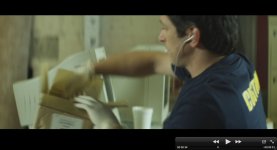
Stretched vertically / squeezed horizontally, yes. We shot with Anamorphic lenses, so the footage is already stretched / squeezed. I batched about 10 clips and they worked fine, but now REDCINE just seems to not be able to unsqueeze them any more. I'm at a loss. I'll try and post some examples ASAP.
 
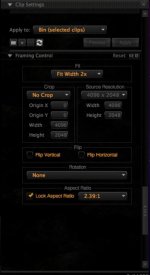
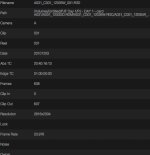
I've attached examples. The squeezed is what I'm not getting. Unsqueezed is from the earlier clips I processed through REDCINE (about a week ago). I also screened the settings I'm using. The thing that throws me off is the source resolution says 4096x2048 in the Clip Settings section, but in the metadata, it's 2816x2304. I'm so confused :willy_nilly:
 

Attachments

  • unsqueezed.jpg
    unsqueezed.jpg
    41 KB · Views: 0
  • squeezed.jpg
    squeezed.jpg
    41.3 KB · Views: 0
  • settings.jpg
    settings.jpg
    25.9 KB · Views: 0
  • metadata.jpg
    metadata.jpg
    83.8 KB · Views: 0
First: The Lock Aspect Ratio box only effects the crop selection box.

Second: You have Fit Width 2x properly selected for the chosen clip but is it set the same on each clip when you put it in the viewer?

If Fit Width 2x is selected for each clip then I will need further information such as logs from an export that is squeezed.

Please send any logs to redcinex at red dot com.
 
Hey Matthew. Thanks for the response. I've been fiddling with settings all day, and you triggered the solution! I wasn't putting clips in the viewer, therefore the export settings weren't going onto the clips. I processed them all individually and applied 2x on each and it seems to be okay now! I did a test and everything's fine. Doing a batch export now. Thanks a lot for your help. Very much appreciated.
 
Back
Top