Welcome to our community

Be a part of something great, join today!

  • Hey all, just changed over the backend after 15 years I figured time to give it a bit of an update, its probably gonna be a bit weird for most of you and i am sure there is a few bugs to work out but it should kinda work the same as before... hopefully :)

PROBLEM WITH RED CINE-X 454 / 470

Joined
Dec 8, 2009
Messages
5
Reaction score
0
Points
0
Location
Singapore
hello guys,

im having a problem with my red cine-x
i have both 454 / 470.
i have a redrocket with v. 1.4.10 driver.
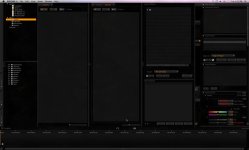
when i launch red cine-x i noticed that the menu are blank...

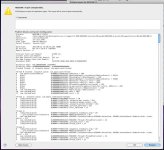
after quiting the cine-x theres a crash report generated.
"red cine-x quit unexpectedly"
what seems to be the problem?
anyone experienced this?
it was just sudden. a few weeks before ive got no problem with both the cine-x 454 and redrocket.

please check the attachments.

thanks.

chris
 

Attachments

  • REDCINE-XScreenSnapz001.jpg
    REDCINE-XScreenSnapz001.jpg
    73 KB · Views: 0
  • Problem ReporterScreenSnapz001.jpg
    Problem ReporterScreenSnapz001.jpg
    91.9 KB · Views: 0
Hi Christopher,

My advice to you is to navigate to:

/users/yourusernamehere/library/application support/red

make a zip file of your redcine X folder by right clicking on it, and then zipping it.
delete the folder, but leave your zip archive. This will let you recover any look files or anything else you have created.

after deleting red/redcinex folder then startup V470 of RCX, you should be up and running, good to go.

the application support library isn't too compatible between versions (at least in my testing) so the best way is to start up with a fresh support folder (application generated) when a new version comes out.

Hope this helps!

Dan
 
Would it be possible to add a feature to RCX that automatically sends logs of errors to Red?
 
hi dan,

thanks for the tip. i tried it but still got the same old problem...

i can email you the error if you wanted to... for some reason i cant attach the pdf or the document onto this...

thanks
 
Chris,

Can you clarify for me your issue? You are not able to access any of the menus? As in text is not appearing in the menu drop downs?

If it is possible for you to enable verbose logging from the preferences dialog (the hotkey is CMD-,) and send me an RCX log file that would be great.

Cheers,
David
 
hi david,

yeah you can access the menus, but the thing is the button is invisible.
when i quit the rcx, an error report pops out...

im trying how to do this verbose logging first...

ill get back to you. :)

thanks!
 
HEY GUYS!

good news!
problem solved.

if any case you experience this problem, the solution is this :

rebuild the font cache by using the terminal
and typing the command : sudo atsutil databases -remove

then it goes back to normal operation.

" What this does is essentially rebuilds your font cache that includes any external fonts (such
as the one we supply we RCX). " - david

i thank david ibbitson for this solution, as well as jonathan bennet for helping and supporting.

thanks guys!
 
Back
Top