Jan van Gorkum
Member
- Joined
- Jun 11, 2010
- Messages
- 8
- Reaction score
- 0
- Points
- 0
I've encountered a problem while editing Red material offline with ProRess 422 proxies I made in Final Cut Pro using Log & Transfer. (I'm editing on a Mac Pro with Final Cut Pro 7.)
I started editing offline on an iMac intel dual core, which worked perfect. But I also had to work on a second computer (using the same external hard drive, a Western Digital Studio 2TB containing the footage). I've continued working on this other computer with the same version of the program (FCP 7.0.2). This computer is a Mac Pro (Quad Core).
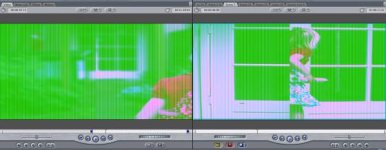
The problem is that, while editing on the Mac Pro, sometimes all of the video material turns in to a green, distorted image in which the footage has been split in half. (See attachment). This occurs in the timeline and when you click on a clip from a bin and it opens in the clipviewer. Every single clip is affected by this.
When I restart final cut, everything's normal.
This problem keeps returning on this second computer. I guess it started in an editing sequence where I had put a mask (2:35:1) over a clip. This didn't cause a problem on the first Mac I'm working on (a intel iMac dual core). I've deleted all masks, but it also happens now with clips which haven't been altered in any way. So masking a clip can't be the cause, I assume, certainly not a problem where everything is affected by it.
I've checked everything on the first computer I started editing on and there everything remains normal and no problems there.
Hope some one can help me out, cause I've have to edit on this second computer for most of the time.
I started editing offline on an iMac intel dual core, which worked perfect. But I also had to work on a second computer (using the same external hard drive, a Western Digital Studio 2TB containing the footage). I've continued working on this other computer with the same version of the program (FCP 7.0.2). This computer is a Mac Pro (Quad Core).
The problem is that, while editing on the Mac Pro, sometimes all of the video material turns in to a green, distorted image in which the footage has been split in half. (See attachment). This occurs in the timeline and when you click on a clip from a bin and it opens in the clipviewer. Every single clip is affected by this.
When I restart final cut, everything's normal.
This problem keeps returning on this second computer. I guess it started in an editing sequence where I had put a mask (2:35:1) over a clip. This didn't cause a problem on the first Mac I'm working on (a intel iMac dual core). I've deleted all masks, but it also happens now with clips which haven't been altered in any way. So masking a clip can't be the cause, I assume, certainly not a problem where everything is affected by it.
I've checked everything on the first computer I started editing on and there everything remains normal and no problems there.
Hope some one can help me out, cause I've have to edit on this second computer for most of the time.