Welcome to our community

Be a part of something great, join today!

  • Hey all, just changed over the backend after 15 years I figured time to give it a bit of an update, its probably gonna be a bit weird for most of you and i am sure there is a few bugs to work out but it should kinda work the same as before... hopefully :)

Problem with DCP-o-matic

Christoffer Glans

Well-known member
Joined
Jun 11, 2007
Messages
4,993
Reaction score
36
Points
48
Age
42
Location
Stockholm, Sweden
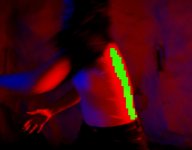
I've downloaded it and tried creating a DCP but getting some weird green pixels on the final image. Now, this isn't a grade I've done so I'm figuring that it's not able to process the extreme colors (out of gammut?), but I'm not sure what to do? There are no settings in DCP-o-matic to limit colors or anything that refers to the green pixelated parts of the image. I thought it was just in the preview, but it ended up on the DCP as well. Anyone?
 

Attachments

  • Green.JPG
    Green.JPG
    60 KB · Views: 0
I've downloaded it and tried creating a DCP but getting some weird green pixels on the final image. Now, this isn't a grade I've done so I'm figuring that it's not able to process the extreme colors (out of gammut?), but I'm not sure what to do? There are no settings in DCP-o-matic to limit colors or anything that refers to the green pixelated parts of the image. I thought it was just in the preview, but it ended up on the DCP as well. Anyone?

What type of source files are you using? Can you send me an example input that triggers this? (to carl@dcpomatic.com)
 
Back
Top