Welcome to our community

Be a part of something great, join today!

  • Hey all, just changed over the backend after 15 years I figured time to give it a bit of an update, its probably gonna be a bit weird for most of you and i am sure there is a few bugs to work out but it should kinda work the same as before... hopefully :)

ProArt PA32UCDM Review - QD-OLED 1000nit Reference Grading - The Perfect GRADING Monitor?

PIXELTOOLS PQ-TOOL

HDR APL Tool


T2F seems to always have wrong information in their videos & this time is no exception. You do not want to use PQ Optimized for grading. And there is no Rec.2100 PQ mode. The correct choice is HDR_PQ BT.2020/PQ Clip.

IMG_2207.png
 
Last edited:
Jon do you have this monitor yet.? I was think about getting this at some point when I ever got into HDR and curious on what you thought about it in relation to changing the factory settings of one of the LG TVs and calibrating them commonly used to for color grading.
 
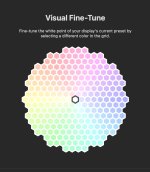
Yes, I’ve got the ASUS PA32UCDM but I haven’t done much grading with it yet. I calibrated it with ASUS ProArt Calibration software. It only took around 1-1/2 minutes! I purchased a Portrait Displays G1 Pattern Generator, C6 HDR5000 colorimeter and a Windows laptop to calibrate my Samsung S90C QD-OLED with Calman Home for Samsung. To match my MacBook Pro to the two QD-OLED displays, I did a Visual Fine-Tune Calibration and nudged the color on the grid a notch or two toward magenta. I’m not using the laptop for grading. Are you thinking of using an LG TV for grading or as a client monitor?

493810173_699694299182236_7884798358735076659_n.jpeg
 
Yeah the LG would have been for grading if the Asus didn't exist. I've seen alot of People on many forums that may discuss HDR montoring using Different models of LG TVs that have had their factory settings changed with use of a special Remote control that they had to purchase online. Then use Calman Home to further Calibrate it for grading.
 
Yeah the LG would have been for grading if the Asus didn't exist. I've seen alot of People on many forums that may discuss HDR montoring using Different models of LG TVs that have had their factory settings changed with use of a special Remote control that they had to purchase online. Then use Calman Home to further Calibrate it for grading.
Oh! To disable TPC & GSR. Even with its aggressive ABL, I’d still recommend the ASUS over a consumer TV.
 
Here's what I was talking about. Although it seems to be a somewhat good alternative for not having a $20,000+ Reference Monitor, I always just didn't Think I would want to use a TV as a Color Grading Monitor.

This is a 4 year old Video however Newer Videos are Out for more recent LG OLED displays.


Other videos


At a workshop at Scandinavian Photo, Leon Barnard of Team 2 Films says the ASUS PA32UCXR can do 16,000 nits, not once, but three times.

“It’s got incredible brightness. It can do 16,000 nits peak, 1,000 nits full screen, so it can do 6,000, you know if there's a small portion of the screen, it can push it as far as 16,000, but it will overload the monitor thermally if it runs the whole panel at 16,000 nits, so 1,000 nits, but what's good as well, there's headroom, so you know it can definitely do a thousand nits.“

 
Renowned colorist Thomas Urbye returns LG G5. What’s up with these manufacturers releasing defective flagship TVs at premium prices?


LG TV Calibration Guide (New for 2025) | Calman Ultimate Workflow Tutorial​


Calman Autocal is broken for HDR10

IMG_2287.jpeg
 
Yeah I guess maybe they might need to do more work on what the Auto Calibration functionality is and isn't during correctly. Maybe have some type of Auto Calibration feature "Bypass" so you can do some parts yourself. It just seems that the LG G5 has a lot of unsatisfied users in one respect or another.
 
Back
Top