Welcome to our community

Be a part of something great, join today!

  • Hey all, just changed over the backend after 15 years I figured time to give it a bit of an update, its probably gonna be a bit weird for most of you and i am sure there is a few bugs to work out but it should kinda work the same as before... hopefully :)

Pro res 4:2:2

Joined
Sep 21, 2011
Messages
20
Reaction score
0
Points
0
Location
Bali, Indonesia
Website
jayabali.com
Dear sirs,

I'm new user of RED camera, to color correct the R3D file i'm using REDCINE pro X, the problem that i got is i couldn't find the Pro res 4:2:2 codec to export to APP. i did update the REDCINE all the time, but i still couldn't find the result that i want.

thank you in advance for any advice

Jaya
 
thank you for the replay, i'm using mac pro with APP for my editing system. what i did so far, i put directly R3D file to APP and do the color correct in the timeline, it working fine at the moment.
but some expert on the web says that we have to do color correct at REDCINE and Export as 4:2:2 file to make it easier editing in the timeline.
and the weird thing is nobody having the same problem as me as far as i surfing in the internet.

thank you
Jaya
 
I believe that Scott already answered your question . It doesn't look like you have prores installed on your system.
You don't need to transcode to prores, it just makes it easier on your system. You could transcode to a different codec, one that is included with premiere pro but if it's working for you there is no need.
If you feel the need to go prores, then the cheapest way is to download a copy of apple motion, it's about $50 and has the codec included.
The avid codecs are free and available on their site.
 
If you're editing in Premiere and can get satisfactory playback of your RAW R3D files, there aren't many reasons to transcode to ProRes. The only one I can think of is if you're finishing/grading in Premiere and want to use REDCOLOR3. You can, however, just use DNxHD instead of ProRes for that purpose.
 
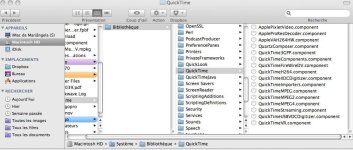
As said, you need the specific Quicktime component installed on your computer to be able to export a specific quicktime file : in your case a Prores quicktime file.

For Mac see the below path where your component should be installed.

Pat
 

Attachments

  • Quicktime.jpg
    Quicktime.jpg
    76.6 KB · Views: 0
Back
Top