Welcome to our community

Be a part of something great, join today!

  • Hey all, just changed over the backend after 15 years I figured time to give it a bit of an update, its probably gonna be a bit weird for most of you and i am sure there is a few bugs to work out but it should kinda work the same as before... hopefully :)

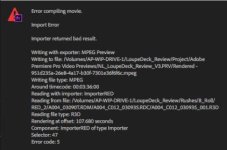
Premiere Pro Import Error while rendering

Joined
Dec 27, 2017
Messages
5
Reaction score
0
Points
1
When I try to render or export footage premier pro will return an import error with the error code 5 , sector 47. This error only occurs on certain clips. Has any one found a resolve for this issue? I have tried switching off GPU acceleration, deleting any temp files and encoding to a different codec.

I am using a 2016 15 inch Macbook pro, Intel Core i7 2.9 GHz, Radeon Pro 460 4GB

I shot this on a Red Epic-W Helium 8k


Best,
Nick
 

Attachments

  • Error_Message.jpg
    Error_Message.jpg
    17.6 KB · Views: 0
nick, ive been having the same exact problem on one of my projects. i'm working on new imac pro and i havent been able to make an export of my video for weeks. i spent 2 hours on the phone with adobe, and they couldn't figure it out.

this is so aggravating. if someone could help us out, you'd be a lifesaver.

mike
 
Last edited:
Delete the clip that fails out of your project. Import it again and place on the timeline. This fixes it 99% of the time.
 
Hey Jamie, this didn't seem to work. Any other ideas?
 
I've dealt with this issue time and time again and the one thing that seems to solve my problem is changing all my clips from 'scale to frame size' to 'set to frame size' and then for some reason it renders out. There are lots of other 'workarounds' but it definitely isn't an acceptable state of affairs.
 
Hello everyone! So can anybody tell if its problem is resolved?
I have same problem but any method from youtube is not working
 
Render the whole timeline, then export using the render previews
 
Back
Top