Kenny Mosher
Well-known member
- Joined
- Jun 3, 2011
- Messages
- 525
- Reaction score
- 1
- Points
- 18
Hey Guys
OK so I am wondering if anyone else is running into these issues.
I currently have a CS6 sequence with 5k R3Ds that is having random glitch problems. The problem looks like clips are "flickering" back and forth either between
1) Red Gamma 2 and Red Gamma 3
or
2)A previous look made in Red Cine-X and and an updated look from Source Settings in Premiere
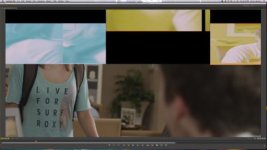
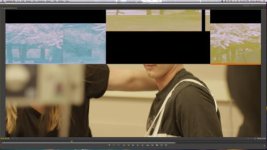
I am also getting some other random glitches that I can't really explain (see attachments)
This glitch occurs in playback on random clips and it appears in exported files as well.
Here is what I have tried to do to solve the problem:
1) Delete prefs
2) Repair disk permissions
3) Clear PRAM
4) Make offline clips that have the issues and relink them (worked for playback on those clips, but then new clips became "infected")
5) Replace footage on effected clips (worked one time for playback)
6) Open new project and new sequence and imported the premiere sequence into that project (didn't work)
Right before I installed CS6 I upgraded to a Quadro 4000 and put a GT120 in my machine as well. My Red Rocket never had these issues in CS5.5 though, so I don't think its to blame.
I have a Mac Pro 3,1 with 32 GB ram and I am running the R3Ds off G-Safe thru Esata
Honestly it seems like something from the GPU MPE acceleration.
This is very frustrating, because I am used to Adobe products working so flawlessly with R3Ds.
Any help would be greatly appreciated.
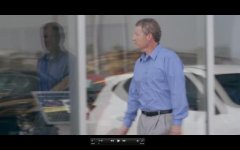
Attached are screen grabs of the exported H.264 file. These images show frames that are 1 frame apart, but as you can see they look totally different. I will also attached a Vimeo PW protected link to watch it in action (errors at 0:10, 0:39, 1:13, 1:32, 1:42, 1:52, etc).
https://vimeo.com/45571994/
PW: CS6GLITCH
OK so I am wondering if anyone else is running into these issues.
I currently have a CS6 sequence with 5k R3Ds that is having random glitch problems. The problem looks like clips are "flickering" back and forth either between
1) Red Gamma 2 and Red Gamma 3
or
2)A previous look made in Red Cine-X and and an updated look from Source Settings in Premiere
I am also getting some other random glitches that I can't really explain (see attachments)
This glitch occurs in playback on random clips and it appears in exported files as well.
Here is what I have tried to do to solve the problem:
1) Delete prefs
2) Repair disk permissions
3) Clear PRAM
4) Make offline clips that have the issues and relink them (worked for playback on those clips, but then new clips became "infected")
5) Replace footage on effected clips (worked one time for playback)
6) Open new project and new sequence and imported the premiere sequence into that project (didn't work)
Right before I installed CS6 I upgraded to a Quadro 4000 and put a GT120 in my machine as well. My Red Rocket never had these issues in CS5.5 though, so I don't think its to blame.
I have a Mac Pro 3,1 with 32 GB ram and I am running the R3Ds off G-Safe thru Esata
Honestly it seems like something from the GPU MPE acceleration.
This is very frustrating, because I am used to Adobe products working so flawlessly with R3Ds.
Any help would be greatly appreciated.
Attached are screen grabs of the exported H.264 file. These images show frames that are 1 frame apart, but as you can see they look totally different. I will also attached a Vimeo PW protected link to watch it in action (errors at 0:10, 0:39, 1:13, 1:32, 1:42, 1:52, etc).
https://vimeo.com/45571994/
PW: CS6GLITCH
Attachments



Last edited: