Welcome to our community

Be a part of something great, join today!

  • Hey all, just changed over the backend after 15 years I figured time to give it a bit of an update, its probably gonna be a bit weird for most of you and i am sure there is a few bugs to work out but it should kinda work the same as before... hopefully :)

Premiere and Avid DnxHD

Rudi Herbert

Well-known member
Joined
Jun 1, 2007
Messages
1,433
Reaction score
0
Points
0
Gentlemen,

I need to edit on, and encode back to, Avid DNxHD files and I am on Windows CS 5.5. I don't see DNxHD either as an option for a sequence or as a format available within Media Encoder. I downloaded a Codec packet from the Avid website but it did not load into the Adobe programs. Any suggestions?

Thanks,
 
Well,

I know DNxHD uses QT as a wrapper, but among my QT options on the Media Encoder or on the New Sequence settings, I do not see DNxHD among the QT options. Again, I'm on a PC, not a Mac, maybe that makes a difference?
 
Hi Rudi,

You shouldn't need to worry about your sequence settings. Once you have the DNxHD codec pack installed - you should be able to import the footage just like you would any other format.

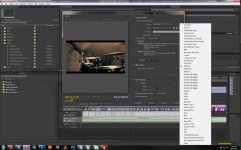
On the exporting side you need to change your format to quicktime. Then go to the video tab, and select the codec that you want to use. DNxHD should be an option there. I'm on Windows and have no problems with this so that shouldn't be your issue. Screenshot is attached :)
 

Attachments

  • DNxHD.jpg
    DNxHD.jpg
    94.7 KB · Views: 0
Got it, that was it, I wasn't looking under the video codec tab, thanks!
 
if you click and drag a clip from your bin to the icon that looks like a post it note below it, it will create a sequence that's set to all the settings of that clip, so you'll render in that codec too, in case you want to render your timeline out with your previews to save time.
 
Back
Top