Welcome to our community

Be a part of something great, join today!

  • Hey all, just changed over the backend after 15 years I figured time to give it a bit of an update, its probably gonna be a bit weird for most of you and i am sure there is a few bugs to work out but it should kinda work the same as before... hopefully :)

Premiere 2019 - Adjusting RED settings causes file to go black

BrandonChristensen

Well-known member
Joined
May 7, 2011
Messages
1,236
Reaction score
4
Points
38
Location
Las Vegas
I just bought a new iMac (non-Pro) to replace my old iMac (non-Pro) and am doing VFX for a project I'm working on.

My workflow has been the same for years.

Click the shot, click Effect Controls, click Master and there are the settings. Change the Gamma to RedLog and then spit it out with handles.

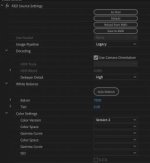
But now, when I change to redlog, the clip goes black and all of the R3D file settings 0 out. I'm currently unable to do my work because of this.

Has anyone seen this? I know Premiere just updated the other day, and that may be the cause of this...

I just checked, and changing ANY clip causes it to happen. And I have to restart premiere because the clip goes black and unusable. Can't change any settings on it, it just... doesn't work.
 

Attachments

  • Screen Shot 2019-04-04 at 2.50.52 PM.jpg
    Screen Shot 2019-04-04 at 2.50.52 PM.jpg
    7.9 KB · Views: 0
I tried another project and it worked just fine.

This is bizarre.

Maybe I need to create a new project file and import this project into it.
 
Tried importing the project into a new project, no dice:

Can't even attempt to change the files. It's just all zero'd out.

Screen-Shot-2019-04-04-at-3-09-51-PM.png
 
Having the same issue. I tried loading an older version of Premiere but Adobe won't let you import the a project file from the latest patch into a legacy version of Premiere which is insanely frustrating. Didn't want to bother with XMLs so I reimported the R3D and am not touching the metadata. Really hoping this gets patched before I get to picture lock...
 
Having the same issue... black frame and 0'd controls in master settings, upon trying to change legacy footage to IPP2. It's just not having it. Has anyone had any luck circumventing this bug?

Can't revert to an older Premiere version as a ton of work has been done in this one. Is there any way to change the footage in RedCine and force Premiere to read it that way? Maddening.
 
Found a workaround, at least to get IPP2 control back within Premiere. Open the shot in RedCine and change to IPP2 controls, and save. Then within Premiere in the master settings, choose reload from RMD. You can then the image pipeline to IPP2, without the frame going black.

Unfortunately this doesn't seem to work with merged clips, which is a whole different nightmare.
 
Working in a project with all merged clips so I guess I'm going to need to do a lot of workarounds. Only way to work with the RAW settings in Adobe right now is to send my Premiere assets to After Effects which is no good for my project workflow. Considering I merge clips on all projects that require syncing I'm really not sure what to do other than wait for Adobe to finally do something about this.
 
Found a workaround, at least to get IPP2 control back within Premiere. Open the shot in RedCine and change to IPP2 controls, and save. Then within Premiere in the master settings, choose reload from RMD. You can then the image pipeline to IPP2, without the frame going black.

Unfortunately this doesn't seem to work with merged clips, which is a whole different nightmare.

Boom... saved me a ton of headache just now. This worked great for me... thanks!
 
Back
Top