Welcome to our community

Be a part of something great, join today!

  • Hey all, just changed over the backend after 15 years I figured time to give it a bit of an update, its probably gonna be a bit weird for most of you and i am sure there is a few bugs to work out but it should kinda work the same as before... hopefully :)

Post-production stills workflow...

vincent kardasik

Well-known member
Joined
Apr 11, 2009
Messages
1,492
Reaction score
17
Points
38
Age
46
Location
Hossegor, France
Website
www.lkrtel.com
Hi All,
I recently wrapped a motion/stills shoot for one of my client and the new firmware helped achieved the result needed... Or almost.
We're now experiencing an issue with the TIFF exported with ADD.
Our client compared them to DSLR files and find them too soft... Not to say not sharp enough.
I know there's no sharpening in camera but when applying sharpening in Photoshop with the regular effects/plug-ins, the results is far from being great.
What's your stake on that? How do you deal with r3d files for print?
FYI all stills were shot in 6K FF at RC 2:1.
Thanks.
 
Depending on the shot ADD can soften the shot. I am also not a huge fan of DEB "by default" for the same reason.

There are quite a few "sharpening" tools in RCX.

The "RAW sharpen" (at the top), then "clarity" under Alchemy and finally the "unsharp mask".

I wouldn't apply unsharp mask in RCX (mostly) if I plan doing that in Photoshop, but in case of a Lightroom workflow, this could be a good place to start.

But I'd first check the shots without ADD and see what a bit of chroma-noise reduction could do if THAT is the reason for going ADD
(And that's my first question really: Why ADD?)

Also if you shot 2:1 compression, the frame-rate has been fairly low, and if there is a bit of motion between the frames, I don't think ADD is ideal under all circumstances.

More critical, though, would probably be if the stills are shot "as stills", meaning with a short enough shutter, if that is a critical factor.
In other words: Is motion blur killing your stills?

A frame to look at (R3D still) would probably make the answers more sensible and plentiful than my ramblings
 
Last edited:
Depending on the shot ADD can soften the shot. I am also not a huge fan of DEB "by default" for the same reason.

Now there are now quite a few of "sharpening" tools in RCX.

Of course the "RAW sharpen", then "clarity" under Alchemy and finally the "unsharp mask".

I wouldn't apply unsharp mask in RCX (mostly) if I plan doing that in Photoshop, but in case of a lightroom workflow, this is a good place to start.

But I'd first check the shots without ADD and see what a bit of chroma-noise reduction could do if THAT is the reason for going ADD

Also if you shot 2:1 compression, the frame-rate has been fairly low, and if there is a bit of motion between the frames, I don't think ADD is totally ideal under all circumstances.

More critical, though, would probably be if the stills are shot "as stills", meaning with a short enough shutter, if that is a critical factor. In other words: Is motion blur killing your stills?

A frame to look at (R3D still) would probably make the answers more sensible than my ramblings

Thanks for your reply and these explanations Gunleik.
It doesn't seem that motion Blur is an issue, shutter speed was kind of high.
I will try to upload a r3d this evening if the clients is OK.
Ideally, I'd like to do as much as possible in RCX but if Photoshop is the best option, I'll take it.
I agree with you it seems that DEB soften my stills.
 
Apparent sharpness is also a function of contrast, so a lot may boil down to how much contrast is in the image (or in the correction). Drop the mids, drop the blacks, the picture will feel sharper.

There's always the chance the clients are just expecting too much. What kind of monitor are you using to evaluate the photos, and how was it set up?
 
Also try Adobe Camera Raw; with DLSRs it automatically applied 25/1/0 and a bunch of noise reduction. Try those settings on your TIFFs, and it'll give it a bit more punch.
 
Thanks for your inputs Marc and Mike.
the clients are always expecting at least a bit too much but here I got the feeling there's a lack of something in my stills...
SO far we've checked the stills on set on a MBP retina screen, we're on the process to to color grade on a more accurate screen.
 
What was the shutter angle?

Are your clients used to flash photography?

Did you experiment with different ADD settings?
 
SO far we've checked the stills on set on a MBP retina screen, we're on the process to to color grade on a more accurate screen.
Color-correction and specifically-targeted sharpening -- for example, in the subject's eyes -- can enhance the effect quite a bit. I wouldn't trust a Mac monitor as far as I could throw it. Get an actual Grade-1 monitor if possible, one you can really trust, and one that's been calibrated to a known standard.
 
I got you Marc but that was the screen used by the client and his main point was to compare R3D stills with DSLR stills.

David, as always, thanks a lot for your input.

Sorry for the lack of reply on a thread I opened but I have been exchanging a lot with the client lately.

On that job I've never shot with a shutter angle below 1/250th and I went sometimes up to 1/1000th.

I tried several ADD export and I have to agree with Gunleik, when you shoot a lot of frames, probably too much, ADD can produce some softness because of the motion between missing frames.

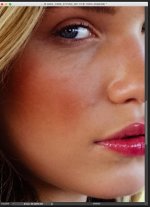
I can't upload a R3D as the campaign will be released later this year but here's a sample of my latest conversation with the creative director.

51prjoX.png


Picture on the left is from a DSLR on a previous shoot, a 5D Mark III, picture on the right is mine.

You will notice they are both cropped and not shot at all in the same conditions... The girl was fully static on the DSLR shot while we were driving in a car on the picture on the right.

Client's comments:

"We could use this one for smaller print ad"

dbDwb13.png


Client's comments:

"Retail print is still questionable. We would need to test with large format printing on a few test images. Im getting pixels breaking apart in the mid tones."

Compared to DSLR stills, this is general feedback about what we shot:

"These will be good for anything digital… all day long.
I would not use these for print advertising or retail. The resolution just isn’t there for good skin and retouching.
In low light or shadows seems to be the biggest issue. If I need to blow up 200%, for retail the face goes fast and pixelates badly."

Back home I asked my DIT to re-work our stills... I sent them to the clients and the marketing team replied they were stoked about the result but the creative director was still complaining about quality/resolution.

Funny fact is that last year, that same client used one of my shot to extract a still and print it on a catalog.

Except it was shot on MX in 5K WS with a 180° shutter as I was shooting for motion... That day, nobody complained about the quality or the resolution.
 
Looking at the stills it seems you might be caught in the "bullshit trap".

You work is great. Not everyone likes it that one camera (and person) can kill both jobs. To me the DSLR stuff looks flat and the color is awful.

But.

Its up to the client and the creative director will probably have the final say. In any case, nice work. I'm not buying the blowup thing at all.

just adding to this as I look again, I see what Gunleik sees as well. That can also be solved with prime NR in DXO optics. But it's not the point. No one wants to have to "fix" anything, the want to "enhance" something. There's some chromatic noise there in the skin tone (I didn't totally pixel peep the first time) that would fall apart or need to be reconstructed and that leads to things falling apart.

I have a lot of respect for creative directors as they tend to have very keen eyes and they have very high visual literacy. I'd be shooting some more tests and finding ways to solve problems. It's not a studio situation in very controlled circumstances where these things can be checked in the moment.

I absolutely think it can be recovered but compared to something that needs little work a very large print might be better from the other camera. (If that is what they prefer) I wouldn't argue just present solutions.

For me, I'd take the dragon colors over canon colors.
 
Last edited:
Well, not sure if I agree totally with David, I definitely see the difference... :)

But I have also done a few large prints from MX and Dragon, and I think the main issue I see in your frame is easily solved, but not through ADD or DEB (for a stills workflow).

If you load the shot to lightroom and apply the the chroma de-noise, you'll get rid of the specles (which kinda shine through.).

I'd say the sharpness and tonality is there, but the chroma-noise messes that up, and is fixable.

Now. The 5D has higher resolution and AFIK no OLPF, so it will be sharper and have higher resolution. But I am not sure if you should let that stop you.

Looking at this particular example, sharpness/detail is not really all that different if you look at the iris and the hair.
I tend to think that your image is "too sharp" (or sharpened) for a large blowup...

Also I wonder if you have applied a bit of skintone softening, which also kills tonality...

Have a look in vogue etc. It's not really all "dead sharp", and definitely not pushed.
But gentle and cool. (just a general observation, and of course not true for ALL imagery)

Leave it gentle...

Just a couple of huncehs and thanks for the peek!

Took the liberty to apply the chroma denoise on the jpg... I'll take it down if that's bad!

Thing with "leaving it gentle" is that it scales a lot better, and funnily enough, scaling can be good, both up and down...
 

Attachments

  • dbDwb13.jpg
    dbDwb13.jpg
    61.4 KB · Views: 0
Last edited:
Thanks for the kind words David.

Gunleik, we first applied a skin smoothing method to get a nice glow on the skin and the client freaked out... He was looking for something "sharp, sharp, sharp, etc..." i.e. with lots of details... Those same details which are masked in Vogue or other fashion magazine to bounce back on your example.

On that example, I had to push the unsharp mask because of the client request, we provide a "softer" version and he requested something with more sharpening... I tend to think now it's too sharp but from all our test, that was his favorite one.

Thanks for applying the chroma denoise, it looks much better and I wish the creative team would let me go that far in "enhancing" the frame...

I'm a newbie to still workflow and on that one I was probably a bit too enthusiastic about that job which popped up at the last minute... Lesson learned, from now on I need to control the entire pipe workflow when it comes to stills as I do when it's all about motion.

Once again thanks a lot Guys for your inputs and feedbacks.
 
As long as it is a good learning experience...

But he's right. The rolloff (for stills) is brutal in the bottom.

Now the thing is to use that knowledge when you shoot/light, and not expect to fix it with ADD or DEB.
At least not without testing out exactly what tools like that do for a still. (They are meant to be motion tools)
 
As long as it is a good learning experience...

But he's right. The rolloff (for stills) is brutal in the bottom.

Now the thing is to use that knowledge when you shoot/light, and not expect to fix it with ADD or DEB.
At least not without testing out exactly what tools like that do for a still. (They are meant to be motion tools)

Got you on this.

That first "stills" shoot in Guerrilla mode with harsh natural light wasn't that easy for a first photoshoot experience... But it's still remain a good learning experience.

That's pretty much how my career is doing since day one.

First experience is always tricky and risky with a mixed feedback then it goes all smooth on the next job, hopefully it will be the same for my next photoshoot ;)
 
Back
Top