Welcome to our community

Be a part of something great, join today!

  • Hey all, just changed over the backend after 15 years I figured time to give it a bit of an update, its probably gonna be a bit weird for most of you and i am sure there is a few bugs to work out but it should kinda work the same as before... hopefully :)

Please help!!! Urgent help needed with greenscreen footage!!!

Ivan Egorov

Well-known member
Joined
Aug 10, 2007
Messages
119
Reaction score
0
Points
0
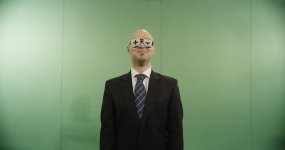
We got this footage to key, shot on Epic. Its unkeyable!!!
Is there anyone who could help, maybe it can be fixed!!!

http://www.megaupload.com/?d=2JQAYLPU R3d file here.
Please anyone help ASAP

Build 2.0.2, keying in AE's keylight

Updated the file!!
 
Just had a look at it. It is keyable, but definately not easily (the test I posted had JPEG artifacts that weren't in the original file, obviously)
The greenscreen is very uneven. Do you know if it was a real greenscreen ? It doesn't look very saturated, and the vertical lines are very visible on the background... Plus, the light isn't very even neither, and there is some vignetting in the 5K frame.
Also, there is quite a lot of noise in the vest, which is surprising given that the footage doesn't seem to be underexposed... Would love to hear from someone from Red...
 

Attachments

  • A001_C108_120931.0000081.jpg
    A001_C108_120931.0000081.jpg
    33.9 KB · Views: 0
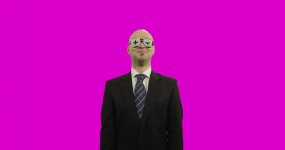
  • A001_C108_120931.0000081_Key.jpg
    A001_C108_120931.0000081_Key.jpg
    24.6 KB · Views: 0
The subject is under-exposed. The green screen itself is poorly lit. But it's totally keyable as Nils shows. Personally, if it were my project, I would hand roto a garbage matte to isolate most of the screen from the subject and then just worry about keying the little bit around him not roto'd out. Combine both chromakey with lumakey layers. ...I've keyed far worse than this. Keylight in AE is OK, but kinda limited. Have access to other software/ tools?
 
I did give it a quick try
Quick and dirty key only one keyer and quick mask, it need more work but the footage can be keyed.
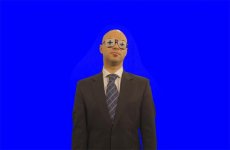
I used the Ultra-keyer in Fusion, in this case it solved the job better then primatte.

edit: clearly i didn't work on the spill, just tetsted wich keyer workes for you :-)
 

Attachments

  • Greenscreen_test0001.jpg
    Greenscreen_test0001.jpg
    17.2 KB · Views: 0
Last edited:
The subject's skin seems contaminated with green, is there a way to fix it in redcine or something?
Like tweak some raw settings so it would give a better result?
Other tools could be used i think, any suggestions?

Thanks
 
its called spill light - there are lots of techniques - key light gets rid of spill quite easily but skin will become magenta as easy. you'd want to pick the spill and grade it away with whatever grading tool you have available - use the mask to isolate and then grade against the green.
 
Is there a way to tweak the raw file in redcine to ease the keying in AE?
 
The subject's skin seems contaminated with green, is there a way to fix it in redcine or something?
This happens frequently when shooting in small insert stages, or placing the actor too close to the green screen. This is a good reason to use a much bigger stage, and get the actor at least 15-20' in front of the green screen background, to avoid spill issues.

After Effects, Nuke, Shake, Fusion... all of these are great examples of compositing software that have very good clean-up tools. But it always helps to have well-exposed, well-lit material to work with.
 
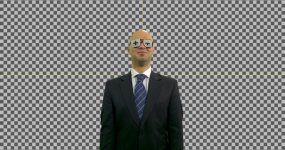
Keying it is not a huge problem - but as others have pointed out, the green screen contamination in the flesh tones is more of a problem. This is keyed in Nuke...

Ziggx
 

Attachments

  • keyed-small.jpg
    keyed-small.jpg
    96.3 KB · Views: 0
Back
Top