Welcome to our community

Be a part of something great, join today!

  • Hey all, just changed over the backend after 15 years I figured time to give it a bit of an update, its probably gonna be a bit weird for most of you and i am sure there is a few bugs to work out but it should kinda work the same as before... hopefully :)

Please help me grasp the RED workflow - never edited R3D RAW before!

OK guys, so I downloaded the REDCINE-X_PRO_Build_8_Beta_64-bit.msi file and installed the application - now I can follow the tutorial that you linked me to on Youtube - thanks so much!

However, I still believe it'll be better to set all R3D properties in Vegas prior to rendering my multi-camera project out. And here one more question comes:

- looking at the attached screen grab from R3D file format properties in Vegas Pro media bin, am I right assuming that what is called OLPF compensation here (which may be set to Off, High, Middle, and Low) is in fact the same as debayering option you mentioned? Basing on how it changes the preview quality, they should be the same - but please confirm...

BTW when I render an R3D clip out with OLPF set to Off, I'm getting a rather soft image - certainly softer than the XDCAM EX with standard settings. Which would suggest I should be using the Highest setting for render, and possibly Low for preview when cutting (to get high enough fps in Vegas Preview Window)... But this is in contradiction to what has been said here about setting debayering to 1/4 before render!

Could those more knowledgeable chime in, and clarify this for me please?

Piotr
 

Attachments
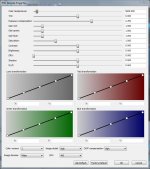
  • R3D decode properties in Vegas Pro.JPG
    R3D decode properties in Vegas Pro.JPG
    87.9 KB · Views: 0
Last edited:
I'm not sure what OLPF is....but I found this:

"In high-quality digital imaging systems, optical low-pass filters (OLPF) are used to eliminate color Moire fringes. "

I hope someone else could enlighten...
 
Yes, this is exactly what OLPF is (in most cameras not recording raw, it's implemented in hardware). But if this setting does not correspond to de-bayering, then which does? "Image Detail" would sound more like it, but its effect on the perceived image sharpness is far less pronounced than "OLPF compensation" in Vegas, or De-bayering in RedCine-X Pro...
 
OLPF compensation takes some of the softness OUT of the image that is intorduced by the use of the optical low-pass filters (OLPF)... Which as Enrique pointed out, if desired, might be better suited to a seperate application of "un-sharp masking" in a different program. Of course, this type of sharpening is completely dependent upon your personal aesthetic, so you may want to try a coupole tests to see if its worth applying...

My guess is that the debayer quality in VEGAS is linked to IMAGE DETAIL, which I would set to HIGH.
 
Yes, it looks like OLPF compensation is there to partially make for the effect of hardware OLPF. Which leaves us with only one parameter that could be related to de-bayering - Image Detail. But as I said: changing the latter influences the preview quality much less than de-bayering does in REDCINE-X_PR...

Also, I have noticed a strange thing when playing with Vegas Preview quality settings: the sharpest image is not with Best/Full, but Preview/Full !!! Does anyone know why? My project setting is 1080/25p, to best match the remaining cameras...

Piotr
 
I think you have many of the answers. My workflow back when using FCP & even now with Premier is this:

1. Go into RCX (pro 8 now) and do all of your selects here. Then do a basic one light color correction (in most cases this is merely white balance/ting and a simple curve....but i go into a bit of Shadow; contrast; saturation etc....you can choose your color space as well...if a simple 1080p i'd recommend with Redcolor and Redgamma.....this gives you some saturation and contrast already.

2. Debayer at HIGHEST Quality (overnight if you have to) and to Prores 444

YOu may also like the new red effects: Alchem & Saturation and turn both up a notch within RCX

Then you have your prores files ready for edit.

I'd do any sharpening in post since RED does not add any sharpening in camera.
 
If you're planning to crop any of your material, RCX is a also good place to do that, will reduce the amount of data that needs debayering, as well as reduce the final output file sizes.
 
Piotr-
Not sure about the preview quality... But un a unrelated note, I just heard that VEGAS supports EPIC audio. Other NLE's are not yet supporting the EPIC/Scarlet audio, ony R1... Can you verify VEGAS Epic support?
Thanks,
CK

CK, believe it or not, but I have no idea which RED camera model was used to record the material I'm incorporating into my current project (see my OP). All I can tell you is that the audio is decoded and audible in Vegas Pro 11, and the "Media Properties" state R3D as both the audio and video format...

Piotr
 
Dear All,

OK, so my project consists in95% of XDCAM EX clips, and only the remaining 5% are 4k R3Ds. I decided to render it as a whole, rather then create intermediates in Redcine-x Pro. The more so that it's been my goal to do some Pan & Scan, using HD cropping window...

Well, in most part the results are OK. The full size RED material looks great, even the windows cropped to 1920x1080 are only tad softer than XDCAM EX. However, in one particular point I used an even smaller crop - I wanted to enlarge an area in a window size of my planned delivery (DVD - 720x576, widescreen Pal). Unfortunately, after rendering the whole project to this format, that particular window looks terribly soft!

This is a nasty surprise to me - I was sure that if I use a 720x576 window of the 4K source, and render it to 720x576, I'll get sort of "pixel-to-pixal mapping" in terms of resolution - yet it clearly lacks pixels! Why is that?

I've set Imag Detail and OLPF Compensation to High, so I really don't know what else I could do to preserve the resolution... Any advise?

Piotr
 
I don't understand all this talk about proxies and debayering? Why do I have to debayer r3D files for use in Vegas? I'm currently working on a project shot with the Red One and editing it in Vegas. I just drop the r3d files onto the timeline like any other format. Vegas also has a nice properties window for r3d clips that enables me to control all the metadata. Am I missing something?
 
Back
Top