Welcome to our community

Be a part of something great, join today!

  • Hey all, just changed over the backend after 15 years I figured time to give it a bit of an update, its probably gonna be a bit weird for most of you and i am sure there is a few bugs to work out but it should kinda work the same as before... hopefully :)

Ongoing Gamma mismatch issue

Please have someone at RED write a .command file for Mac OS X that checks

(a) the file name of each file for existence
(b) the permissions for each file, and
(c) computes a hash of the contents and checks against the correct value

The values for all of these should match a single, known configuration, and the script should be updated on each release. This would correctly identify *so* many installation problems, and even less-than-technical users could just double-click the script after install and verify everything.

Hi Erich. Yes, the state of the installation tools available to us on the platform is unsatisfactory. I experimented with different ideas for using scripts during the installation process as a brute-force method of deleting existing files, but it stands to reason that if the regular file-copy operation fails, so will a script. I'll look into getting results back to the user in the form of a log file, since that appears to be our only option.

Your suggestion for a script to verify the condition of the system is reasonable, although the only definitive check would be for versions. There has been no pattern to permissions problems or any other explanation for the installer's silent failure. Because we can't reproduce this problem in house, it has been impossible to troubleshoot; often we can't get diagnostic info from the customer because he has already manually deleted the files in question before reporting the problem.

I have a script that blows away installed components for testing purposes, but haven't given it to customers because of major changes to the OS X installation "receipts" between Leopard and SnowLeopard. Receipts on SnowLeopard are no longer files with a known name that can simply be deleted; they're entries in a database of sorts. I'll see if I can refine the script to make it more universal and integrate it into the next installer.
 
I have a script that blows away installed components for testing purposes, but haven't given it to customers because of major changes to the OS X installation "receipts" between Leopard and SnowLeopard. Receipts on SnowLeopard are no longer files with a known name that can simply be deleted; they're entries in a database of sorts. I'll see if I can refine the script to make it more universal and integrate it into the next installer.

this will be VERY GOOD NEWS. Thanks Gavin.
 
Can someone post a list of current red components and their locations so we can verify we have the complete current setup? What exactly are all the components:

Redcode QuickTime component
redline
Log and transfer plugin
Color framework


Is there anything else?
Is there a way to tell what version all these items are?
 
Sure, Bobby. Here are the FCS-related components and how to check their versions.

Color support:
/Library/Frameworks/REDCODE.Color.framework

To get version: Right-click, "Get Info", check version. From the 30.1 installer, it should be 4.2.


FCP Log & Transfer support:
/Library/Application Support/ProApps/MIO/RAD/PlugIns/RED.RADPlug

To get version: Right-click, "Show package contents", drill down until you see info.plist, double-click it, check "Bundle version". From the 30.1 installer, the L&T plug-in is still version 30.0.


REDCODE QuickTime codec and preference pane:
/Library/QuickTime/REDCODE.QT.component
/Library/PreferencePanes/REDcode.prefPane

To get version: Right-click, "Get Info", check version. After the 30.1 installer, the codec should be 4.2 and the preference pane 1.1.

Redline isn't a part of the FCS components.
 
Last edited:
I had this same problem a few weeks ago! Essentially what was causing the funkiness was Apples Colorsync which makes assumptions for you depending on what color profile you have selected in your display preferences. I had my display profile set to it's monitor defaults and was having the same funky gamma shift. After hours and hours of research and following link after link, deep in the rabbit hole somebody recommended using "Generic RGB" as your color profile then calibrate your monitor to display 2.2gamma or sRGB. Luckily my monitor has a calibrated sRGB setting so if yours hasn't you may need to select Generic RGB and customise or calibrate it!?!
After changing these settings my footage displays accurately in RCX, QT7, QTX and Avid (Mac and PC). The only drawback is that the color in FCP and Compressor looks darker which is disconcerting but when rendered out (without any grade applied) the output matches the grade in RCX. We're an Avid house so we haven't been able to test the FCP playing out to a broadcast monitor or scopes so you would need to test whether the output is correct. Side note - along the journey for a solution it has been stated by many that FCPs preview is sh!t and that you can only grade using an output card on a b.cast monitor. I assume that it has something to do with FCP expecting 1.7 gamma and converts for preview to 2.2 or vice versa :willy_nilly: but not knowing that Colorsync is working its magic! But anyway across 5 different machines including an iPad and 2 PCs the outputs match whether DNxHD, ProRess or H264.

I must say that where I found this solution the person who had this problem - when this solution was recommended it did not solve it for him but it worked for me so here's hoping it works for you.

Ironically here are a couple of good links on the Apple website:

At the bottom of each page are links which are not recommended for bed time reading as they induce migraines - well they did for me :sissy:

http://support.apple.com/kb/ht3712

http://discussions.apple.com/thread...004FF5DD21D6.node0?messageID=7407356&#7407356

Hope this helps you. It's daunting trying to troubleshoot this stuff with so so so so many variables :mad2:

All the best,
 
Sure, Bobby. Here are the FCS-related components and how to check their versions.

Color support:
/Library/Frameworks/REDCODE.Color.framework

To get version: Right-click, "Get Info", check version. From the 30.1 installer, it should be 4.2.


FCP Log & Transfer support:
/Library/Application Support/ProApps/MIO/RAD/PlugIns/RED.RADPlug

To get version: Right-click, "Show package contents", drill down until you see info.plist, double-click it, check "Bundle version". From the 30.1 installer, the L&T plug-in is still version 30.0.


REDCODE QuickTime codec and preference pane:
/Library/QuickTime/REDCODE.QT.component
/Library/PreferencePanes/REDcode.prefPane

To get version: Right-click, "Get Info", check version. After the 30.1 installer, the codec should be 4.2 and the preference pane 1.1.

Redline isn't a part of the FCS components.

THANKS GAVIN That's real awesome!
 
Thanks Mike - my settings in Quicktime are to enable FCP gamma BTW.

Graeme

hi Graeme,

but technically the "enable FCP ....etc....'''' it say that color will be read at 2.2 gamma and displayed at 1.8 ....but snow leopard default gamma (as the standard gamma for everybody that calibrate the monitor) is 2.2 ,
so having that setting On is not technically Wrong?

Thanks

g
 
I still have this issue when rendering from redcine-x. My monitor is 2.2, I have all the right plugins/versions.

I see that the color profile of the QT is HD(1-1-1).
When I save a TIFF the color profile is set to my ICC monitor profile and are showing correct gamma.

This is a huge pain. The DoP do not care much about dailies and offline being off.

What I'm I doing wrong?

Is it just a QT issue that apple have to solve?

I actually did not have this issue in OSX 10.5 in the RedAlert/red rushes days.

All help is much appreciated!
 
Did a quick test
And cannot reproduce this problem (going to prores 422 with rocket transcode)

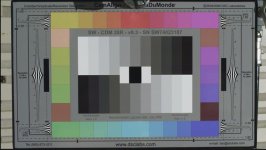
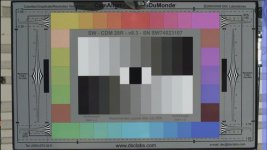
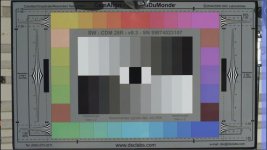
here are 3 screenshots.

1. is RCX
2. is from FCP prores 422 none
3. is from FCP prores 422 auto

FCP is 7.03
System is Snow Leopard 10.6.4
Quicktime is 7.6.6

The RED FCP installer is the latest (rocket for color)

Mac is dual 2,8 MacPro 2008

Question is:
Why does this work for some, while not for others?

Gunleik
 

Attachments

  • gamma_rcx.jpg
    gamma_rcx.jpg
    54.6 KB · Views: 0
  • Gamma_pr422_none.jpg
    Gamma_pr422_none.jpg
    55 KB · Views: 0
  • Gamma_pr422_auto.jpg
    Gamma_pr422_auto.jpg
    55.4 KB · Views: 0
I think this is nothing new. Ever since 2008 when i began using RC and then RCX and transcoded....i've always noticed color shifting. I'm told that i'm seeing things or not transcoding properly or a variety of other things. I have to say that at the moment, it's the best it's been for a transcode, but DEFINATELY not emulating the colors we see in RCX while doing a one light. I have to add back in saturation within FCP or Color after transcoding and even then colors are slightly off---most folks i show cannot see them, but as you know when you sit and transcode, color and work with material...YOU can see a difference as the user/colorist.
Wish it were better in order to lower the work tasking down the line.
 
Back
Top