Welcome to our community

Be a part of something great, join today!

  • Hey all, just changed over the backend after 15 years I figured time to give it a bit of an update, its probably gonna be a bit weird for most of you and i am sure there is a few bugs to work out but it should kinda work the same as before... hopefully :)

Ongoing Gamma mismatch issue

bobbystone

Well-known member
Joined
Mar 30, 2008
Messages
210
Reaction score
0
Points
0
Hey all,

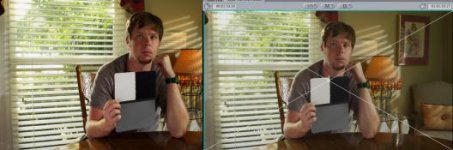
I'm still having problems with my rendered Pro_res clips not matching the grade applied in RCX. Anyone else having these problems? The Gamma on the rendered movies are flatter and the saturation is less (which also might just be bcause of the gamma) But they don't look much at all like the files I'm grading. I'm attaching a side by side screenshot. On the left is the RCX window, and on the right is the rendered prores movie in the final cut viewer window. Note that if I render to a jpeg still, the gamma matches perfectly, so it's some sort of quicktime issue. It's a real problem for me though, so I'd appreciate a: knowing if anyone else is experiencing this, and B: if anyone has any tips or solutions:

Camera build 30.5.0
RedCine-X Build 262 for Mac
OSX 10.6.4
Quicktime 7.6.6
Redcode 4.0
 

Attachments

  • red_gamma.jpg
    red_gamma.jpg
    20.6 KB · Views: 0
Render to Jpeg

Render to Jpeg

Here's a sample fo RCX to jpeg. There are some subtle colro differences, but it's a MUCH closer match.

And on experimenting, it seems to be more like a black-point type of issue as opposed to a gamma issue.
 

Attachments

  • red-jpeg.jpg
    red-jpeg.jpg
    20.2 KB · Views: 0
I am also getting this issue.. Hitting space bar on a mac to preview a file, its super washed, no contrast or saturation, open in quicktime, much better, but not a match to what I see in RCX... Love to find out the solution to get a better match.
 
Ok - following up on this....

I have some reference R3D files I use in calibration. I know them well and their reference RGB values covering the whole the camera can produce. I loaded it up into RC-X, sent out a ProRes422(HQ), enabled chroma filtering for 444 sources, gamma correction of none.

In FCP I've loaded in the ProRes. I went through the reference values, comparing them between RC-X (ISO800, 2800k, REDColor, REDGamma) and the FCP output, using the digital color meter app to read out the RGB values. They match.

Also, reading above about the potential of it being a black point issue - I've checked the black levels of my clip in RC-X and in FCP (ProRes from RC-X) and they are identical.

So - the good news, it should all work just great. The bad news is that it's not doing so for you. That means there must be some setting somewhere that's not the same as what I have here. If we can figure that out, I think we'll solve this for you.

Graeme
 
Thanks Mike - my settings in Quicktime are to enable FCP gamma BTW.

Graeme
 
Thanks G

Thanks G

Graeme, Thanks so much for looking into this for me. It's been a real bear to try to solve and a hindrance to my use of the camera. Is there some componenet or addition I may have that might cause a problem here? I do have 2.2 gamma checked in QT Preferences. Whats a simple way to start from the beginning to try to diagnose this?

Here's a screenshot of the gamma curve I've trial and error'd to try to get the footage to look proper:
 

Attachments

  • Screen shot 2010-09-02 at 10.59.16 PM.jpg
    Screen shot 2010-09-02 at 10.59.16 PM.jpg
    7.6 KB · Views: 0
Can you check what the Quicktime export dialogue box has for it's gamma setting for ProRes inside RC-X?

Graeme
 
I've been looking into this issue for about a year now. It's gotten MUCH better with then new REDCODE QT component 4.2 which is in the FCP3 download on RED's support site. This may or may not assit you with getting gamma to match, but it seems that i was getting 75% matches with transcoding to prores from R3d's last year and up to date i'm getting about 90% or so.
That said....there may be multiple reasons and places to look. first off I'd look at what version of FCP suite you'r running. then if it's the latest, you might look into this:
http://reduser.net/forum/showthread.php?t=48297&highlight=log+transfer+problems

You'll need to manually delete fils within your library AND then go back and run the RED's update for FCP3. there you'll get the latest QT component update of i believe 4.2 which i believe assists with this undersaturated problem---at least it did for me. I posted on this many times only to be told it was a QT issue, but reality is that i don't think it was....I believe it was an issue with QT reading data with all of RED's FLUT, REDGAMMA, REDCOLOR etc.....and not reading it properly. Anyway, seems it's much better now after i went through maual deletion of files and reinstall of FCP3. It updated the new QT component from 4.0 to 4.2.

Try that to at least eliminate the obvious and get updated to the lates QT Component, then you'll at least be on better ground to move forward.

ARe you grading on a RR card or only on desktop? this makes a difference as well. and then to what monitor if RR out?
 
Can you check what the Quicktime export dialogue box has for it's gamma setting for ProRes inside RC-X?

Graeme

where exactly are you referring to Grame? within Export and then the presets? or another location?
 
Johnny, inside the ProRes export options, it has a Gamma Correction option.

BTW, note how helpful RED is with what is essentially an Apple problem :)

Personally, I could never understood the way Apple deals with gamma. They were also really unhelpful.

So I went to Avid, whose DNxHD format is like ProRes, except it does not have this gamma problem.

Bruce Allen
www.boacinema.com
 
Johnny, inside the ProRes export options, it has a Gamma Correction option.

BTW, note how helpful RED is with what is essentially an Apple problem :)

Personally, I could never understood the way Apple deals with gamma. They were also really unhelpful.

So I went to Avid, whose DNxHD format is like ProRes, except it does not have this gamma problem.

Bruce Allen
www.boacinema.com


Bruce, you mean within setup where you can choose in the GAMMA settings Automatic or NONE? I'm aware that NONE is the preferred method, but is this what Graeme and you are both referring to---chose
NONE"? that said, it NEVER helped me in the past and i don't think it will help the OP on this. The issue i believe is more than simply a setting within the prores setup as i've tried many different runs of this the past many months and worked with a large production house that hired outside sources to assist. In the end, it was found that correction within any settings could not work, and they went with another codec for saving their stock footage.

But beyond this is the fact it seems to be getting better (at least in my hands on case). I'm pretty happy with what i'd call 90% match of prores to R3d with latest builds of RCX, FCP3 and of course the manual deletion of files to get the new QT component to load. This i think is rather crucial and you would NEVER know you are NOT up to date since there is no error given if the files are not updated for the FCP3 update. I found after 3 uploads, i was still looling at FCP2 update. This is where you get the latest QT component updates by the way.

But yes....i do agree QT has been a huge headache in a workaround.
 
I'd also like to point out the reference of RED helping out which i think they have a duty to assist since they are bringing a new codec to the mainstream. I believe they have every duty to assist in getting us working with their codec and manipulation of it with mainstream editing software. Otherwise we are lost within this forum looking for answers and of course getting the RED authorized by various production companies as an aquistion camera is paramount to most of our business......I'm delighted that RED is assisting us daily, but i think it their duty since everything changes day to day with RED---and always for the better. But if you are not on these forums day after day, you get so behind on latest workflows. I wait the day it's just drag and drop.
 
You'll need to manually delete fils within your library...

Graeme, yes Apple's installer framework sucks. I hate it too. But people are having *way* too many problems because stuff is not installed correctly.

Please have someone at RED write a .command file for Mac OS X that checks

(a) the file name of each file for existence
(b) the permissions for each file, and
(c) computes a hash of the contents and checks against the correct value

The values for all of these should match a single, known configuration, and the script should be updated on each release. This would correctly identify *so* many installation problems, and even less-than-technical users could just double-click the script after install and verify everything.
 
Graeme, yes Apple's installer framework sucks. I hate it too. But people are having *way* too many problems because stuff is not installed correctly.

Please have someone at RED write a .command file for Mac OS X that checks

(a) the file name of each file for existence
(b) the permissions for each file, and
(c) computes a hash of the contents and checks against the correct value

The values for all of these should match a single, known configuration, and the script should be updated on each release. This would correctly identify *so* many installation problems, and even less-than-technical users could just double-click the script after install and verify everything.

I'm surprised this has not been done. Great point and can we PLEASE get somethign like this going. I know i'd been running FC3 update for 6mo to a year OR at least i thought i was.....then after manual verification of files....the updated DID NOT update me to the latest update. Cmon---this is basic--how may other Redusers are rolling around with outdated sofwater components. Not a dig on red, but go the full 100% on this please so we are all on the same plane when it comes to your updates.
 
I've been looking into this issue for about a year now. It's gotten MUCH better with then new REDCODE QT component 4.2 which is in the FCP3 download on RED's support site. This may or may not assit you with getting gamma to match, but it seems that i was getting 75% matches with transcoding to prores from R3d's last year and up to date i'm getting about 90% or so.
That said....there may be multiple reasons and places to look. first off I'd look at what version of FCP suite you'r running. then if it's the latest, you might look into this:
http://reduser.net/forum/showthread.php?t=48297&highlight=log+transfer+problems

You'll need to manually delete fils within your library AND then go back and run the RED's update for FCP3. there you'll get the latest QT component update of i believe 4.2 which i believe assists with this undersaturated problem---at least it did for me. I posted on this many times only to be told it was a QT issue, but reality is that i don't think it was....I believe it was an issue with QT reading data with all of RED's FLUT, REDGAMMA, REDCOLOR etc.....and not reading it properly. Anyway, seems it's much better now after i went through maual deletion of files and reinstall of FCP3. It updated the new QT component from 4.0 to 4.2.

Try that to at least eliminate the obvious and get updated to the lates QT Component, then you'll at least be on better ground to move forward.

ARe you grading on a RR card or only on desktop? this makes a difference as well. and then to what monitor if RR out?


Are you saying that the QT component affected how your transcoded files looked? I'm pretty sure the QT component only works with the QT wrappers and has no impact on the transcoded QT movs from redcinex.
 
I have some reference R3D files I use in calibration. I know them well and their reference RGB values covering the whole the camera can produce.

Graeme, are these files too good for us crows, or would we be able to get our hands on a 'calibration' R3D? I've tried producing this kind of thing for myself, but found it somewhat difficult to know whether I was actually exhausting the gamut of the camera...
 
Gamma options?

Gamma options?

Guys where do I find this gamma export options setting?
 
Are you saying that the QT component affected how your transcoded files looked? I'm pretty sure the QT component only works with the QT wrappers and has no impact on the transcoded QT movs from redcinex.

Not at all sure about the QT component. But I am saying that over time with RCX upgrades AND implementation of the latest upgrades in FCS3 from RED which include QT component 4.2 i've noticed a dramatic difference in the transcoded prores files matching much closer the original graded R3d's. So where the magic occurred within the past 4-6 months is only a guess. I've noticed it like a hammer smacking my screen.
 
They're just files that I use regularly and know the RGB value of, practically by heart. Nothing magic.

Gamma Export option is at the point where you select ProRes as your Quicktime codec in RC-X. It's an Apple option associated with that particular codec (thus recognizing, of course, the multitude of Apple issues with gamma).

Graeme
 
Back
Top