Donald MJ Anderson
Well-known member
Hi
Eventually getting round to swapping out the non swappable original Dragon OLPF to the swappable type with the DSMC Interchangeable OLPF Installation Kit.
Opened the kit and I see the LL OLPF and two chopstick type things and a clamp of sort.
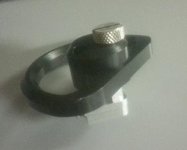
Pic of clamp attached...
Strangely no instructions what so ever...like... none.
Looked on REd.com and on here and couldn't find any instructions. I guess they must be online but I`m blind I guess! 8) Anyone can point me in the right direction?
Thanks
Eventually getting round to swapping out the non swappable original Dragon OLPF to the swappable type with the DSMC Interchangeable OLPF Installation Kit.
Opened the kit and I see the LL OLPF and two chopstick type things and a clamp of sort.
Pic of clamp attached...
Strangely no instructions what so ever...like... none.
Looked on REd.com and on here and couldn't find any instructions. I guess they must be online but I`m blind I guess! 8) Anyone can point me in the right direction?
Thanks