Welcome to our community

Be a part of something great, join today!

  • Hey all, just changed over the backend after 15 years I figured time to give it a bit of an update, its probably gonna be a bit weird for most of you and i am sure there is a few bugs to work out but it should kinda work the same as before... hopefully :)

OLED EVF Issue

Joined
Oct 3, 2011
Messages
78
Reaction score
0
Points
0
Location
New Zealand
Hi All,


I've just received my new OLED EVF.
I'm running v3.0.7 on my Scarlets that we are using the EVF on.

The EVF displays a slight orangey cast. It is not displaying a neutral colour temp (that my Std EVF does)

It also appears quite noisy / grainy overall - but very noisy in the blacks.

My DOP would rather use the Standard EVF & wants to ditch the new OLED.

Something is not right here !

Any thoughts ????


Thanks
Julian.
EPIC x 1 / Scarlets x 2
 
I have a quick FIX... for blacks. Did it last night, Transforms the OLED into what we all want !!! Solid blacks.

I'll share soon...

Cannot fix the WARM look though... that's going to have to be a RED FIX... But I can live with that, At least I have good balck and white levels now finally..
Color I don't really care about, as I throw all my onset meta data out the window, the moment I grade... I start from RAW scratch.

But your DOP mate is dreaming if he things the LCD EVF was better... Dreeeeeeaaaaming...
 
  • Thread starter
  • Banned
  • #6
Hi Mark,

So are you saying your OLED has the orangey thing going on as well ?

Chrs
Julian.
Niche Cameras Ltd / New Zealand.
 
Yep... :(

I can get rid of the warm look by altering my FLUT colors... But that completely fucks up all the other monitors on set... So that's something RED can fix, or should I say, what they have to fix.

I'll send a report in and send a request off to RED & Graeme to see if they can solve that color issue... RED are usually very good at addressing issues like this, Lets hope they listening.

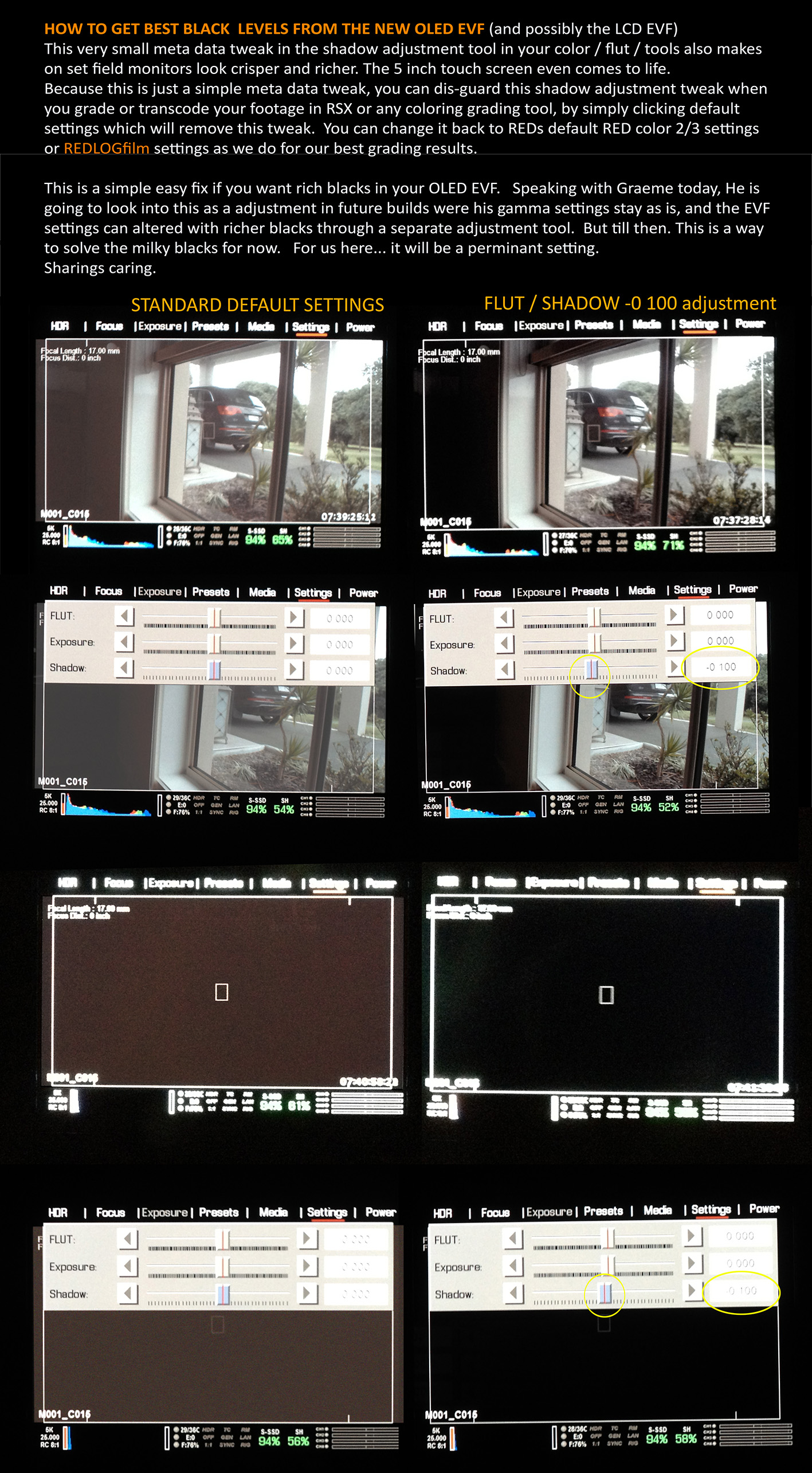
I have a solution for muddy blacks on the OLED... try this the next time you look through the view finder... Expose a shot correctly, then put your hand over the lens or put a lens cap on.. you will note that the MENU areas are solid black, but the picture is 10 to 20% noisy warm grey... Then take the cap off and look into your blacks.. they are not black.

I have a simple 1 step adjustment in color settings, which makes everything look clean & BLACK! on every monitor on set. It's a meta data adjustment, but does not hurt the final image..
I transcode and grade from RAW, I through out all my onset meta data settings every time, so this adjustment does not concern me. And to be honest.. It looks better over all.

Which i need to chat about with Graeme about as well.. Because we should not have to do this, they OLED EVF should be rich blacks regardless...

But at least there is a solution for now.

Will share soon.. I'm in the middle of a huge edit.. can't get to sharing it for now.

Cheers..
 
Yeeeee . . . holding off on the upgrade until this get straighten out
 
Mark.


Is the RED camera family OLED viewfinder managed entirely from within the camera operating system? Our SI2K OLEDs admittedly a few years older than your new one have three buttons, which in combinations and sequence of order used will power on-off, control brightness, contrast and the three colour channels independently of the camera itself. Ours may be an entirely different system as it will accept VGA or SVGA.

For a long time I did not mess with the adjustments as I was only using it as a sighting aid when the touchscreen was sunned too much. I got caught out when running the camera without the touch-screen and in a hurry out in bright daylight without a chance of selecting the histogram. It is a much slower process on the intuitive screens when using the on-camera "mouse" buttons. I set exposure to the OLED unadjusted image and underexposed about five stops. I have since adjusted it to the camera's colour bars and the pluge bar to match the touch screen monitor and that seems to be a comfortable arrangement for me. I now routinely set the histogram "on" before going lightweight with the camera.

If you have a warmish colour cast, maybe a small piece of 1/4 CT blue lighting gel in the optical path of the eyepiece might be helpful in the meantime until the firmware solution is forthcoming.
 
I'm getting really scared about it. I had to sell the original EVf because it wasn't working properly on my EPIC. Bought the Bomb EVF to my surprise with really bad blacks and other issues, then paid the upgrade to the new one because everybody was saying that it was great, rich blacks. etc...

Still waiting on the OLED EVF to come back home (thats' another issue not know when I'll get it back) And this is the second thread I find with problem about the OLED EVF, now not only the blacks are still an issue but the image is warm overall. Come red, is that true?

I can see how it might not be a big deal since we are shooting raw, but the're scenarios where having a decent image helps when adding gels to lights, and see how much you are adding. Eventhough probably we shouldnt be judging exposure or color through an EVF, it would be great to finally have a great EVF and not have to do tricks to have decent rich blacks or color cast.

As usual, thank you Mark for being on top of this, please share the trick to have finally rich blacks. It just gets frustrated to see all this issues on a quite expensive EVF after REd said it was so much better and everyone was saying that finally the OLED was what the original bomb EVF should have been.
 
You'll find that as the unit warms up it tends to loose the warm look.

Once again it's not a problem at all. You finesss your whitebalance when you grade or transcode.
Ive never worried about whitebalance whist shooting, it's not a colour backed video camera, it's a raw data capture camera. I'd be more worried about color temp shooting and Alexa in Prores mode.
 
I have three dead pixes on my OLED EVF. Not a major problem and I can easily live with it. I was wondering if anyone else has seen this? My only concern is if the OLED panel has a manufacture issue and over time I might lose more. I do love the OLED EVF and it's probably the best electronic EVF I have used.
Looking forward to brightness control in a release build as it is way too bright In its outa the box setting for judging exposure or look. (please no lectures on how to expose)
 
I have three dead pixes on my OLED EVF. Not a major problem and I can easily live with it. I was wondering if anyone else has seen this? My only concern is if the OLED panel has a manufacture issue and over time I might lose more. I do love the OLED EVF and it's probably the best electronic EVF I have used.
Looking forward to brightness control in a release build as it is way too bright In its outa the box setting for judging exposure or look. (please no lectures on how to expose)

To bright you say... Interesting.

Not good about the dead pixels Tom. Maybe you send it back and get it replaced. Have you sent a ticket to RED.
 
I will let support know but as long as it does not get worse not unduly worried.
The EVF looks about a stop over and the dark greys look especially bright. Not keen on the beta FW as the camera is busy on jobs so can't yet determine where the brightness is set on this particular EVF. I do not use EVF to set exposure but I do like to see a reasonable facsimile of the image being recorded.
 
I will let support know but as long as it does not get worse not unduly worried.
The EVF looks about a stop over and the dark greys look especially bright. Not keen on the beta FW as the camera is busy on jobs so can't yet determine where the brightness is set on this particular EVF. I do not use EVF to set exposure but I do like to see a reasonable facsimile of the image being recorded.

You should be able to set exposure very easily with it... I do.
You may not have seen this... But it's working for me, and it gets rid of those bright grays you speak of. It's not a true fix, as RED are onto looking at the black levels in the OLED at the moment. but this is what we do to combat the grey blacks... with perfect results. putting the lens cap on you really notice the difference. see below

OLED_Settings.jpg
 
Thanks Mark I had taken your advice when I first saw it and it certainly helps crush the noise out of the blacks. My EVF still feels too bright when compared to the cameras R3D output. I am not panicking untill I can start adjusting the EVF brightness which I assume will be in the next release build.
 
Back
Top