christiansprenger
Well-known member
We just received our new OLED Bomb EVF in the mail and hooked it up to our epic. The colors and black levels are incredibly accurate as promised, however we did noticed one very peculiar and disappointing thing...
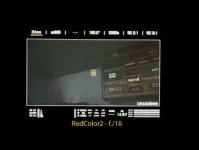
When the camera boots up and the chip-chart flashes, it is breathtaking! The most perfect color accurate chip-chart I've ever seen represented as a digital image. The black levels of the menus are black as black, the menu text is all a perfect crisp white. Incredible clarity. However the actual image its self looks quite odd. When properly exposed I suppose it looks pretty good, but the shadows look truly awful. They appear as though they are being artificially raised maybe 10-20IRE.
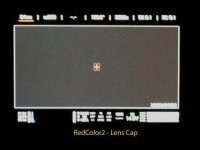
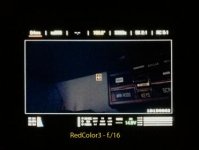
When we first saw this, we figured it was probably just our eyes adjusting to this new contrast. So we put lens cap on the lens and noticed that the whole image then just turned an odd solid grey (similar to this text box that I am writing this post in right now.) I then thought that this was probably caused by RedColor2 and so I changed to RedColor3. Doing so did indeed change the black levels of the image, but now they look weirdly artificially posterized and had a lot of weird blue grain in the shadows. Still, the image did not look acceptable to me or any of the other guys who were at the rental house that I was testing at.
I should also note that I tried adjusting the LED/EVF Brightness in the system menu and this had no effect on the image whatsoever. All the way down looked exactly the same as all the way up.
There was definitely no pattern or groundglass effect as other have reported, it all looked pretty damn clean; I just dont understand what is happening here. Is it possible that I just got a bad EVF? Or is this just something that will be corrected with a build upgrade? Have any other OLED owners experienced this problem? Because of how fantastic that chip chart, looks during startup, I can't help but think maybe its a software problem. I've thousands of hours shooting in RedColor2 and looking at it on dozens of different types of monitors, and never have I seen anything that looks like this.
I've attached a few images below. Unfortuantely I used my iPhone4s to snap them and they are zoomed in, so take them with a grain of salt. I can honestly say that they are pretty accurate in displaying what I'm talking about though. Note where the histogram is living in these images as well as how incredibly black the backgrounds of the menus are.
Would love to know your thoughts.
When the camera boots up and the chip-chart flashes, it is breathtaking! The most perfect color accurate chip-chart I've ever seen represented as a digital image. The black levels of the menus are black as black, the menu text is all a perfect crisp white. Incredible clarity. However the actual image its self looks quite odd. When properly exposed I suppose it looks pretty good, but the shadows look truly awful. They appear as though they are being artificially raised maybe 10-20IRE.
When we first saw this, we figured it was probably just our eyes adjusting to this new contrast. So we put lens cap on the lens and noticed that the whole image then just turned an odd solid grey (similar to this text box that I am writing this post in right now.) I then thought that this was probably caused by RedColor2 and so I changed to RedColor3. Doing so did indeed change the black levels of the image, but now they look weirdly artificially posterized and had a lot of weird blue grain in the shadows. Still, the image did not look acceptable to me or any of the other guys who were at the rental house that I was testing at.
I should also note that I tried adjusting the LED/EVF Brightness in the system menu and this had no effect on the image whatsoever. All the way down looked exactly the same as all the way up.
There was definitely no pattern or groundglass effect as other have reported, it all looked pretty damn clean; I just dont understand what is happening here. Is it possible that I just got a bad EVF? Or is this just something that will be corrected with a build upgrade? Have any other OLED owners experienced this problem? Because of how fantastic that chip chart, looks during startup, I can't help but think maybe its a software problem. I've thousands of hours shooting in RedColor2 and looking at it on dozens of different types of monitors, and never have I seen anything that looks like this.
I've attached a few images below. Unfortuantely I used my iPhone4s to snap them and they are zoomed in, so take them with a grain of salt. I can honestly say that they are pretty accurate in displaying what I'm talking about though. Note where the histogram is living in these images as well as how incredibly black the backgrounds of the menus are.
Would love to know your thoughts.