Welcome to our community

Be a part of something great, join today!

  • Hey all, just changed over the backend after 15 years I figured time to give it a bit of an update, its probably gonna be a bit weird for most of you and i am sure there is a few bugs to work out but it should kinda work the same as before... hopefully :)

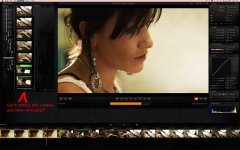
OK... REDCINE-X time.

It is a beautiful app. What APIs were used to create the user interface, might I ask?

Since it is going to be cross-platform, I'm guessing you made a custom widget library using OpenGL ... am I right?

Great work guys! This is very slick for an alpha build!
 
RED Rocket™™ support is in the new RED SDK... so applications that upgrade to the new SDK will be able to use the power of the RED Rocket™™.

this would be cool. So we can have the simplest yet creative work flow from start to film out. Yes i said film out. ok for a minute let's think about this.
workflow:
1) edit realtime in fcp with redrocket
2) send to colour
3) grade in color
4) send to fcp
4) by mean of knoa 3 or redrocket print to laser film printers

Just a thought
 
OK, finally getting around to really playing with it and collecting my thoughts and questions on REDCINE-X...

I love the interface! Like I said previously, the mouse-over previews in Clip Selection is great.

The performance with the RED Rocket is great, when it works. I'm finding that when I start up RC-X everything runs great, but after I start tweaking the look, my performance drops considerably as if it stops using the Rocket. Resetting any of the controls has no effect, neither does quitting or restarting the application. I have to reboot the computer to regain the performance! There also seems to be related to resizing the playback window and the playback window doesn't like to let me resize
it much of the time when it's over the application workspace area, I have to drag it off to the second display to resize, then move it back!??

Is there a way to turn RED Rocket functionality on and off? The Rocket icon or button is illuminated as orange, but does nothing if I click on it.
Limits on window sizes? How come my Clip Selection window only lets me stretch it to about 1000 pixels vertical or something close to that?

I know it's all alpha, just trying to provide some feedback. I'm not sure if the performance issue with the RED Rocket is common or if I have a problem somewhere. RocketCine-X works just fine with my Rocket, or at least it did a couple days ago... Guess I'll double check that. :)
 

Attachments

  • rcxq2.jpg
    rcxq2.jpg
    92.6 KB · Views: 0
Thanks Jeff... it is a known bug between the caching and the Rocket. Thanks for reinstating it is Alpha as well :)
 
OK, glad I'm not imagining it and that it's a known issue. :) It's going to be exciting to watch this application evolve!
 
...There also seems to be related to resizing the playback window and the playback window doesn't like to let me resize
it much of the time when it's over the application workspace area, I have to drag it off to the second display to resize, then move it back!??

I've also had issues with the resizing of the Player window. Sometimes it doesn't let me grab the corner... but I then discovered that sometimes it allows me to click and drag in other areas of the window, such as the textured area near the playback control buttons to resize.
 
In the end of the day the other ones are interested in the business --whether they sold cars, carrots, eyeglasses did not matter as long it's good business-- while here it's the camera, software, hardware and workflow which matters everything.

One major advantage for a company like RED is the lack of a large group of shareholders. As far as I know, Jim is still the one and only shareholder and that way of keeping it simple is just about the only way forward for a company like RED.
 
It is a beautiful app. What APIs were used to create the user interface, might I ask?

Since it is going to be cross-platform, I'm guessing you made a custom widget library using OpenGL ... am I right?

Great work guys! This is very slick for an alpha build!

From the package, it looks like they're using Qt and OpenGL. It looks to me though that they're using Qt's graphics layer to draw the interface and the windows, and then probably using OpenGL to accelerate the video playback, although I didn't see that many OpenGL calls in the sample while playing back footage so I'm not sure...

Also, everything points to it being written in C++ - the binary seems to be statically linked to Boost, and it links to libstdc++.

Just if anyone's interested...
 
Renders Match

Renders Match

My renders seem to match the preview perfectly now. Before with Red Alert and Red Cine, the renders never quite matched the preview while I was grading. Creating a look also seems to be easier and more precise. I really like the sliders that are placed underneath the curve tool.

I can't delete shots from the timeline. And is there any way to copy looks from one shot to another?

Great work, thanks so much for making the Red system better and better.

-Dave Dessel
 
OK, glad I'm not imagining it and that it's a known issue. :) It's going to be exciting to watch this application evolve!

Yeah the team has good traction on fixing it... might possibly get out another alpha build next week with that fix but remember, bug fixes are not a priority on this Alpha build as they focus on the more important framework stuff.
 
My renders seem to match the preview perfectly now. Before with Red Alert and Red Cine, the renders never quite matched the preview while I was grading. Creating a look also seems to be easier and more precise. I really like the sliders that are placed underneath the curve tool.

I can't delete shots from the timeline. And is there any way to copy looks from one shot to another?

Great work, thanks so much for making the Red system better and better.

-Dave Dessel

To delete shots from the timeline... just drag them out. Copy/paste coming soon. We all want that.

Jim
 
If you really want it to sing... get a RED Rocket! :-)

Jim
 
Currently a known issue is output to H.264 has a gamma issue (light). ProRes and the others do not.

Jim
 
This is AWESOME. Thanks so much guys. Can't wait for Rocket to arrive...ordered last Friday...
 
And this is an Alpha build????!!!! Holy crap! Jim, you certainly know how to hire.
 
Back
Top