Welcome to our community

Be a part of something great, join today!

  • Hey all, just changed over the backend after 15 years I figured time to give it a bit of an update, its probably gonna be a bit weird for most of you and i am sure there is a few bugs to work out but it should kinda work the same as before... hopefully :)

NOISE PROBLEM - RED Epic Dragon with Motion Mount

Tim Sessler

Well-known member
Joined
Feb 4, 2015
Messages
131
Reaction score
0
Points
0
Location
NYC
Hi everyone -

I was recently shooting a spot with two Epic Dragons. Both cameras were equipped with the PL Motion Mount, as we were primarily shooting with MoVI and Octocopter.
A-CAM (my personal camera) had the Low-Light OLPF on, B-CAM unfortunately only came with a Skin-Tone-Highlight OLPF.

All A-CAM footage looks great - both at daylight (exposed at ISO 800) and night (exposed at ISO 2000, as we were working with mostly available light). All footage looks exceptional and the noise level in the night shots is amazingly good.

The B-CAM footage overall looks a lot more noisy, probably partly due to the STH OLPF, but especially one scene, shot during sunset looks incredibly bad. In fact I could push A-CAM past ISO 3,200 before getting that much noise.
Here is an example at ISO 800:

B002_C001_0826_YH_0003394_F_0000000.jpg


Here are two R3D files:
1) https://www.dropbox.com/s/0yiddfugro0ewz2/B002_C001_0826YH.0003394F.R3D?dl=0
2) https://www.dropbox.com/s/oa9wq0wwpjuocgt/B002_C001_0826YH.0012413F.R3D?dl=0

NOTES:
CAMERA: RED Epic Dragon
MOUNT: PL Motion Mount set to ND ONLY
LENS: Kowa Prominar
OLPF: Skin-Tone-Highlight
EXPOSED AT: ISO 800
FPS: 48
REDCode: 8:1
BLACKSHADE: Good

Both shots are definitely very underexposed, as I was exposing for the low, direct sunlight. That being said the noise that is visible at ISO 800 still seems very extreme and completely out of proportion from what I've seen from any Epic Dragon in the past.

I'd love to hear if anybody has experienced anything similar? Could it be a bad boot related to the Motion Mount? The Blackshade was spot on - that would be the only other reason for increased noise that would come to mind.
Would really love to solve this issue to avoid any similar problem in the future!

Thanks,
Tim
 
Looks like the RED rainbow flares are also causing a bit of this. The STH Red channel performance in this type of situation (outdoors, backlit) can show up in the shadow detail. If you look at the RED rainbow flare you can see it is pretty pronounced. 7 stops ND probably contributes to that a bit and the lens, etc.

But I would have to see it against the other one in similar circumstances, lighting, etc.

Looks about right though for 8:1 compression, trees, leaves, greenery and all things considered.

Looks a bit better with DEB, RFL and a curve, processed at 500 ISO.

The second one, with the runner is just about 2 - 2 1/2 stops underexposed (so its to be expected).

They really behave like two completely different cameras (and in fact are) when you change out OLPF's
 
Last edited:
Two things, in combination, that I see as probable factors:

1) The Motion Mount loses about 1.5 stops of light over the regular mount - so don't use the motion mount under any other conditions than broad daylight or else high key lighting indoors that compensates for this light loss (can be a little tricky to do well). Good uses are - bright daylight, timelapse, and outdoor gimbal. It will be less useful in studio or night or even dusk settings.

2) never push the STH past 800. Never. If your setup requires it, then throw some light on that setup. Shooting right at 800 is where the noise zone begins. Shoot at a lower iso whenever possible and add light. Dem's the rules.

As I see it, B cam was throttling the parameters of good practice with shooting lowlight scenes in combination with the Motion Mount. You were essentially letting in less light than would normally hit the sensor at 800 without the Motion Mount, and, 800 iso begins to show some noise using the regular mount, if the scene isn't lit adequately.

Was the operator paying attention to the goalposts? - no doubt the blacks were clipping, if there is noise. Toggling over to the false color exposure tool will also indicate the zones where your blacks are clipping - best to toggle over to the RAW image as well, while in false color, to get the specifics of your data loss.

If you pay attention to what these tools are telling you, in tandem, you will never be surprised by the noise in your images - you can selectively choose it, rather than being hit by surprise with it later, in your images.

But I think that if you were shooting with darkened exteriors, with the motion mount, at 800, and saw the clipping in the tools - that's definitely going to produce noisy images. The motion mount is only for situations where you want to be able to darken the image anywhere between 1.5 - 5.5 stops in total, since the base mount loses 1.5 and you have a solid extra 4 stops to ND down, if you need it. Those are the right circumstances to use it.

hope this helps....
 
Totally hear you - the 1) R3D grab is definitely way under exposed. We were shooting on an octocopter, exposed for the sun - so obviously the moment we lost the sun behind the hill (flying/shooting during the same take) it got way too dark.
The noise in the 2) grab set to ISO 800 still seems extreme - doesn't it?

When the LLO OLPF first came out I compared both OLPFs and there clearly is a difference between them - but the difference between my A and B cam seems a lot stronger than that.
Here is my test video that I made back then: https://vimeo.com/114311331

Here are some more R3D grabs from the same shoot later at night:
A CAM 1) https://www.dropbox.com/s/x69rvh1af3aotos/A007_C001_0827C6.0000000F.R3D?dl=0
A CAM 2) https://www.dropbox.com/s/suldo52lcs4o7mi/A008_C002_08277A.0000121F.R3D?dl=0
B CAM 3) https://www.dropbox.com/s/rdee1h2w17bw6ne/B006_C029_0827HK.0000573F.R3D?dl=0

Its an interesting comparison - as its exactly the same location, same lenses, same f-stop, same ISO, same frame rate etc etc. - only difference is LLO vs. SHO OLPF.

All that being said - I am still mostly perplexed by first grabs of the sunset scene that I posted. Any shot at ISO 800 (underexposed or not), left at that exposure should not show this kind of extreme noise, or?

Thanks guys!
 
Skintone is 320. Motion Mount loses 1.5 stops. Putting camera at 125 iso. If you were significantly underexposed at 800, makes sense there'd be noise. Were talking possibly 3-4 stops under exposure, which would be a lot for any camera system.
 
Just on Future strategy.

If you weren't using the motion mount this shoot would have been a great candidate for screw in ND filters and a couple of stops of HRX. Expose for the shadows and use the HDRX stream when the sun is in the shot.
 
Last edited:
Thanks for all the responses - this all makes a lot of sense. The thing where I don't follow at the moment is the following: if I am shooting at ISO 800 and underexpose e.g. 4 stops - shouldnt the noise level be the same than exposing correctly, with the only difference being that the image is 4 stops darker?

Just for comparisons sake I quickly did a Motion Mount vs. regular Mount comparison.
Shot at f/16 with the Motion Mount set to 2.1 ND and using a stacked 1.2 and 0.9 IR ND on the regular mount.


REGULAR MOUNT: ISO 800, ND 2.1

A09_C11_0000064.jpg


MOTION MOUNT: ISO 800, ND 2.1

A009_C012_0908_UM_0000000.jpg


REGULAR MOUNT: ISO 2000, ND 2.1

A009_C011_ISO_2000_0000057.jpg


MOTION MOUNT: ISO 2000, ND 2.1


A009_C012_ISO_2000_0000000.jpg


REGULAR VS MOTION MOUNT at ISO 2000, ND 2.1

Mount_comparison.jpg


Also for reference here are the R3D grabs:
Regular Mount: https://www.dropbox.com/s/7emsa8fmjv1xg9a/A09_C11.0000064F.R3D?dl=0
Motion Mount: https://www.dropbox.com/s/oowk1t91xipcxxf/A009_C012.0000000F.R3D?dl=0

Two things that stand out during the test:
- the stacked ND filter combo pointing straight at the sun caused some very strong blue/cyan tint (that I corrected for in those screen grabs)
- the Motion Mount rainbow effect is extreme and red noise seems a lot more dominant with the MM.

Does anybody know why there is such an extreme color shift with the MM and higher ND values? Seems like thats something that should be automatically compensated by a WB offset, or?
Also is there really that much more noise with the MM or is it an illusion due to extreme red/warm WB shift that is caused by the 2.1 ND of the Motion Mount?

Thanks,
Tim
 
The noise in the Motion Mount is real, as the mount itself is blocking 1.5 stops of additional light.

Correct me if I am wrong - but I think this is not accurate. The Motion Mount results in a 1.6 stops (0.48 density) light loss - meaning this is the lowest ND it could be set to. If its set to 2.1 ND it results in a 7 stop light loss, just like an external ND 2.1 would do. Meaning its not blocking 1.5 stops on top of whatever setting its set to.
 
Correct me if I am wrong - but I think this is not accurate. The Motion Mount results in a 1.6 stops (0.48 density) light loss - meaning this is the lowest ND it could be set to. If its set to 2.1 ND it results in a 7 stop light loss, just like an external ND 2.1 would do. Meaning its not blocking 1.5 stops on top of whatever setting its set to.

Correct. :)
 
In post 9 are you also compairing LLO to STO?

When using STO use D.E.B. if you have underexposed material. I don't know the implication of the MotionMount even if you compensate the loss of exposure (expose both correctly according to your scene).

You probably will have to use some Neat noise reduction and I bet you'll be pleased with the results. It's really impressive how it works and changed the way I was handling noise (I eats CPU and Rendering time!!!).

Pat
 
In post 9 are you also compairing LLO to STO?

When using STO use D.E.B. if you have underexposed material.
Pat

Awesome - just learned something new. Thank you! DEB does make quite a difference!
 
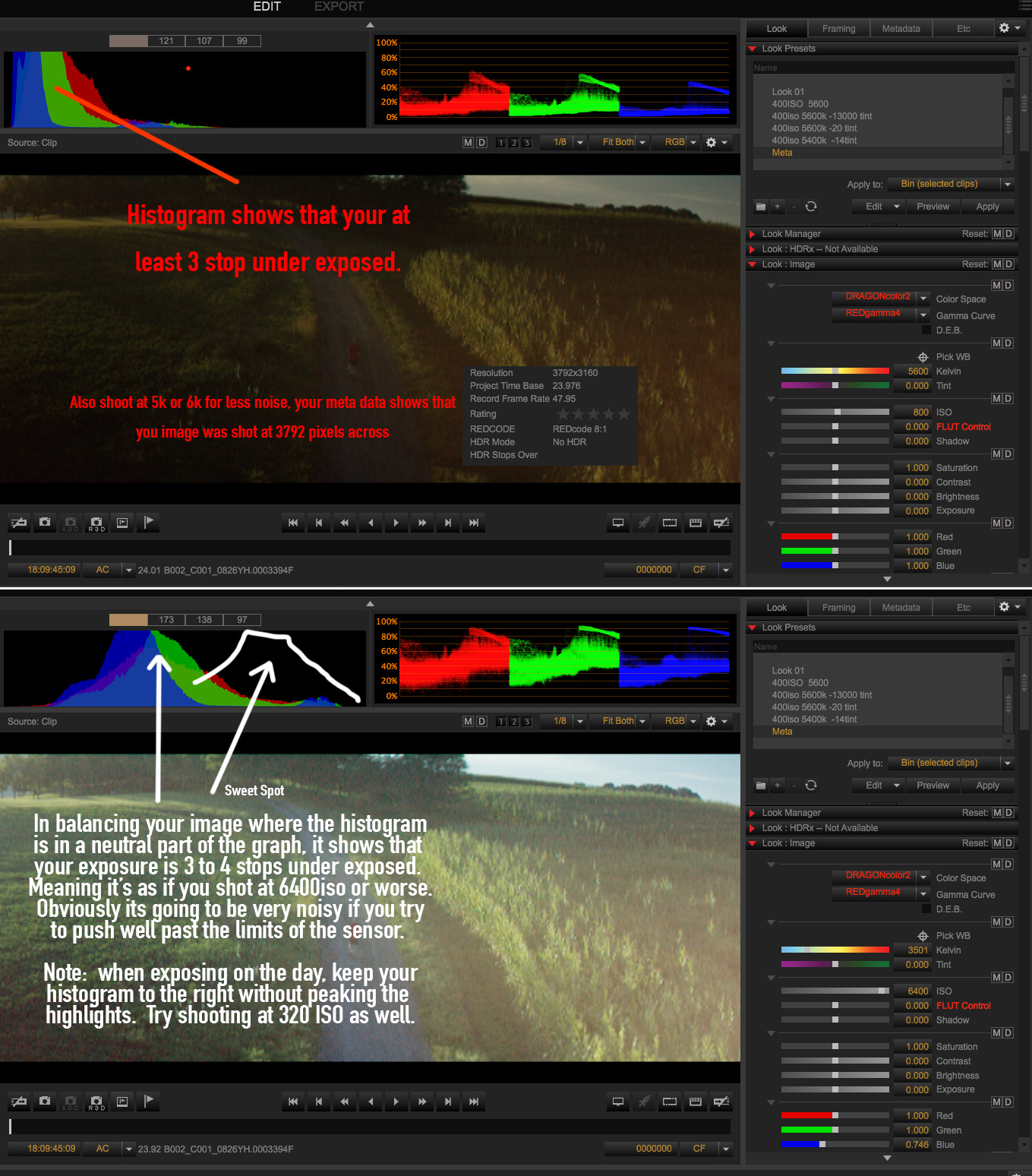
Try not to shoot at 2000ISO ever... if you don't want noise.
If you have to, make sure your histogram is to the right, not in the middle or left ! as you will be in a world of hurt.

Try shooting at 250 or 320 ISO and keep the histogram to the right but not peak. THE SUN or specular light sources will always peak...ignore those.

Motion mount or no motion mount there should be no noise at 250-320 ISO , A little may creep in at 800ISO if your not favouring the right of the histogram.
If you follow these basic rules you will be noise free.

Check out my DRAGON footage on one of the very first DRAGON test cameras before they were launched. You can see that 2000ISO is completely usable if you favour the right on the histogram.
You'll see there is little to no grain at all if your stick this this way of shooting.

https://vimeo.com/71666317

 
Last edited:
I give up.

Mark, if it's any consolation, *I* adopted all your recommendations after having my own struggles, and I have been happy ever since. Both with LLO and with STH. So *I* thank you for your information and inspiration.
 
Some people like NOISE in their images because it has more of a film GRAIN feel to it,
so therefore shooting at high ISO can be very subjective.
 
Back
Top