Welcome to our community

Be a part of something great, join today!

  • Hey all, just changed over the backend after 15 years I figured time to give it a bit of an update, its probably gonna be a bit weird for most of you and i am sure there is a few bugs to work out but it should kinda work the same as before... hopefully :)

Noise on the low end but even worse scary megenta lines

Status
Not open for further replies.
sometimes what you see is meant to be there. its perfectly possible for a white light to be pointed at a grey filing cabinet, only to show a green spot of light.. this tells you the filing cabinet is reflecting green light back..but less red and blue.. its all to with physics ..

i can't actually see the magenta lines in the jpeg.. except in marks grade..

i saw rippling moire patterns in several folds of lace curtain a few months ago whilst brushing my teeth..the curtains were still..only my electric tooth brush was moving my head microscopically..it was crazy..turns out the human visual system can suffer from quite bad aliasing problems all on its own .. so that OLPF is definitely needed..even though the aliasing may sometimes be more realistic i now discover..
 
The magenta line issue is appearing on my Dragon now as well. No filters on lens. Appears whenever shooting into a source. Always magenta. Is this OLPF related?

I'm quite certain it's a CMOS artifact not an optical flare. But it should be/is correctable through calibration and image processing.
 
http://youtu.be/KD5fLb-WgBU
Dragon with the old OLPF or maybe just the MX? At any rate the magenta/red flare does add some character which may be sought after in certain situations. I think it is lovely in this instance which ever camera it is.
 
I'm also quite certain it's a CMOS thing - at one time I heard a seminar about current leaks in high resolution sensors but I could be way off/not at all certain. It does not, however, look optical based on shape and angle. Then again, I could very well be wrong.
 
This isn't a flare, it appears directly in line with the source the camera is aimed at and is locked to that. It appears to be happening on the recording surface.
 
This isn't a flare, it appears directly in line with the source the camera is aimed at and is locked to that. It appears to be happening on the recording surface.

Yes, a characteristic of the old OLPF design. I'm not talking about the magenta lines the OP had issues with by the way, I'm talking about the youtube link I posted. My point was the Old OLPF has it's own unique character and two version of the Dragon might be taken advantage of.
 
Last edited:
i don't see how firmware can fix that?

Negative gain on all pixels in a row with a blown out pixel proportional to the number of blown out pixels.
 
The magenta line issue is appearing on my Dragon now as well. No filters on lens. Appears whenever shooting into a source. Always magenta. Is this OLPF related?

View attachment 53674
View attachment 53675
View attachment 53676

R3D for last image example : https://dl.dropboxusercontent.com/u/161718/A003_C016_06202W.0000245F.R3D

Can you post a moving picture version of this - unless the camera was always locked.

The idea that every time you shoot a light source with the Dragon you'll get this effect, is bonkers. What did RED SUPPORT say about this issue?

In fact, I just tested it with a light bulb (as I did with the sun) and absolutely did not see this magenta spill or flare or bleed or whatever the heck it is.
 
Last edited:
Can you post a moving picture version of this - unless the camera was always locked. The idea that every time you shoot a light source with the Dragon you'll get this effect, is bonkers. What did RED SUPPORT say about this issue? In fact, I just tested it with a light bulb (as I did with the sun) and absolutely did not see this magenta spill or flare or bleed or whatever the heck it is.


Seems like it has to be a super high contrast horizontal strip like a PL bulb in surf board shaper example or the OP's mini-blind example. Happens when the clipping light source get close to lining up with the pixel row perhaps. Round sun or bulbs won't reproduce the effect.
 
I agree with Zeb that this magenta line issue should be limited to an unusual combination of incidence angle to the OLPF - AND - sensor pitch/alignment - AND - hot source.

If, in fact, I am correct that 95% of all the Dragons in the wild by year's end have the new OLPF then the few that decide to stick with the old one will have to note that for renters. FWIW, many other camera companies have put out variants with similar nomenclature that have confused producers. It's unfortunate but a long way from unprecedented.

Looking forward to the new FW as I do shoot available light a fair amount and the current noise profile is problematic in some of those situations.

Cheers - #19
 
I can provide examples on railroad crossings as well. Just tested.
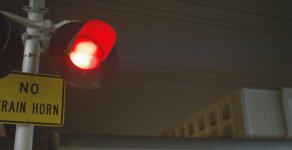
Post whatever you have. The more info RED gets, the quicker they can get a fix together and test out varying examples from users.
 
A004_C014_0528AZ.0000416.jpg

TIFF Download - https://dl.dropboxusercontent.com/u/161718/A004_C014_0528AZ.0000416.tif

R3D Download - https://dl.dropboxusercontent.com/u/161718/A004_C014_0528AZ.0000416F.R3D

Here's the train light example, you can see the streak to the right.

This was testing the camera on the Dragon 2000ISO for Epic MX 800ISO at night. I understand that the sensor is needing light. This was a test to see the new ISO improvements. I think there's noise for sure, but Red really did clean up that blue channel blotchy noise compared to the Epic. Topic at hand though is the streak.

Thanks for the feedback guys.
 
Really not trying to chum the waters right now, but is anyone else getting a gamma-like shift as well? I've attached a trimmed R3D. I've gotten this multiple times now. Camera is warm, camera has been blackshaded and it'll look like the gamma will shift, or the noise pattern will shift. Sent this into Red last week, nothing back yet. You'll see it half way through the shot.

Gamma Shift R3D - https://dl.dropboxusercontent.com/u/161718/A004_C019_0528PA.RDC.zip
 
Bullshit! This guy is a troll who has been trying to stick it to RED for weeks now.

Ban him! .

ok. I did give him enough warnings.

Not banning him just because he is sticking it to us... but because it seems like his last 5 posts have resorted to making personal attacks against members.
 
I'm quite certain it's a CMOS artifact not an optical flare. But it should be/is correctable through calibration and image processing.

Gavin and Rob are correct.. this is a relatively normal CMOS thing.. kinda like the black sun dot all cameras used to have ( i think some cameas from other manufacturers still do ) its been there since the R1 since we do use CMOS technology like almost everyone else. If you take a small source highly clipped a bunch of stops against almost black and it crosses the edge of the frame or just off the edge of frame ( most cases ) you will see what looks like a streak. People call this the "phantom blinds" effect because the easiest way to replicate this is to open slit blinds into daylight in a pitch dark room. Of course you will see this at higher ISOs, and most post houses have developed a post fix from dealing with it over the years from many cameras. Its a silicon thing.

The company that makes the dynamic range charts we use actually have added a little flag that goes over the clipping square now, because if your shooting a CMOS camera and you get that flare it can actually trick you into thinking you have more DR... since the streak replicates the shape of the highlight and lifts everything with it.
 
Charles, what lense and stop is this ?
the gamma shift is strange indeed, but it´s only in this shot ?
 
Status
Not open for further replies.
Back
Top