Welcome to our community

Be a part of something great, join today!

  • Hey all, just changed over the backend after 15 years I figured time to give it a bit of an update, its probably gonna be a bit weird for most of you and i am sure there is a few bugs to work out but it should kinda work the same as before... hopefully :)

Noise on the low end but even worse scary megenta lines

Status
Not open for further replies.

Christian Simpson

Well-known member
Joined
Apr 19, 2007
Messages
94
Reaction score
0
Points
0
Age
45
Location
Southeast
So I was super pumped to get my Dragon the other day and I turned it on just to do a little test and I shot my daughter beside a window and to my surprise I found several magenta lines that seemed to be related to the light coming in thru the blinds. This really really worries me. Does anyone know what this is? Also I'm really surprised with how noisy the darks and shadows are. This photo is just a jpeg but I wanted everybody to get a quick view of what I'm talking about.
https://www.dropbox.com/s/6fcj6pqhw4okew4/A001_C011_0615GY.0000455.jpg
And here's a link to the video. Yes its compressed, its just for you to see these lines I'm talking about in motion.
https://www.dropbox.com/s/jky58dm9xj6pj9e/red dragon_test-HD 720p.mov
 
I1BtQbt.jpg
 
I have also seen the same lines from blinds on my Dragon. Identical noise also.
 
2.jpg


Noise can be taken care of but those magenta lines are not fixable. Like Matthew asked, have you blackshaded? Also, using any filters, or anything else in front of the lens? It looks like a flare or reflection to me. What lens is this shot with?

As far as noise goes, most of your image falls on the underexposed side. The majority is at 20IRE or below. In theory this shouldn't be noisy unless you bring it up in post, but RED is also working on a low end noise issue at the moment. Hoping to see this noise get killed or at least close to even with the old olpf/calibration.
 
At first glance it look like a flare coming from the highlight on the blinds, but on closer inspection the width of the magenta lines do not have a corresponding angle to the blinds. They seem to be the full width of the highlights on the blinds, like some kind of strange histogram.

It seems as if the highlights were affecting the readout of the pixels across the sensor on a line by line basis.

Here is an image with magenta pushed up and the highlights shown as black

RNN8yxDl.png


Full Size Image
 
Very interesting still frame. Thanks Christian.

I have to confess that I have also seen really hot reflections from hot source points reflected or bouncing through into another part of the image like you have from your hot points, from the sun bouncing off the blinds. I also hate that magenta tone. could be from the bounce back from the colour of sensor face itself.

35mm film cameras do not have sheets of glass in-between the lens and the film plane, as does some digital cameras. So here lays a typical light bounce issue that will probably never be able to be removed. I have seen this on the Phantom and the Alexa from time to time as well. Annoying... But I think this is a part of life until they remove the layers of glass between the sensor and the lens. But there then lays another issue... Sensor dust. I have some 5d's that have dots on the sensor from dust and crap, but my REDs have never had the issue because of the glass sheet that sits just in front of the sensor. I'd love to be corrected on this point.

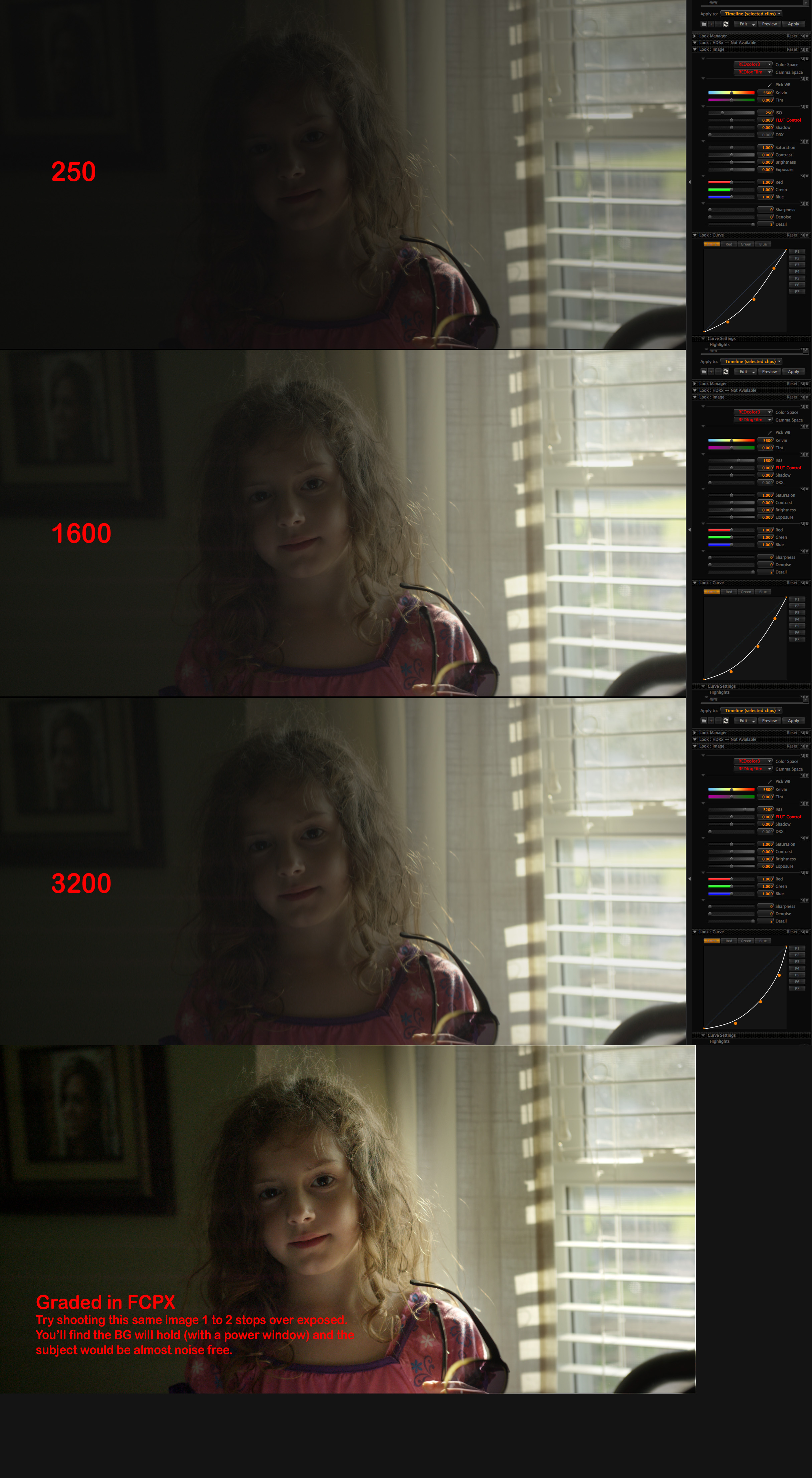
Regarding noise... Well. It's there. You can see it plane as day. The short fix would have been to shoot this shot at 250 iso. As you would have then naturally been 2 stops over in your exposure and then you would have little to no noise at all..
BUT... you like to shoot at 800iso, thats fine, many people do... But one thing you have to do is to trust the range of the sensor. You have technically tried to capture a dark and moody shot in camera, you have not exposed for maximun sensor information. You have favoured more the outside exposure and less concerned about the main subjects exposure.

What i can see in your R3D is another 2 stops of highlight information lurking within. What I can see is under exposure of your young girl by two stops.
by trying to retrieve shadow information from your 800iso base setting, you need to push up to 3200 iso to get it back, but then you will get more noise.
Simple solution is to remind yourself to expose mainly for your subject matter, not just for the outside as thats an irrelevant part of the scene.
In this case, if you had opened up your lens another 1.5 to 2 stops, you would have virtually a noise free image, and still maintained quite a bit of information outside. I pushed your R3D to 3200 iso and the background was still hanging together, meaning it still would have held together at 800 if you were two stops over.

Remembering... 35mm Film wouldn't be able to handle this push either. You would have metered for the young girls face, then metered for the outside and tried to spilt the difference. Your experience of your light meter would have told you that the contrast was to great so you would have added fill light or bounce to keep the exposures not so far apart.

In this case, you favoured the outside more worried about clipping high lights and forgot about the subject matter still being 2 stops under... I bet if you re-shot this image at 800 Iso, and favoured exposure for the girl, the background to a certain extent would still be completely usable. With a small power window applied in the grade around the window to get some of that highlight information back.

anyways...
Everyone does things differently. But for me, it's all about not under exposing or over exposing. Finding that sweet spot is key to noise free images at 800iso. Same when shooting film, nothings changed.

grades.jpg
 
@Mark
I'm a bit slow here so please bear with . . . Basically expose your shadows above 20IRE to be sure they are clean and let the highlights clip if necessary? I would have exposed the OP shot close to what he did - the Stop Lights were on since the blinds are already clipping. I know this is not the final Dragon 16 stop DR build we are working with here - not beating a dead horse - just trying to understand what to do in the meantime since work goes on and I don't want to lose shots based on rules of thumb (800ISO + No Clip) that might be dated. Seems like now it's 250ISO and E way TTR and let it clip if you gotta to save shadow detail and fidelity. True?
 
@Mark
I'm a bit slow here so please bear with . . . Basically expose your shadows above 20IRE to be sure they are clean and let the highlights clip if necessary? I would have exposed the OP shot close to what he did - the Stop Lights were on since the blinds are already clipping. I know this is not the final Dragon 16 stop DR build we are working with here - not beating a dead horse - just trying to understand what to do in the meantime since work goes on and I don't want to lose shots based on rules of thumb (800ISO + No Clip) that might be dated. Seems like now it's 250ISO and E way TTR and let it clip if you gotta to save shadow detail and fidelity. True?

What he's basically saying is let the window clip since nothing out there is of significance. If there was some importance to it then bring in additional light to fill the underexposed interior to balance the shot out. But otherwise, a blown out window is a better option for a better exposure on the subject. With digital we've gotten in the habit of not clipping but in film you would clip all the time. I've learned to just let windows go some times instead of worrying about highlights that aren't important to the scene and he could have gotten a better image by doing just that. Clipped parts doesn't mean your image will look bad, as long as you control what gets clipped.
 
Mark,

that is great advice all around. The shot is two stops under when exposed this way at 800.

What at I am finding with dragon is that if you expose that shot 1.5 over at 800 then you start to make noise disappear. I would guess the noise goal post on that shot was pretty high.

With MX we protected highlights on a shot like this because it would blow out in a not to pleasing way, with dragon if you give it the stop and a half and let more light onto the sensor and into the shadow areas you would find that you more likely generate the image you were looking to create.

Its ok now with dragon because the highlights hold.

This is image is not all that different from the window test I posted in the others thread ( I wasn't lucky enough to have a model on hand :) ) and so if it was exposed at 8, then it really would shine at a 4/5.6 split or even 4.

dont be afraid to hit this sensor hard and make a thick negative.

once you activate all the range, by letting light onto the shadow areas, then it's amazing how noise disappears. The key is really a nice full histogram or tune on raw view and get that histogram pushed off the left side.

Battistella


on the magenta lines, I have not seen that one yet, but I have some shutters I can test that on.
 
mmh. this is very noisy indeed. i have to test again, but i am quite sure i never had SUCH dirty noise under those conditions with my dragon ... let´s wait for the new FW ..
 
What he's basically saying is let the window clip since nothing out there is of significance. If there was some importance to it then bring in additional light to fill the underexposed interior to balance the shot out. But otherwise, a blown out window is a better option for a better exposure on the subject. With digital we've gotten in the habit of not clipping but in film you would clip all the time. I've learned to just let windows go some times instead of worrying about highlights that aren't important to the scene and he could have gotten a better image by doing just that. Clipped parts doesn't mean your image will look bad, as long as you control what gets clipped.

What if those window blinds were cloud detail? That's been my challenge - holding the clouds while getting noise free shadows and color fidelity under the trees. The OP's image is typical in DR range to my landscape and wildlife work and his RAW histogram is not abnormal. If I expose the shadows over 15 IRE to reduce noise then the cloud detail is gone. Clipped is clipped - whether on MX or Dragon there is no recovering highlights in post once they're clipped. Using the +15IRE method is not close to 16+ stops of DR so I know a fix is on the way. RED has always come through in the past - this is their flagship product so they will come through again.
 
What if those window blinds were cloud detail?

In that case zeb, a vertical grad filter is your friend. If that detail is that important, then why not pop in a .6 or .9 nd to reclaim that area of the frame? The sensor can do a lot, but it still can't do it all. :)

Or turn on two stops of HDR and add the grad in post with a wipe between the A and X track.

battistella
 
Does anyone know what compression ratio this was shot at? I'm not at my computer and have not downloaded the file.

battistella
 
In that case zeb, a vertical grad filter is your friend. If that detail is that important, then why not pop in a .6 or .9 nd to reclaim that area of the frame? The sensor can do a lot, but it still can't do it it all. :)

battistella

Wildlife sometimes doesn't wait for the crew to set up a matte box plus filters and highlights are sometimes not in a perfect grad friendly line and grads only work in a lock down shot ;-)

All good - just looking forward to fully unleashing the Dragon's full near HDR potential so I don't have to be so exact on exposure in the field
 
Yeah, I hear ya. It's a fine line and there tend to be some compromises. I did some stuff over the weekend and I was astounded at how the sky held and what could be dug out of the shadows, but I was rating at 320 and riding that histogram hard. I find it takes quite a bit to make things clip.

Plus us when things do clip, you have to determine the importance of that lipping to the rest of the exposure.

Battistella
 
Status
Not open for further replies.
Back
Top