Welcome to our community

Be a part of something great, join today!

  • Hey all, just changed over the backend after 15 years I figured time to give it a bit of an update, its probably gonna be a bit weird for most of you and i am sure there is a few bugs to work out but it should kinda work the same as before... hopefully :)

Noise and ble spots in image

Chris Phillips

New member
Joined
Feb 17, 2011
Messages
3
Reaction score
0
Points
0
The media company my friend works for has had a RED for about a year and a half now (currently Build 30). We've been doing a lot of test footage recently and have to complain that almost all of the footage is extremely noisy (even in the mids and not just the blacks) and very small blue pixels can be seen, when looking at the shots in full resolution, in the blacks. To try and fix it, I reset the camera to it's factory default settings and performed a black balance. Still, the pictures looks like it was shot on a handicam and the gain cranked to maximum. I never set the ISO over 320. What could be up? Is there a default with the camera of some kind?

Here's a still from some footage:

Screenshot2011-02-16at102645PM.png
 
Chris, I recommend posting an R3D file. Describe all conditions of the shoot. Obviously not a normal look, but hard to tell what's going on without R3D and more info about your shoot.
 
Thank you for the reply, Steve. However, as I am a new member, I'm not quite sure as to how other posters typically provide R3Ds. Should I upload it and paste a link?
 
Yes, that would be ideal. Do you know how to do an R3D trim in Redcine-x? That way you can keep the files small.
 
Thank you for the reply, Steve. However, as I am a new member, I'm not quite sure as to how other posters typically provide R3Ds. Should I upload it and paste a link?

yes...use r3d trim in redcine-x 416 it is an export settting. drop a clip into the clip browser and set an in and out point of say 10 frames...then export r3d trim which you create in the export presets.

also is it an M camera or an MX camera, and did you try crushing the black at all?
 
and what was the debayer level set to ? In the snapshot settings quality and in the export settings ? Which software did you use... ??? Did you restart the cam after black shading? how did you do the black shading ? What is the compression set to on the cam ? What was your ISO setting etc. ??
 
Here is a link to an R3D file shot on this camera:

https://www.yousendit.com/transfer.php?action=batch_download&batch_id=MzZHWUhseWFoMld4dnc9PQ

This clip was shot at 500 ISO but has a level of grain that I would certainly not expect from that setting. 320 ISO seems to produce the same results.

And, to answer Rainer Fritz, I performed the black shading in a pitch black room, with the lens cap on and a blanket for cover. I was told that this would ensure that any light would be prevented from interfering with the sensor.
 
Well, I agree the noise level is very high for ISO 500.

Even after cranking down to ISO 50 and crushing blacks the noise was unnacceptable. I do suppose you could filter noise and get an acceptable 1080p or lower result

(RedCine X 356 x64 OS X)

This is normally indicative of a bad black shading. It sounds like you followed the procedure. I'd suggest trying it again and being more meticulous as you work through the steps.

You might also try reinstalling the firmware. In case there is some problem with the installed version.
 
Not sure if it is related, but everytime you do a blackshading it happens on top of the previous one. Maybe you should reset black shading to factory preset and then do a new one.

No idea if this wil help though.
 
I think I found the solution.

I just noticed when watching your R3D that brightness and exposure are set to 1.8 and 1 when they should be set to 0. This is the equivalent of pushing the picture in post and the reason why you see so much noise. You can change/reset these settings in camera.

These settings don't affect the raw data but when they are turned on you might make other (wrong) desicions and stop the lens down (underexposing the image).

You will find the settings under:
-AV MENU/VIDEO/COLOR/EXPOSURE
-AV MENU/VIDEO/COLOR/BRIGHTNESS

When you reset these your problem should be fixed.

Also, If this is a M sensor I would advice shooting ISO 320.

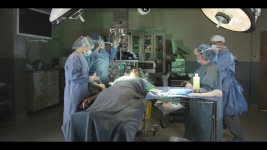
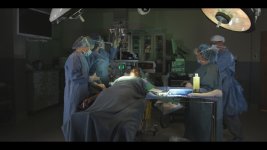
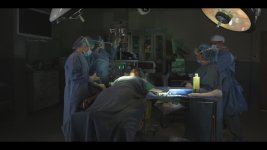
I added still frames of the problem.
 

Attachments

  • WRONG_EXPOSRUE_BRIGHTNESS_ISO_500.jpg
    WRONG_EXPOSRUE_BRIGHTNESS_ISO_500.jpg
    88.6 KB · Views: 0
  • RIGHT_ISO_500.jpg
    RIGHT_ISO_500.jpg
    81.6 KB · Views: 0
  • RIGHT_320_ISO.jpg
    RIGHT_320_ISO.jpg
    68.9 KB · Views: 0
Last edited:
30min Warm-up?

30min Warm-up?

Try having the camera warm up for at least 30 minutes before you do the black level calibrations.

Because REDCODE needs the black level calibrations done BEFORE the shot is made (unlike a true RAW camera where it can be before or after) you need to make sure the sensor and preamps and ADC are at the same temp as they will be when shooting, or the compression can react to the higher black level and encode the noise that would otherwise be lower on the tonal encoding zone, it seems.

ARRI ALEXA has a cooler on its sensor to avoid such black level drift. HDSLR have the same problem, as the sensor gets hot the black level goes up, and that makes the H.264 encode the noise as blocks in the image.

If that does not help, it may be a cap going bad in the sensor bias circuits or something with the power or cooling not working right, in which case a bench test by a tech might be needed if none of the other measures work...

You may have covered the air vents while doing the black calibrations as well, so that is something to avoid as well... is the fan working?
 
As Kobe saw it right the brightness setting didn't reset when you did the factory reset and was set too high. I let the brightness setting always at 0 and adjust only ISO setting.
A Firmware flash and then black shading should solve this for sure.... or manually adjust it to 0.
As it looks for me at the moment the footage is not broken....
 
Here is a link to an R3D file shot on this camera:

https://www.yousendit.com/transfer.php?action=batch_download&batch_id=MzZHWUhseWFoMld4dnc9PQ

This clip was shot at 500 ISO but has a level of grain that I would certainly not expect from that setting. 320 ISO seems to produce the same results.

And, to answer Rainer Fritz, I performed the black shading in a pitch black room, with the lens cap on and a blanket for cover. I was told that this would ensure that any light would be prevented from interfering with the sensor.

i thought you said you never shot over 320?

all the same, as fritz suggested: flash the firmware, do a black shade, shoot. good thing you were doing tests. that's always a good idea, and helps you solve unexpected problems like these.
 
Back
Top