

Michael Reyes
New member
- Joined
- Oct 5, 2008
- Messages
- 2
- Reaction score
- 0
- Points
- 1
*****UPDATE*****
The Beta firmware, 3.0.6, has fixed the problem for now. Thank You RED!
*******************************************************
I just sent the the same thing to RED technical support, just wanted to see if anyone else has had this problem.
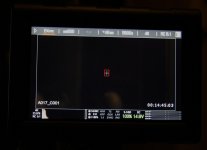
I cannot change or see what f-stop I am shooting with. There are only hyphens where the f-stop number should be.
The camera was only powered up for a few minutes from a REDVOLT before the problem occurred. The temperature outside where I was shooting was in the 80's I'm guessing (I never checked the weather). I changed the resolution a few times and shot in this order:
2 clips at 5k REDCODE 5:1
1 clip at 2k REDCODE 5:1
2 clips at 3k REDCODE 5:1
1 clip at 5k REDCODE 5:1
As soon as I stopped recording the last clip, the camera returned to standby mode and the usual glitchy visual occurred. When it settled, the Aperture window displayed, "-- --" I tried rebooting, changing resolution modes, shutting down-removing lens-replacing lens-power up, changing lens while powered down, removing all accessories and reattaching them, factory restore. Nothing worked.
I need to mention that this error has happened before, but I was able to temporally fix it by rebooting. Once I was back to my computer I did a "force upgrade" ,but it didn't change anything either.
I tested each lens on my Canon 7D to see if the lens motors were damaged. The Canon was able to change the f-stop on each lens as usual.
Configuration when problem occured:
Scarlet-X w/ SSD Side Module
Al Canon Mount
5" Touch Screen
DSMC Side Handle
64GB RED MAG
RED VOLT
Lenses (I tried all of these with the same result):
Canon 24-70mm 2.8
Canon 50mm 1.4
Tokina 11-16mm 2.8
The Beta firmware, 3.0.6, has fixed the problem for now. Thank You RED!
*******************************************************
I just sent the the same thing to RED technical support, just wanted to see if anyone else has had this problem.
I cannot change or see what f-stop I am shooting with. There are only hyphens where the f-stop number should be.
The camera was only powered up for a few minutes from a REDVOLT before the problem occurred. The temperature outside where I was shooting was in the 80's I'm guessing (I never checked the weather). I changed the resolution a few times and shot in this order:
2 clips at 5k REDCODE 5:1
1 clip at 2k REDCODE 5:1
2 clips at 3k REDCODE 5:1
1 clip at 5k REDCODE 5:1
As soon as I stopped recording the last clip, the camera returned to standby mode and the usual glitchy visual occurred. When it settled, the Aperture window displayed, "-- --" I tried rebooting, changing resolution modes, shutting down-removing lens-replacing lens-power up, changing lens while powered down, removing all accessories and reattaching them, factory restore. Nothing worked.
I need to mention that this error has happened before, but I was able to temporally fix it by rebooting. Once I was back to my computer I did a "force upgrade" ,but it didn't change anything either.
I tested each lens on my Canon 7D to see if the lens motors were damaged. The Canon was able to change the f-stop on each lens as usual.
Configuration when problem occured:
Scarlet-X w/ SSD Side Module
Al Canon Mount
5" Touch Screen
DSMC Side Handle
64GB RED MAG
RED VOLT
Lenses (I tried all of these with the same result):
Canon 24-70mm 2.8
Canon 50mm 1.4
Tokina 11-16mm 2.8
Attachments
Last edited: