Welcome to our community

Be a part of something great, join today!

  • Hey all, just changed over the backend after 15 years I figured time to give it a bit of an update, its probably gonna be a bit weird for most of you and i am sure there is a few bugs to work out but it should kinda work the same as before... hopefully :)

No Audio on Scarlet with rode videomic

Greg Blakey

Active member
Joined
Apr 19, 2011
Messages
36
Reaction score
0
Points
0
Location
Berlin, Germany
Hi! Just wondering if anyone else is having issues with the audio input. It registers as the mini jack is live, but no sound is coming through. Is it just the rode videomic?

Regards
Greg
 
Coming through? What do you mean? After ingest, is there no audio on the file or are you trying to monitor in camera? You do know that there currently is no audio monitoring in camera except for meters, right?
 
No sound in the meters. Nor on the files.

Thanks for that link Bob, It can be hard to sift through all the posts

I will see what the wiring is on that mic
 
Oh ok, but does that take mini jack in? As the mic has a fixed mini jack plug, No XLR

Thanks for your help
 
Great link Bob, only wish I saw this two days ago. Just bought these in a BH order and yup, mine are the M version ahah. Bummer, oh well I will check the local music shop, they must have em.
 
DVshop has them.

Great link Bob, only wish I saw this two days ago. Just bought these in a BH order and yup, mine are the M version ahah. Bummer, oh well I will check the local music shop, they must have em.
 
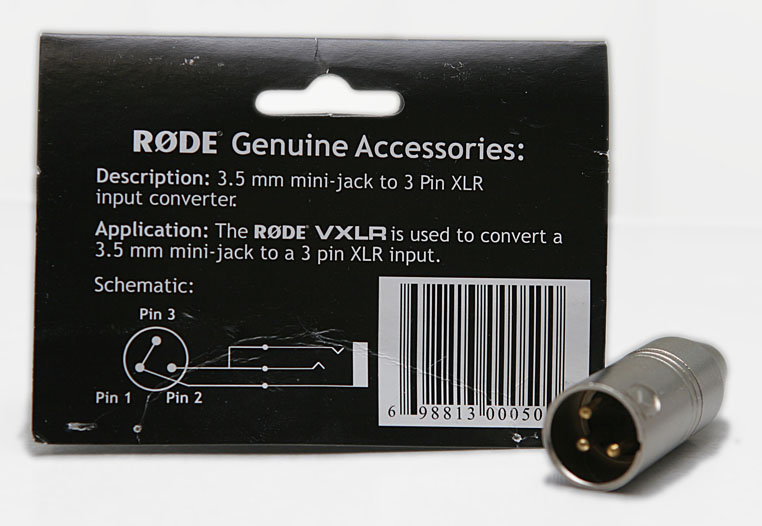
This is the pinout for the VXLR, by the way

22997d1306337301-rode-vxlr-adapter-rode-vxlr.jpg


Tip and ring are bridged and go to XLR pin 2, sleeve goes to bridged XLR pins 1 and 3.

On Scarlet the jack is a remapped blanced audio input, Tip is IN+, ring is IN- and sleeve is ground.

From the VXLR pinout, the Videomic will give you OUT+ on both the tip and ring and ground on the sleeve. Therefore, when you plug the Videomic into Scarlet you apply an identical signal on IN+ and IN-, they will cancel out at the differential amplifier and you won't get a signal. I believe that the UNBALANCED mode allows you to use a mic like this but I'm not sure if it ignores the ring and just uses IN+ and Ground or if it uses the ring somehow. Also, I've heard mixed reports, it might not be enabled in the current firmware.

You could make a female to male 1/8"/3.5mm/minijack cable which shorts ring and sleeve on the camera side and maps the sleeve on the mic side to the shorted ring and sleeve on the camera side and the tips connected as normal. Leave the ring unconnected or connect it to the tip on the mic side, be careful not to short this to the sleeve, the mic won't enjoy that. The camera, then, would be subtracting ground (0) from IN+ and wouldn't kill your signal. It's doing the same thing the VXLR without all the extra expense and bulk of full size XLR cables.
 
Solved it! a mini jack stereo to min jack mono plug made it work for anyone else that has this problem at $1.95

Cheers!
 
I have the A-box from wooden camera and I had problem to get any sound.
I used only one rode ntg2 mic but I did connect both of the A-box cables to the Scarlet. I got it to work first after only connecting one of the A-box cables to Scarlet (the one with the mic connected). As soon I plug in the other one the mic "disappear". Is this normal?
 
Solved it! a mini jack stereo to min jack mono plug made it work for anyone else that has this problem at $1.95

Cheers!

Just keep an eye on new builds before you upgrade your camera, in case they re-enable the phantom power...
 
Just keep an eye on new builds before you upgrade your camera, in case they re-enable the phantom power...

Probably one of the reasons that it was disabled in the first place... They know when mics are unplugged, I think it should automatically disable phantom whenever a mic is unplugged and have the user explicitly re-enable it with a warning dialogue.
 
Pretty sure they decided not to have phantom power at all in the Epic/Scarlet.

Probably one of the reasons that it was disabled in the first place... They know when mics are unplugged, I think it should automatically disable phantom whenever a mic is unplugged and have the user explicitly re-enable it with a warning dialogue.
 
Back
Top