Welcome to our community

Be a part of something great, join today!

  • Hey all, just changed over the backend after 15 years I figured time to give it a bit of an update, its probably gonna be a bit weird for most of you and i am sure there is a few bugs to work out but it should kinda work the same as before... hopefully :)

New Workstation Build

Jeff, man, I need your help. I just can't make up my mind what I want to do here. Do I go 2690's or 2687w's?

If I go 2687w, I'm thinking I'd have to go with 2 Corsair liquid cooling options. An H80 in the rear on 1 cpu and an H100 at the top of the case in a push/pull configuration.
OR do I go 2690's and not worry about the liquid cooling? The prices come out almost exactly the same. Not seeing anybody having tested the liquid cooling options with those cpu's it's hard to make a definitive decision and I don't know enough about this stuff to know any interesting differences in the cpu's. So what do you suggest? And if I go 2690, am I still going to need to purchase a premium air cooling option?

Decisions, decisions.

Also, I've been using 1 30" Apple Cinema Display for most of my career, but considered going with 2 Dell U2711's. Any thoughts? Will I hamper the 580's performance at all if I'm running two of those guys?
 
jeff,

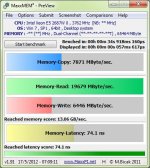
do you have a dual z820? if so have you tested the memory bandwidth? i have been seeing less than desirable memory write benchmarks. in fact every dual processor c602 chipset board i have tested yields sub 11GB a sec memory write speed. even intel is looking into the issue as they are getting reports from numerous customers.

can you try maxxmem2 to assess if you havent already?

thx!

-jason


Hi Jason,

I'm not really familiar with maxxmem2, but I gave it a try on the Z820 and attached the screenshot it saved. Not familiar with any of the tests it runs or how it runs them... some of the numbers seem lower than they should for what I would assume they're doing, but I'm not familiar with this benchmark app. I haven't really got into specific memory and CPU benchmarks just yet, but so far these systems seem crazy fast even compared to 12-core "Westmere" class Xeons running at 3 or 3.4 GHz.
 

Attachments

  • MaxxMEM2_71134.jpg
    MaxxMEM2_71134.jpg
    54.7 KB · Views: 0
Jeff, man, I need your help. I just can't make up my mind what I want to do here. Do I go 2690's or 2687w's?

If I go 2687w, I'm thinking I'd have to go with 2 Corsair liquid cooling options. An H80 in the rear on 1 cpu and an H100 at the top of the case in a push/pull configuration.
OR do I go 2690's and not worry about the liquid cooling? The prices come out almost exactly the same. Not seeing anybody having tested the liquid cooling options with those cpu's it's hard to make a definitive decision and I don't know enough about this stuff to know any interesting differences in the cpu's. So what do you suggest? And if I go 2690, am I still going to need to purchase a premium air cooling option?

Decisions, decisions.

Also, I've been using 1 30" Apple Cinema Display for most of my career, but considered going with 2 Dell U2711's. Any thoughts? Will I hamper the 580's performance at all if I'm running two of those guys?

I'm not sure what to recommend for the liquid cooling. :( Based on everything that's out there now, I would go with TWO H100's if possible. Make sure the water block cooler portion covers the entire surface area of the CPU. I have not tried the Corsair ones myself, but they look to be the best option at the moment for what is actually available.

As for the GTX580, running two displays is not a problem at all. Of course, if you do run 3D or complex visuals that span both displays, you're pumping out that much more pixel and other data, so it does impact performance in that regard -- dual U2711's is the same as running a single 5120x1440 display. Anyway, I've been running dual 30" (mostly Dell 3007FPW) displays on my couple primary workstations, both PC and Mac for a few years now. Funny, the 27" actually feels small compared to the 30", even though they're the same horizontal resolution. I keep hoping that EIZO will figure out a way to drop the price on their 36" 4K monitor. I would gladly trade my dual 30's for one of those! :)

I've got dual GTX580 CLASSIFIED ULTRA cards running on my SuperMicro config. Seems like a great setup so far, other than being massively power-hungry and they'e a tight fit!!! IMO, the liquid cooled HydroCopper versions would have been the way to go, but I'm still running air cooling on this system. It seems to be working, even with the 2687W CPUs, but the box sounds like a jet at takeoff... It's going in a rack with a bunch of other noisemakers, so I don't really care about that. The HP system was nice and quiet, but now that I have it fully configured and up and running, it's not so quiet with the RED Rocket and Quadro 6000 whirring away inside. I still need a secondary GPU for it as the GTX580 Classified Ultra does not physically fit inside the HP system. I'm very interested in the soon to be released Tesla Kxx GPUs, but may just go with a lesser stock GTX580 that I know will fit. The 580 drives Resolve quite well.
 
Jeff & Luke,
Just for reference, here's a MaxxMem2 result of a very cheap PC with 4GB (2x 2GB) DDR2-800Mhz RAM sticks (ran on Windows XP Pro x86 SP3):
 
I'm not sure what to recommend for the liquid cooling. :( Based on everything that's out there now, I would go with TWO H100's if possible. Make sure the water block cooler portion covers the entire surface area of the CPU. I have not tried the Corsair ones myself, but they look to be the best option at the moment for what is actually available.
I'd like to go with 2 H100's, honestly, but I just can't figure out where I'd put that second one. It's basically 2 120mm fans and almost all the cases I've looked at only have room for 1 120mm in the rear. From what I can tell my best bet for air circulation is to have the push/pull configuration of the h100 at the top of the case and then a 120mm out the rear as the exhaust. That's why I was thinking the H80 for the 2nd CPU. It's basically the same as the H100, except the radiator is thicker in a 120mm size. The case I'm most interested in at the moment is the Corsair 800D, and just like most of the other full server cases out there, it only has the 1 x 120mm size in the rear as opposed to 2 of them that I would need for another H100. Or at least, that's what I can gather with my limited understanding.

As for the GTX580, running two displays is not a problem at all. Of course, if you do run 3D or complex visuals that span both displays, you're pumping out that much more pixel and other data, so it does impact performance in that regard -- dual U2711's is the same as running a single 5120x1440 display. Anyway, I've been running dual 30" (mostly Dell 3007FPW) displays on my couple primary workstations, both PC and Mac for a few years now. Funny, the 27" actually feels small compared to the 30", even though they're the same horizontal resolution. I keep hoping that EIZO will figure out a way to drop the price on their 36" 4K monitor. I would gladly trade my dual 30's for one of those! :)
Ok, that's great to hear. We don't do any 3D work here, so I don't think that'd be an issue. I know what you mean about the 27" seeming smaller. I'm surrounded by 27" iMacs and I think my 30" Cinema Display almost seems to dwarf them sometimes, despite knowing full well that the horizontal resolution is the same. It seems that vertical resolution is more impactful than we like to give it credit for, being "children of the widescreen".

I've got dual GTX580 CLASSIFIED ULTRA cards running on my SuperMicro config. Seems like a great setup so far, other than being massively power-hungry and they'e a tight fit!!! IMO, the liquid cooled HydroCopper versions would have been the way to go, but I'm still running air cooling on this system. It seems to be working, even with the 2687W CPUs, but the box sounds like a jet at takeoff... It's going in a rack with a bunch of other noisemakers, so I don't really care about that. The HP system was nice and quiet, but now that I have it fully configured and up and running, it's not so quiet with the RED Rocket and Quadro 6000 whirring away inside. I still need a secondary GPU for it as the GTX580 Classified Ultra does not physically fit inside the HP system. I'm very interested in the soon to be released Tesla Kxx GPUs, but may just go with a lesser stock GTX580 that I know will fit. The 580 drives Resolve quite well.
I will say, having used Mac Pro's all the time, it's going to take some getting used to with the fan noise. I'm actually considering getting some better quality fans to replace the stock ones that come with the Corsair Liquid Cooling units. I heard that they can be unnecessarily loud and I know it's going to bother me, more than likely. Any recommendations on quality, lower-noise fans? I've seen a few recommendations on other sites already, but thought I'd ask the man himself.

Thanks again!!
 
Make sure the water block cooler portion covers the entire surface area of the CPU. I have not tried the Corsair ones myself, but they look to be the best option at the moment for what is actually available.

FYI, found this video very quickly showing an H100 covering a LGA2011 CPU. Looks like it does cover the entire surface, from what I can tell. Skip to 3:17 to see the H100 going on.

 
jeff,

these numbers are in line with my findings. 6GB a sec on writes is abysmal... we are supposed to be seeing results that are significantly higher. when run in single processor modes the chipset is getting the speeds it should. only when running dual procs is the memory not performing as it should. its a HUGE problem for us. intel is aware and we are waiting for a response.

to get an idea how bad here is my laptops maxxmem2 results.

maxxmem2f4014.jpg


i know it says desktop but its a dell precision m6600 :)

15GB a sec on a year old laptop, and besting a 10k machine almost 3:1...

-jason

Hi Jason,

I'm not really familiar with maxxmem2, but I gave it a try on the Z820 and attached the screenshot it saved. Not familiar with any of the tests it runs or how it runs them... some of the numbers seem lower than they should for what I would assume they're doing, but I'm not familiar with this benchmark app. I haven't really got into specific memory and CPU benchmarks just yet, but so far these systems seem crazy fast even compared to 12-core "Westmere" class Xeons running at 3 or 3.4 GHz.
 
Last edited:
Yeah, I'm trying to hold my breath for the K20. :) Will definitely be taking one for a spin as soon as I can get my hands on it. The Tesla K10 ships next week I'm told, but it's essentially a GTX690 with no video ports. I'm definitely curious to see how it scores with CS6 and Resolve, i'm really not sure what to expect. On one hand, it has 2GB more to work with than the current Quadro6000/ Tesla C2075 and is capable of a lot more GFLOPS... But it's limited to single-precision and I don't know how that fits into the environment of those two applications -- the primary ones I'll be using it for. I'm kinda thinking a good GTX580 is still going to be superior and a good interim solution until that K20 arrives. And by then, we may see other GeForce offerings. I find it interesting that nVidia has announced the Kepler-based Tesla cards, but no mention of Quadro. I've heard a rumor from two separate sources that thee will be no new Quadro cards on this generation of Kepler GPUs. Not sure what to make of that, but it's starting to look very credible.
 
I have briefly tested GTX 670 2 GB with Premiere Pro CS6 and it is faster than GTX 580 3 GB once you start adding in a bunch of effects; similar if you are only editing. At least Premiere CS6, for now, seems to be largely single precision oriented. There's evidence that the same applies for Resolve, considering GTX 580 beats Quadro 6000 while the latter is well ahead on double precision.

Tesla K10 is actually GTX 690 underclocked, to keep the TDP under 225W (and more expensive, of course). It's great for power sensitive HPC environments where you add in a ton of Teslas, but for individual PCs GTX 690 is probably the best option, if you can find one. K10 does have 4 GB ECC RAM per GPU and there is no news of GTX 690 8 GB variants. At this time, GTX 690 looks largely like a PR stunt with next to no supply - I have read only 3 out of Nvidia's 18 partners were invited to sell 690, and all reference designs. Come to think of it, in 2 months GTX 680 has almost never been in stock! GTX 670 is pretty hard to find too despite being stockpiled of defective dies for 4 months. Nvidia are having critical issues manufacturing these GK104 chips.

The no-Kepler(GK104)-for-Quadro rumour is very credible. At best we will see an mid range Quadro 4000 replacement. We will probably have to wait till 2013 for a next-gen GK110 based Quadro.
 
So I have to ask if you've considered buying a system like the HP Z820? I received one here today and there's a lot about it to like. There is another thread around here, where I compared my Z820 configuration to a similar build using the SuperMicro X9DAi motherboard.

Jeff, any chance you could point me to the thread that has your Z820 config? I'm going to go down that route for editing R3D w/out RED Rocket (atleast to start off with).

Many thanks in advance!
Nikhil
 
So I'm finally pulling the trigger on this system and getting ready to order the parts. One thing I was wondering is, I'll be running dual Dell U2410's from the GTX 580, but I need another GPU for a production monitor via HDMI. Was wondering if somebody can give me some advice on a simple GPU to accomplish this task.
 
I know it costs more, but I strongly recommend buying your graphics card from HP for this! They use customized firmware on all their video cards that helps to smooth operations with their workstations.

For now, the Quadro 6000 is the best option for the system for best all-around performance. Some of the higher-end gaming cards can beat it in some operations, but for overall performance, it's king. That said, I wouldn't recommend buying one right now. I would save some money and do the Quadro 4000 or do a GTX580 from EVGA or PNY for the time being. The reasoning behind that is the new Kepler based Quadros are to start shipping in the next few weeks and HP should have the K5000 and K6000 approved for the Z820 within the next 30 to 60 days.

I suppose your timing on the system purchase also plays a role. Depending on how soon you buy, those cards may be available as an option right from the get-go.


Intel will be launching updated Xeon CPUs early next year -- probably end of February. It is unclear as of yet if they will be drop-in compatible with the current Z820 workstation (and most other current Romley platform Xeon systems). They will use the same socket and same chipset, but will have different (lower) power requirements. I've found in the past that upgrading CPUs, especially in a dual-Xeon box like this, is usually not very economical. Often better to sell the workstation or assign it to another task and purchase a new one. Just letting you know that the new ones are coming around the corner fast this time rather than a 26 month wait. Happening for two reasons, the last iteration was delayed nearly a year behind schedule and the new iteration uses the 22nm fab process so Intel is eager to push forward at this point as quick as they can.
 
Back
Top