Welcome to our community

Be a part of something great, join today!

  • Hey all, just changed over the backend after 15 years I figured time to give it a bit of an update, its probably gonna be a bit weird for most of you and i am sure there is a few bugs to work out but it should kinda work the same as before... hopefully :)

New to PPro question R3D playback issue in Source window

David Callahan

Well-known member
Joined
Jan 1, 2008
Messages
288
Reaction score
0
Points
0
Location
Oklahoma City, OK
I'm using PPRO 5.04 and I'm having trouble getting my R3D to playback in my source monitor. I only have a stock graphics card that doesn't support CUDA, but I don't think that's the problem. B/c when I setup a multicam timeline (1080p, Red codec) and synced it to footage shot on a Canon 7D, it plays back flawlessly. PPro doesn't seem to be changing my playback settings in my source monitor. My image in the source window is cropped and looks like it's full res. My magnification for that window is set to "Fit" and my playback resolution is set to "1/8". Any clues?
Thanks.
 
Not sure I understand your problem. But in case you are playing a 4K R3D on a 1080p timeline, right click on the clip on the timeline and click "Scale to frame size" and see if that does anything for you.
 
The problem is not playing the r3d in the 1080 timeline. That is working perfectly. The problem is playing the r3d file in the source monitor. Premiere won't downrez it for playback. It's also not resizing like it should. In FCP we would trash prefs when it started going wonky. Anything similar in Premiere?
 
First open the wing tip menu of the source monitor. (top right of source monitor looks like 3 horizontal lines) Pop that down and tell me the playback/paused settings... We have secret keys to push on startup to do wonky things but you need a secret handshake and I would rather fix the actual problem ;)

Cheers

Dave
 
I'm having a similar problem in 5.5 with source monitor.. When I double click a clip in the timeline to load it in the source monitor every thing is OK, the clip plays according to the playback/paused settings of source monitor..

But if I double click the same clip from the project panel and load it to the source monitor, I can't play it any more even when I put the playback paused settings to 1/8.. In my case I suspect this problem in playback is because the source monitor is trying to play the clip in full resolution and is not effected by playback/paused settings.

Why? IMO this has to do with blackmagic card.. The BlackMagic sequences are not affected by playback/paused setting in program monitor.. Somehow the same thing happens to the clips loaded to the source monitor from project panel.. Sometimes I can even see the output from the source monitor in my external panasonic monitor, which proves the source is playing through BlackMagic engine..

As about the clips loaded from any timeline, they are not affected from BlackMagic playback engine, and I can control the playback/paused setting..
 
Had a similar problem here once I installed the new blackmagic drivers. Double check the Preferences > Player Settings and make sure its on Adobe Player. That solved it for me in terms of playback, but I don't have a solution for using the Blackmagic presets & monitoring yet.
 
My playback resolution is set to 1/8, and the paused resolution is set to 1/2.

First open the wing tip menu of the source monitor. (top right of source monitor looks like 3 horizontal lines) Pop that down and tell me the playback/paused settings... We have secret keys to push on startup to do wonky things but you need a secret handshake and I would rather fix the actual problem ;)

Cheers

Dave
 
Brendan,
This fixed my problem! Thanks so much! I think I updated my drivers and they defaulted back to AJA as my playback. As soon as I switched it back to Adobe player in preferences, it started acting perfectly again.
Had a similar problem here once I installed the new blackmagic drivers. Double check the Preferences > Player Settings and make sure its on Adobe Player. That solved it for me in terms of playback, but I don't have a solution for using the Blackmagic presets & monitoring yet.
 
premiere pro cs 5.5 problems

premiere pro cs 5.5 problems

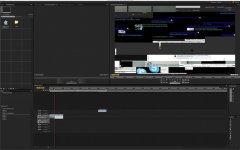
I have Cuda and Matrox MXO2 with a MAC PRO . Quad-Core Intel Xeon 2.93 GHz + 32 GB RAM and Raid zero drives. However when I load RED EPIC files into Premiere, (i have the plugin importer lastest) . I get this gargabe on the playback window. What's wrong with my system?
 

Attachments

  • screen-capture.jpg
    screen-capture.jpg
    62.4 KB · Views: 0
Thanks Brendan..

That worked perfectly..
 
Back
Top