Welcome to our community

Be a part of something great, join today!

  • Hey all, just changed over the backend after 15 years I figured time to give it a bit of an update, its probably gonna be a bit weird for most of you and i am sure there is a few bugs to work out but it should kinda work the same as before... hopefully :)

New Sonnet Thunderbolt PCIe box for RedRocket - Available !

Nils Ruinet

Well-known member
Joined
Apr 21, 2007
Messages
1,369
Reaction score
0
Points
36
Location
Paris, France
Website
vimeo.com
Since I haven't seen anyone mentioning this on here (or I missed it), I just got an e-mail from Sonnet saying that their long awaited "echo express pro chassis" is available for pre-order, and will be shipping on the 8th of june. Price is $799. They say it's compatible with the Red Rocket card.

http://www.sonnettech.com/product/echoexpresschassis.html

As far as I know it's the first Thunderbolt PCIe extension box that becomes available. Finally !

I ordered one, I hope I won't have to wait too long before it gets to France... ;)
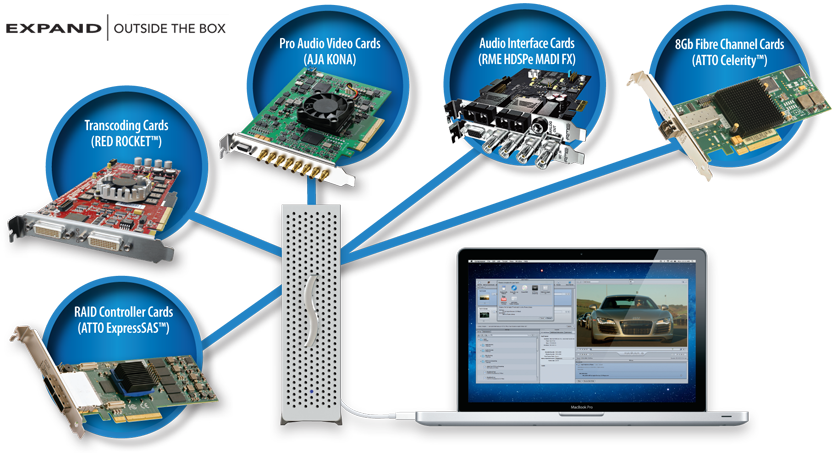
echochassis_overview.png
 
Potential, great. Current usefulness - perhaps about to get better...

Potential, great. Current usefulness - perhaps about to get better...

Wonder what would happen if I put a RedRocket and a Quadro4000 in the dual slot version and hooked it up to my 13" MacBookAir? Maybe daisy chain a Promise RAID via the TB loop through...

I have been waiting for the implementation of the optical TB interface before investing in TB hardware - anyone know the differential between current copper TB speeds and anticipated optical TB speeds? Timeline for shipping all the components of an optical TB infrastructure? Jeff K.? Gary A.?

Open question, does anyone see a more "server-ish" version of the TB expansion chassis concept? At the very least a chip in the expander box that would allow for data I/O to happen onboard without routing back through the host? Just thinking out loud...

Cheers - #19
 
I don't anticipate TB going optical for at least a few years. There haven't even been any public demos of an optical setup that I've seen. It's taken this long for TB to filter down this far, I'd say we're a solid 2+ years from optical TB, and that is being optimistic.
 
Wonder what would happen if I put a RedRocket and a Quadro4000 in the dual slot version and hooked it up to my 13" MacBookAir? Maybe daisy chain a Promise RAID via the TB loop through...

I have been waiting for the implementation of the optical TB interface before investing in TB hardware - anyone know the differential between current copper TB speeds and anticipated optical TB speeds? Timeline for shipping all the components of an optical TB infrastructure? Jeff K.? Gary A.?

Optical phase one is: just an optical cable with built-in electrical to optical converter at one end end optical to electrical converter at the other end.

Speeds will be the same as normal Thunderbolt.

Faster thunderbolt will be phase 2, in 2014 or so.

Bruce Allen
www.boacinema.com
 
Pretty sure Graphics Cards to not work with apple laptops at the moment. Hopefully apple addresses this.

Also noticed that the Sonnet is only 4x while the Magma is 2 8x and 1 4x....

I also noticed that it was only 4x, and Sonnet isn't exactly a model of stability when it comes to pro level products. Think I'm going to hold off and get the Magma.
 
The Sonnet units have been available for pre-order since NAB, actually just a bit before. I have the compact single-card version on order myself. According to those who have been testing them, they're rock-solid. So I'm hopeful... As I'm not a fan of most other Sonnet products. And of course, they have the larger version which takes two full-length cards.

Yes, it's only a single X4 (X16 electrical) slot in the compact Sonnet enclosure. Which is fine. That's all the bandwidth you can squeeze over a Thunderbolt channel as is. Actually, not true. You only get half of that on a single Thunderbolt channel. So The other guys placing X8 and multiple slots in their enclosures are just blowing marketing smoke up your skirt. ...Just sayin'

The RED Rocket will effectively run at half it's potential bandwidth in this Sonnet enclosure. Which is fine most of the time... In fact is going to be fine 99.9% of the time on an iMac or Macbook Pro where the CPUs couldn't process that much inbound data from the Rocket anyway.
 
I was wondering if the 8x was even possible over TB, Thanks Jeff. 2 cards in one device is probably more then enough for the bandwidth, hopefully the new MBP's have 2 TB ports and USB 3 then I can see some real potential.

If the Sonnet is actually stable and will run my RR and Atto R680 raid card it will be perfect.
 
There are advantages to other expander boxes out there that allow more cards or different cards to be installed. It's all about the ability to configure and maintain convenience. Most of those operate under the premise that you won't be using all of the cards at the same time, nor will you need to maximize the bandwidth to each card and if you do, not to more than one at a time.

Other than high performance storage adapters and monster GPUs, the Thunderbolt port is going to handle these cards just fine. Just keep in mind that a Thunderbolt port is 20Gbps via two 10Gbps channels with a cap at 10Gbps per Thunderbolt device and up to 7 devices, no more than two of them being DisplayPort 1.2 display devices. Thunderbolt can daisy chain or be used with a hub, however a hub counts as one of the 7 devices.

No matter what cards you install in an expansion box, all of their data can only pass through a straw that is 10Gbps in size... As a frame of reference PCIe gen2.0 is 500MB/s per lane, which means X1 is roughly 4Gbps, X4 is roughly 16Gbps. So a Thunderbolt port can give an expander like this 10Gbps or about 62% of the bandwidth of an X4 card. It's a bit more than half, but comes with higher latency. Real-world speeds are comparable to half....

RED Rocket is PCIe v1.1 X8, which is also roughly 16Gbps.

If you install the Rocket in an X4 slot, it runs at half speed, regardless of whether the slot is v1.x or v2.0. ...It runs at 8Gbps tops. So you are sacrificing a bit of bandwidth on the Rocket in the Sonnet enclosure because it's an X4 slot rather than an X8 slot.

A box like the Magma ExpressBox 3T has more slots and two of them are X8 gen1. You will get a small boost for the Rocket in that enclosure because of the better alignment with the X8 slot. However, the data pipe going to the system is still the same size.

Personally, I went with the Sonnet due to its compact size. I almost ordered one of the mLink expanders as well, however it doesn't work with double-width cards or cards that have extra connectors. They have their Red version with modifications for the two Rocket SDI connectors, but that's it and it was $100 more than the Sonnet. Otherwise it's specs are the same as the Sonnet. I've seen the Sonnet in action -- it's near silent and works reliably with the ATTO H6xx series adapters and is said to perform great with the Rocket too.

The Smaller Sonnet unit is mostly portable... The Magma 3T is not. Comes down to various needs. I'm not so sure I would go for the 3T if I were just connecting a Rocket. Just to gain that extra 12% of theoretical bandwidth... Because the top-end bandwidth like that is not going to be your bottleneck with the Rocket anyway. At least not on a Macbook Pro or iMac.
 
Jeff how should it work out to use the RR and an Atto SAS raid card in the Sonnet and do encoding/playback from the raid with the RR? Do you foresee this working well on a Macbook Pro? or is this asking for to much bandwidth to be effective?
 
There are advantages to other expander boxes out there that allow more cards or different cards to be installed. It's all about the ability to configure and maintain convenience. Most of those operate under the premise that you won't be using all of the cards at the same time, nor will you need to maximize the bandwidth to each card and if you do, not to more than one at a time.

Other than high performance storage adapters and monster GPUs, the Thunderbolt port is going to handle these cards just fine. Just keep in mind that a Thunderbolt port is 20Gbps via two 10Gbps channels with a cap at 10Gbps per Thunderbolt device and up to 7 devices, no more than two of them being DisplayPort 1.2 display devices. Thunderbolt can daisy chain or be used with a hub, however a hub counts as one of the 7 devices.

No matter what cards you install in an expansion box, all of their data can only pass through a straw that is 10Gbps in size... As a frame of reference PCIe gen2.0 is 500MB/s per lane, which means X1 is roughly 4Gbps, X4 is roughly 16Gbps. So a Thunderbolt port can give an expander like this 10Gbps or about 62% of the bandwidth of an X4 card. It's a bit more than half, but comes with higher latency. Real-world speeds are comparable to half....
RED Rocket is PCIe v1.1 X8, which is also roughly 16Gbps.

If you install the Rocket in an X4 slot, it runs at half speed, regardless of whether the slot is v1.x or v2.0. ...It runs at 8Gbps tops. So you are sacrificing a bit of bandwidth on the Rocket in the Sonnet enclosure because it's an X4 slot rather than an X8 slot.

A box like the Magma ExpressBox 3T has more slots and two of them are X8 gen1. You will get a small boost for the Rocket in that enclosure because of the better alignment with the X8 slot. However, the data pipe going to the system is still the same size.

Personally, I went with the Sonnet due to its compact size. I almost ordered one of the mLink expanders as well, however it doesn't work with double-width cards or cards that have extra connectors. They have their Red version with modifications for the two Rocket SDI connectors, but that's it and it was $100 more than the Sonnet. Otherwise it's specs are the same as the Sonnet. I've seen the Sonnet in action -- it's near silent and works reliably with the ATTO H6xx series adapters and is said to perform great with the Rocket too.

The Smaller Sonnet unit is mostly portable... The Magma 3T is not. Comes down to various needs. I'm not so sure I would go for the 3T if I were just connecting a Rocket. Just to gain that extra 12% of theoretical bandwidth... Because the top-end bandwidth like that is not going to be your bottleneck with the Rocket anyway. At least not on a Macbook Pro or iMac.

Can we expect transcoding speeds with the Sonnet, RR and MacBook Pro (17" 2.4Ghz) to be similar to an 8 Core Mac Pro with RR? I'm currently using the Mobile Rocket system as a portable solution and am hoping for significant speed bump if I go the Sonnet route.
 
Jeff,
You mentioned that you've gone for the smaller Sonnet chassis - I was under the impression that is a half length card where the RED Rocket is a full length card - am I mistaken? So how are you going to get the RR card in the smaller chassis?

Or have I just read this wrong (probably the case!)

:))
 
Jeff how should it work out to use the RR and an Atto SAS raid card in the Sonnet and do encoding/playback from the raid with the RR? Do you foresee this working well on a Macbook Pro? or is this asking for to much bandwidth to be effective?

Seems a lot to ask if you want to use them at the same time. However, may still be workable... There is 10Gbps worth of bandwidth for both cards to share. That's roughly 1GB/s or in real-world terms you could have a RAID that sustains close to 400MB/s and still maintain that same level of bandwidth or a bit more with the Rocket all in the same data pipe.

Can we expect transcoding speeds with the Sonnet, RR and MacBook Pro (17" 2.4Ghz) to be similar to an 8 Core Mac Pro with RR? I'm currently using the Mobile Rocket system as a portable solution and am hoping for significant speed bump if I go the Sonnet route.

Compared to an 8-core Mac Pro? That depends on which Mac Pro you're comparing to and a few other factors -- namely, what sort of storage bandwidth you can achieve on your Macbook Pro system. But to keep this short and sweet, the simple answer is, NO. Moving to a Thunderbolt expander system like the Sonnet or MLink or whatever, you are effectively giving the Rocket 4X the bandwidth available with the current ExpressCard based MobileRocket. That's fine and great for the Rocket itself, but you will then need an ExpressCard eSATA adapter to provide some hope of decently fast storage to use in conjunction with it. If you start daisy-chaining Thunderbolt devices off the single Thunderbolt port, that obviously divides up the available bandwidth.

The actual transcoding still happens within the system itself, so on a system like the Macbook Pro, you have a system with fewer cores. less RAM capacity and lower-powered CPUs compared to recent Mac Pro systems. Best to identify your bottleneck(s) that you have with your current setup and then see where having increased bandwidth for the Rocket will make a difference. For using the Mobile Rocket, do you have one with internal storage or are you running storage separately via Thunderbolt or FW800? Moving to the Thunderbolt expander is going to invoke a complete change of how you configure your mobile setup.

Jeff,
You mentioned that you've gone for the smaller Sonnet chassis - I was under the impression that is a half length card where the RED Rocket is a full length card - am I mistaken? So how are you going to get the RR card in the smaller chassis?

Should work... If it doesn't, that means I've been lied to by at least 8 different people. The guys at Sonnet have told me it works but is a very tight fit. Either way, I have both of their expanders on order... And an mLink R one as well as I'm intending to test them all and set them up for different purposes. The Sonnet EchoExpress here is destined to hold an ATTO H680 most of the time, which most certainly fits as that card is tiny. It's a larger solution than ATTO's own new Thunderbolt to SAS offering, but sadly it's about $70 cheaper and is near silent. The ATTO one is annoyingly loud! If the Rocket doesn't fit, which it may not since it's just a touch over 9" long and the Sonnet enclosure is 9.9" long... That means the guys at Sonnet have misinformed me and a ton of other people. Officially the EchoExpress takes a half-length (7.75") card. but there is supposedly is a bit more room in there to work with... I intend to put a Rocket in the mLink R unit I've ordered, if/when it ever shows up... I ordered the larger Sonnet enclosure mostly out of curiosity and for testing purposes, but I'm sure I'll find a use for it. Hoping to get them all soon.
 
OK, got my Sonnet Echo Express (the smaller unit) yesterday. The Rocket DOES NOT fit. I see where the discrepancy came from though, there's been some changes to the Echo Express unit since some of the past prototypes. Internal electronics at the front of the unit keep the Rocket from fitting. It needs about 1/2" more clearance -- bummer.

So I'll be placing my mobile Rocket into the Echo Express Pro unit, which is 6.3" longer overall. Along with a CalDigit 6GU3 (add eSATA and USB3). I'll have to do a mod for the SDI connectors. I'm expecting that unit next week.

So far I'm using the ATTO H680 in the Echo Express box. Seems to work pretty good. I'm using it with BRU PE with an LTO tape drive and doing a backup of an iMac and the Pegasus Thunderbolt RAID connected to it. So far, so good. I'm about half-way through a 4TB backup...
 
I got my magma in a little over a week ago. the rocket still only shows up as 4x in RCX. but Magma is still working on optimizing for rocket I believe. or might have had to just play around with it more. either way I was still getting real time transcoding to pro res with scarlet 4k footage. actually even slightly faster. and this was just from internal hd to the same internal hd. Probably would get it faster from one drive to a different drive. Epic 5k I expect maybe 18 fps or so with the transcode. which is pretty impressive for me with a laptop solution. in the very least I have a proper playback option out of a laptop now.

the unit is very big, but easy to work with. auto turns on with my system, rocket works, my decklink works. even through in a atto h680 in there, and used a esata fanout cable. works perfect. now I can hook up, up to 8 esata devices to my laptop, do r3d backups, transcodes, and check my quicktimes in fcp or premiere out of my decklink.

pretty brilliant.
 
I've been waiting for the Magma but looks like sonnet has beat them to it. In the end availability is what counts ;)
Just hope it's more reliable then the Echo Express....

The Magma does not support x16 slot....so that was a deal breaker for me....i think it's one x8 and two x4 slots on Magma box....these guys just don't get it....c'mon.

BUT all this T-bolt--one REALLY needs to figure out if you are maxing out your T-bolt thru-put....so might want to break things out over USB 3 as well. at 10gbs adding a raid card; graphics or I/O card and Redrocket one is probably maxed out and t-bolt can't handle all of that.
 
Jeff: what are your recommendations to spread out the bandwidth via T-bolt and USB 3 for running following hardware off of the new MBP retina:

*Redrocket card
*5bay e-sata hot swappable drive bay (mine has port multipliers)

What i NOW need:
* Blackmagic card or standalone that connects via t-bolt box--or USB 3 (this i need to look into as i'm not sure if the USB 3 version is same as studio 3 t-bolt)
* Raid card

....Why i am asking Jeff is that i see same thing that many others are considering---which is running all this T-bolt devices BUT, with 10gb/s we are quickly running out of bandwidth. so for a basic mobile editing solution on the new MBP retina, one has to think HOW to build a system that does not max out on T-bolt, but work with USB 3 and T-bolt -- my .45 cent opinion. There seem to be a lot of devices out there...but which to really consider are the big question given what we NEED to create a mobile R3d edit suite.
 
Back
Top