Welcome to our community

Be a part of something great, join today!

  • Hey all, just changed over the backend after 15 years I figured time to give it a bit of an update, its probably gonna be a bit weird for most of you and i am sure there is a few bugs to work out but it should kinda work the same as before... hopefully :)

new REDCINE-X feedback

RE: The De-Noise/Sharpness parameters...

RE: The De-Noise/Sharpness parameters...

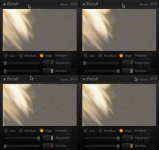
While trying to discern the effect of the De-Noise/Sharpness parameters upon an image from within B.96, I entered extreme values on a test clip, then grabbed images of the detail window after each value change, and brought them into pshop for comparison. The rendered result shown within the Detail window DOES NOT CHANGE no matter which values are entered. Here's the four grabs side by side.
so... once again, is this a bug? or are these parameters simply not enabled in this version?
-CK
 

Attachments

  • Detail-4-up.jpg
    Detail-4-up.jpg
    41.6 KB · Views: 0
Up until Build 90, RedCineX would automatically find the R3Ds on any disc if I had "Volumes" selected in the Browse tab. Now I have to drill down to the level of individual mags to see any clips. Was this on purpose?
 
That's what the browser is meant to be used for.
I know Deanan, but I' trying to integrate Clipfinder and Redcine x.
This is my workflow:
Export an xml from FCP
Import into Clipfinder
Replace MOV with R3D
Select all
Copy
Paste to another directory
Open RedcineX and import the directory
Reconform the xml in Clipfinder with the QT generated by RedcineX

Now, I've got a beta version of Clipfinder that can generate r3d alias files.
With the redcine x browser I can't access to alias files generated by Clipfinder. I can only open the aliases with the open clip command one at the time. If I had a multiple clips command I could import into redcine x all the editing of FCP without the need to copy the files in another directory.
 
STUPID FEATURE REQUEST:

Now when you double-click on a clip in the bin it drops on the timeline, can I have the option of only opening it in the viewer? Possibly just an option to turn off the timeline functionality all together?

Yes I know I can just drag the clip over to the viewer, but I naturally double clip each time because that's the default behavior in FCP, AE and AVID. I'm trying to avoid the timeline because it seems to be very slow (having to generate all those thumbnails) and I just plain don't like it (although I'm glad it's there once conforming gets supported).

p.s. this build 96 is AWESOME! leaps and bounds ahead of what it was a few builds ago.
 
To whom do i send Log files ? And I do not have a separate log folder like it says in the manual all my logs are in the Redcine-X folder, strange.

Anyway I exported a quicktime with H.264 with Redgamma and Redcolor selected and after the ewxport i opened the clip with Quicktime and It look much more washed out. I know every player shows a clip a bit different but what can I do to minimize this ?
 
On Build 96... looking good. Here are the bugs I've found so far:

1. Selecting clips from bin and dragging to timeline reverses their order

2. Sharpness is reset to zero when you apply a look

3. Load a project. Save it with a new name. Then try to change the output folder in export settings. The file dialog shows the folder where I just saved the redcine project. This is wrong - it should go to where the current output folder is.

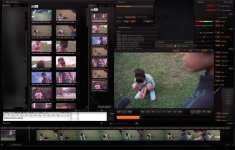
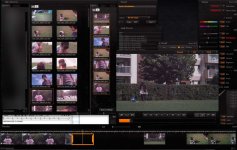
4. Had this once, unable to replicate: after scrolling, clips go black. Can't recreate the problem yet. Some pics attached (sorry - had to blur out the folder hierarchy because I can't give away details of the company network to people trying to make illegal copies of our TV spots for Alvin and the Chipmunks: The Squeakquel ;)

Bruce Allen
www.boacinema.com
 

Attachments

  • build96blackclipbug1_small.jpg
    build96blackclipbug1_small.jpg
    95.2 KB · Views: 0
  • build96blackclipbug2_small.jpg
    build96blackclipbug2_small.jpg
    97.3 KB · Views: 0
Up until Build 90, RedCineX would automatically find the R3Ds on any disc if I had "Volumes" selected in the Browse tab. Now I have to drill down to the level of individual mags to see any clips. Was this on purpose?

Yes. It was using up a huge amount of memory and time parsing and generating thumbnails. When we move to 64bit after extracting quicktime from the app, we'll be able to bring some of that back.

STUPID FEATURE REQUEST:

Now when you double-click on a clip in the bin it drops on the timeline, can I have the option of only opening it in the viewer? Possibly just an option to turn off the timeline functionality all together?

Obviously we can't do both at the same time but maybe we can make it optional.


To whom do i send Log files ? And I do not have a separate log folder like it says in the manual all my logs are in the Redcine-X folder, strange.

Anyway I exported a quicktime with H.264 with Redgamma and Redcolor selected and after the ewxport i opened the clip with Quicktime and It look much more washed out. I know every player shows a clip a bit different but what can I do to minimize this ?

Send me the log files (deanan at red).

The apple quicktime gamma issues are still a nightmare. We'd like a fix for that also but we haven't gotten the official solution yet.


On Build 96... looking good. Here are the bugs I've found so far:

1. Selecting clips from bin and dragging to timeline reverses their order

1: try switching to list mode, setting the order and then dragging to the timeline. Icon mode still has some issues.
 
The apple quicktime gamma issues are still a nightmare. We'd like a fix for that also but we haven't gotten the official solution yet.

If you want a H264 Quicktime encoder without gamma issues, check out this "x264Encoder 1.1.10" plugin:
http://www003.upp.so-net.ne.jp/mycometg3/

I know the website doesn't look like a million bucks (the animation with the kitten that pops its head over the welcome bricks is a nice touch though)... but try it!

Works for me - you just select x264Encoder from the Quicktime export menu and can then completely ditch the stupid Apple H264 Encoder forever. I'm trying to send the guy some beer as we speak.

1: try switching to list mode, setting the order and then dragging to the timeline. Icon mode still has some issues.

Thanks! Will try.

Bruce Allen
www.boacinema.com
 
Anyway I exported a quicktime with H.264 with Redgamma and Redcolor selected and after the ewxport i opened the clip with Quicktime and It look much more washed out. I know every player shows a clip a bit different but what can I do to minimize this ?

If you're in Snow Leopard and you're using the Quicktime-X player, this will definitely be the case. Fortunately, you also have the Quicktime 7 player, it's hidden in the Applications/Utilities directory. Use that player and it will look correct, or at least more correct.

I don't know what Apple is doing with different gammas in different players, but it's getting really old.
 
If you're in Snow Leopard and you're using the Quicktime-X player, this will definitely be the case. Fortunately, you also have the Quicktime 7 player, it's hidden in the Applications/Utilities directory. Use that player and it will look correct, or at least more correct.

I don't know what Apple is doing with different gammas in different players, but it's getting really old.

thanks guys,

I'm using Windows forgot to mention that.

But what about TIFFs. What applitcation should I open them with so that what I see in Redcine applies to what I see when I open them in a image viewer. I'm mainly using a little application called IrfanView for day to day stuff, it's very nice but I think it also has It's own gamma and color interpretations.
 
Ok, next bug report:

GRADES FOR CLIPS NOT REMEMBERED WHEN RE-LOADING PROJECT
1. Load clips straight into the bin - never drag them into the timeline.
2. Go through each clip in the bin, applying grades (drag each clip into the viewer, apply grade)
3. Save the project, quit RedCine-X
4. Reload RedCine-X, reload project: grades are gone

Also, may I submit a feature request, please? Please save the state of the batch queue with the project.

EG if I have to stop a render when it's 90% of the way through a clip, I am screwed. When I want to continue the export, then I have to start from zero again. Some of my clips are very long - eg overnight render on a 8-core Mac Pro. So this would be appreciated!

Bruce Allen
www.boacinema.com
 
Does logging have to be enabled? I looked for a logfile after my crashes, but I didn't find any.
 
Couple of things...

I had a bunch of clips trimmed in the timeline and selected one to export, no problem, but then I selected a few more and had them in the queue and after the first finished successfully the others leapt to 100% and there were no rendered files after that I had to quit RCX and open it again and it behaved the same way???

Is it possible to have a bunch of clips in the timeline and export al of them in one step but as separate files not one long string?

Thanks,
Tehben
 
Ok, next bug report:

GRADES FOR CLIPS NOT REMEMBERED WHEN RE-LOADING PROJECT
1. Load clips straight into the bin - never drag them into the timeline.
2. Go through each clip in the bin, applying grades (drag each clip into the viewer, apply grade)
3. Save the project, quit RedCine-X
4. Reload RedCine-X, reload project: grades are gone

Also, may I submit a feature request, please? Please save the state of the batch queue with the project.

EG if I have to stop a render when it's 90% of the way through a clip, I am screwed. When I want to continue the export, then I have to start from zero again. Some of my clips are very long - eg overnight render on a 8-core Mac Pro. So this would be appreciated!

Bruce Allen
www.boacinema.com

Email me the log files for the bug please. It's working ok here.

For the batch, are you going to dpx/tiff or quicktime/mxf? We can't pause the latter.

Does logging have to be enabled? I looked for a logfile after my crashes, but I didn't find any.

It's always enabled. On windows it's under C:\Documents and Settings\***you user name***\Local Settings\Application Data\REDCINE-X
 
Couple of things...

I had a bunch of clips trimmed in the timeline and selected one to export, no problem, but then I selected a few more and had them in the queue and after the first finished successfully the others leapt to 100% and there were no rendered files after that I had to quit RCX and open it again and it behaved the same way???

Is it possible to have a bunch of clips in the timeline and export al of them in one step but as separate files not one long string?

Thanks,
Tehben

We're adding a way to export the clips separately soon.

Send me the log file for the error above (deanan at red).
 
Email me the log files for the bug please. It's working ok here.

Oh, I am such a frikkin' retard:

Turns out that I wasn't following my own step-by-step directions. :banghead:

When you quit REDCINE-X and re-open it, it starts up with your footage still in the bins (the way you left it). But the footage has had grades reset.

Since I wasn't using the timeline, I mistook that for REDCINE-X autoloading my last project and forgetting the grades.

When I actually re-loaded the project, it was fine.

Sorry, I owe you many beers :beer:

For the batch, are you going to dpx/tiff or quicktime/mxf? We can't pause the latter.

DPX! I would like OpenEXR but won't be greedy :)

A resume-able Quicktime or MXF export function would rock but is not going to happen - totally understand!

Oh, and if you build that iPad thing, chat to Stu Maschwitz - he's doing the same thing for Colorista. He might make it listen to OSC (Open Sound Control) messages, since there are already programs for iPhone etc that send OSC eg:
http://hexler.net/software/touchosc
So you only have to do the reader portion. Maybe he can give you his source code? Since you guys are basically doing very similar things - building an "OSC -> color wheels x-y data" converter. We know he's a fan and would probably do it just for the cred of saying he helped RED :)

Thanks for all of the great work.

Bruce Allen
www.boacinema.com
 
Back
Top