Jake Russell
Member
- Joined
- Jul 19, 2010
- Messages
- 12
- Reaction score
- 0
- Points
- 0
- Location
- New York City
- Website
- www.therussellbrothers.com
Hi,
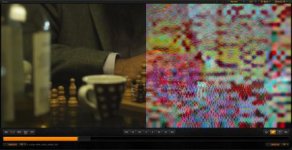
I'm using RCX build 356 with a Rocket. I recently brought in some footage to RCX. I was doing one lights and everything was going great until I loaded up one clip into the viewer. Then, half of the Viewer went wonky (see attached).
I tried loading another clip and another clip, but they were all the same. The right 50% side of the frame was all messed up in viewer. I restarted the computer. I then tried to load a clip up (not the problem child). It worked fine. I then loaded every other clip except the one that gave me the original issue. Everything was great so I decided to load the problem child in and the error happened again. THe right 50% of the viewer was all jacked up.
I then went to the source file in my Finder and I loaded up one of the proxy files from the source R3D then it plays just fine.
Has anyone ever seen this type of thing before? Is there a solution?
I'm using RCX build 356 with a Rocket. I recently brought in some footage to RCX. I was doing one lights and everything was going great until I loaded up one clip into the viewer. Then, half of the Viewer went wonky (see attached).
I tried loading another clip and another clip, but they were all the same. The right 50% side of the frame was all messed up in viewer. I restarted the computer. I then tried to load a clip up (not the problem child). It worked fine. I then loaded every other clip except the one that gave me the original issue. Everything was great so I decided to load the problem child in and the error happened again. THe right 50% of the viewer was all jacked up.
I then went to the source file in my Finder and I loaded up one of the proxy files from the source R3D then it plays just fine.
Has anyone ever seen this type of thing before? Is there a solution?