Welcome to our community

Be a part of something great, join today!

  • Hey all, just changed over the backend after 15 years I figured time to give it a bit of an update, its probably gonna be a bit weird for most of you and i am sure there is a few bugs to work out but it should kinda work the same as before... hopefully :)

"new Ipad" (3) , how do I get highest quality demo video on it ?

Interesting! I will have to try it in the DropBox app. REDcine-X isn't letting me render at anything higher than 32Mbits/s for some reason...if I set it at 50 it goes back to 32. Weird.

OK so give it to me at 2050 or 2xxx whatever is default next.

The truth about iPad3 is about to be discovered....

Isn't 32 max BR player speed?

Just checked:
http://en.wikipedia.org/wiki/Blu-ray_Disc
it is 36Mbits/sec But I have seen some posts listing 60 (64 with audio) or even 72 for 3D

.....The maximum data transfer speed for standard Blu-ray 2-D is 54Mb per second. I think the maximum data transfer speed for Blu-ray 3-D is 72Mb per second but I would need to verify that information, they might have allowed a higher speed in the Blu-ray specs. But 72Mb per second is most likely correct since that is the maximum speed of 2X BD-ROM drives....
 
Justin, I just noticed, you joined this forum Jan 2007 exactly like me, what a coincidence.
Can't believe I am here for more than 5 years, went so fast.


So why waiting for I/O module or FF sensor seems like so long....? :-)
 
Justin, I just noticed, you joined this forum Jan 2007 exactly like me, what a coincidence.
Can't believe I am here for more than 5 years, went so fast.


So why waiting for I/O module or FF sensor seems like so long....? :-)

Hahah! I think that is when the forum first opened wasn't it? There was a RED forum on www.dvxuser.com for awhile and then Jarred made this one especially for us.
 
A few people have Dec 2006 join dates.
 
Interesting! I will have to try it in the DropBox app. REDcine-X isn't letting me render at anything higher than 32Mbits/s for some reason...if I set it at 50 it goes back to 32. Weird.

REDCINE-X uses QuickTime for exporting H.264. The QuickTime encoder only supports a maximum of level 4.1 which has a data rate of 32,768 Kbps. That's why it's not allowing you to set the data rate any higher. (This is true in the QuickTime application also.)
 
However Tom file he sent to us is going 88Mbits/sec and higher.
I wonder what he was using for export?
Justin was exporting to MPEG4 not H.264 so I don't know what setting is there.
On new Windows QT Player (paid version) you can select export to MPEG4 higher rate than 32.
Anyway in any case, what we want to check is if the build-in iPad3 player can go above 2048.

Anybody wants to create the file with bit more than 2048 horizontal pixels and MPEG4?
 
Great work Justin. Just got my iPad3 and your files look great up until retinga-16x9-75.mov. Got stuttering with it. Your subject matter is interesting in that I spent several days earlier this month shooting wind turbines around Rio Vista (Calif.). My son designs the things for Siemens. Anyway, I will try my hand at prepping some iPad footage using your results. Thanks again for the big contribution.
 
Andrew, here is a 2560x1347 version...doesn't play on my iPad. I will try something like 2,110 next...

http://dl.dropbox.com/u/5673574/retina-2.5k.mov


2.5k file doesn't play under any app on iPad3
It probably would play audio like the TimeScapes does if it had one in it.

I excluded any conversions by using "AirShare" Pro that allows you to have iPad mounted as a drive on the laptop.
Next I did copy your file from desktop to this way created iPad memory and visible on the laptop as a drive Z:.
Next I used AirShare file manager to invoke your video.
I also use DropBox by coping your file from my laptop desktop to DropBox and than accessing DropBox from my iPad3 and clicking on this file.

Both iPad apps played the file but screen was blank (black)

I also discovered that both DropBox and AirShare cannot handle upload out of their storage files bigger than 260MB
This limits how big files you can play from the DropBox or iPad memory.

Download to the DropBox or to the AirShare iPad3 memory is OK.

DropBox may limit only this type of files .mp4 or .mov I didn't check other files.
It just stops transfering the file after 260MB is downloaded and it hangs there so it looks like it froze.
However if you look on the WiFi router stats you see clearly it just stopped the transfer.

AirShare once you mount the iPad memory storage as a network disk and you try to transfer file out of that way created storrage gives you error message (item to large or some other cryptic errors)
 
Can someone summarize the recommended way to encode , using Prem cs5.5 or AE ?
I'm getting some unusual results with these , for example h264 is capped at 2000 pixels across.
When I try mp4, it is banding like crazy, even tho it's at 9MBit rate. Something is wacky !
My previous tests were from Fusion, but that is not my usual workflow component.
thanks
 
I personally would stay with H.264 at 1080p and a high data rate, but, perhaps the MPEG-4 encoding at 2K with a low data rate is producing results better than that of H.264 at 1080p with a high data rate.

Justin, were you able to tell if your MPEG-4 files at 2K+ looked better on the iPad's display than just a 1080p H.264 file?
 
I ran a number of tests with 1080p h.264 vs 2k mpeg4 using the Timescapes 1440p trailer as a source. If you compare screen shots, edges looked slightly sharper (if there was no motion, or practically none) with 2k mpeg4 BUT in motion, h.264 looked much much better. h.264 retains a lot more detail in my opinion.

I was using handbrake at around 50Megabit for both. x264 vs ffmpeg mpeg4.

Bill

Edit: I'm not convinced they look as different in motion after further testing.
 
I ran a number of tests with 1080p h.264 vs 2k mpeg4 using the Timescapes 1440p trailer as a source. If you compare screen shots, edges looked slightly sharper (if there was no motion, or practically none) with 2k mpeg4 BUT in motion, h.264 looked much much better. h.264 retains a lot more detail in my opinion.

I was using handbrake at around 50Megabit for both. x264 vs ffmpeg mpeg4.

Bill

Sorry, but I just have to ask. :D What settings were you using in HandBrake? (I know, there's a lot...) Or, did you use a built-in preset?
 
Lol, no worries dude, lemme make a list. I'll update this post asap.

Handbrake Settings:

H.264 Settings

OUTPUT SETTINGS:
container: mp4
large file size: no
web optimized: no
ipod 5g support: no

PICTURE:

width: 1920
height: 1080
keep aspect ratio: yes

anamorphic: none
modulus: 16

cropping: none

VIDEO FILTERS:
none

VIDEO:
video codec: h.264 (x264)
FPS: Same as source
quality: Avg Bitrate - 50,000 kbps
2 pass encoding: yes
turbo first pass: yes

AUDIO:
1 Track - AAC Passthrough

SUBTITLES/CHAPTERS:
none

ADVANCED:
I used the Regular Preset - High Profile's defaults
No DCT-Decimate: yes


MPEG 4 SETTINGS

All the same from above EXCEPT:

PICTURE:
Width: 2048
Height: 1152

VIDEO:
Video Codec: MPEG-4 (FFMPEG)

So i went back and looked at each file in CineXplayer and instead of taking screenshots I paused them and looked at it with the magnifying glass. I'll post some screen shots in a couple minutes for comparison.

edit: Might take a little longer for comparison stills, I'll reserve judgement until they're done.


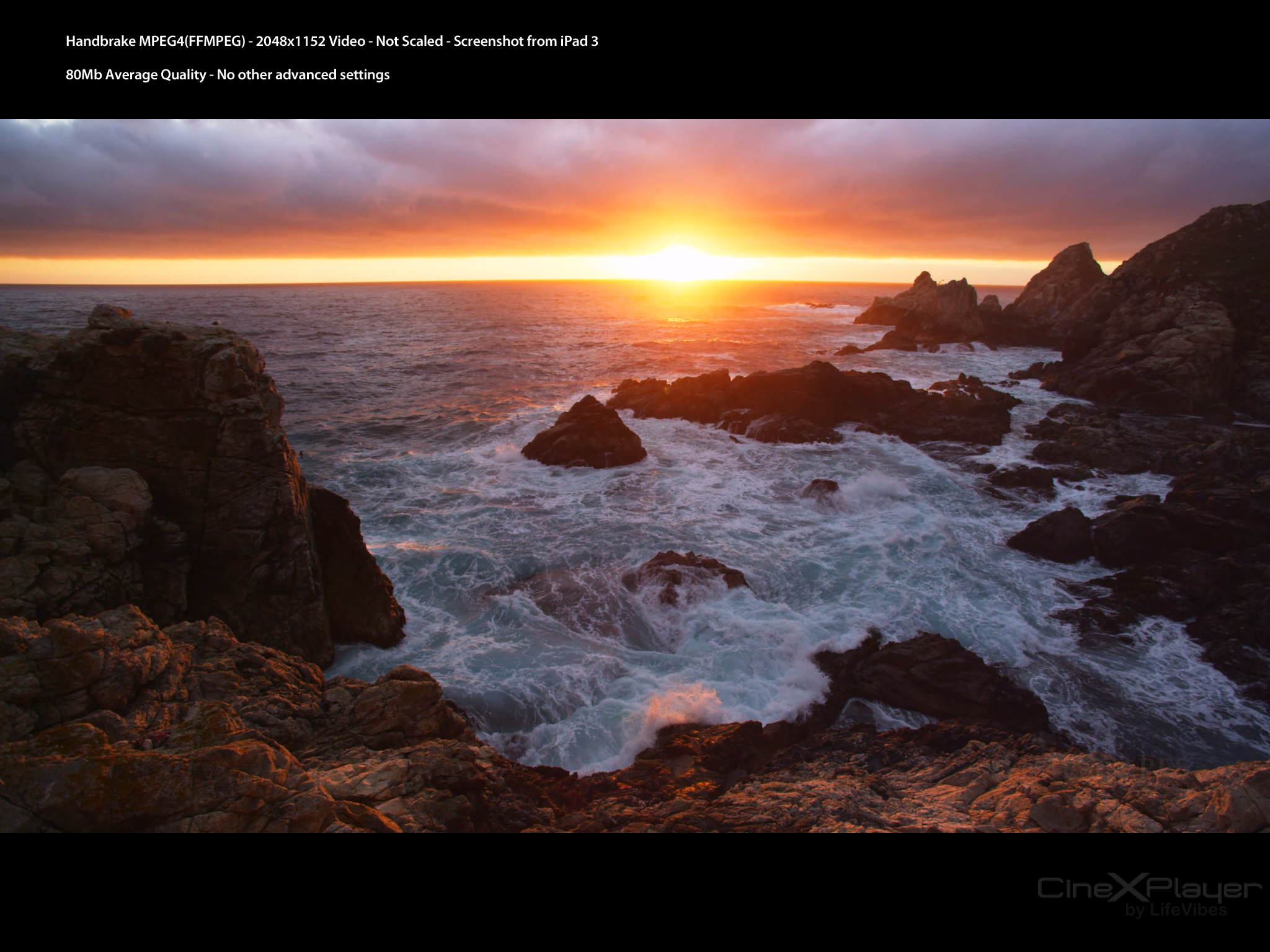
It's pretty difficult to stop CineXPlayer on the same frame of 2 different videos, but these are pretty close. I took the screen shot, added the text and uploaded them. No changes to the images other than that. I'm honestly pretty surprised that the MPEG4 file did this well. If anyone has some 4k source material they'd like to see tested I be glad to take a look.

H264 Screenshot - Click Thumbnail for full image:


MPEG4 Screenshot - Click Thumbnail for full image:
 
What I am seeing is that 2048 format is native to the iPad3 display so keeping it in this aspect ratio for iPad3 must produce less of Moire effect.
Especially visible when playing turbine-lines.mov file that is encoded at 2048 pixels (see posts from above).

I meant, aspecially not visible when playing 2048 file. (Morie not visible at all at 2048)
 
Hey guys, can you give me a summary of the findings thus far? I'm sure this will be of great interest to many iPad/resolution nerd/filmmaker types out thee.

Is it basically that H264 will only go up to 1920, but MPEG4 will work at 2048? To my eyes, the MPEG4 screenshot above looks better, but obviously I have not seen this in motion.
 
I haven't been able to render 2048 h.264s with REDcine-X at all… It just crashes. I am able to render out 2048 MP4s at 32 Mbit per second no problem.

If you want a 2048 H.264 file, you could try exporting Uncompressed from RCX, import that into Squeeze and then encode a level 4 or 4.1 H.264 file from there.
 
Back
Top