Steve_Fish
Well-known member
My new RedLapse time lapse App for RED DSMC cameras has just approved for the Apple iTunes App Store and is now available for sale. You can find it by searching for RedLapse in the iTunes Store, or you can use this direct link: https://itunes.apple.com/us/app/redl...2963?mt=8&uo=4
Here's a brief description of the App:
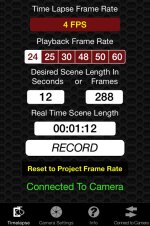
RedLapse is a Time Lapse controller for RED Dragon, EPIC and SCARLET digital cinema cameras. It allows you to quickly and easily adjust the necessary settings for filming time lapse scenes. It will calculate scene lengths and real time recording lengths for you at any RED frame rate and playback rate. It will automatically start and stop recording and give you countdown and count up info while filming. It also allows you to change Aperture, Shutter Speed, ISO, REDCODE compression and Color Temperature from within the App.
The App controls your camera over a WiFi connection. To use the App with your RED DSMC camera, you must have a WiFi link via hardware such as the REDLINK BRIDGE or OFFHOLLYWOOD WiFi adapter.
The App is Universal, so it is compatible with both iPhone and iPad. It supports any iPhone or iPad compatible with iOS8 (including the new iPhone 6 and 6 Plus).
For a peek at some screen shots and a more thorough description, I have put a page on my FishTalesPress site: www.FishTalesPress.com/RedLapse
Here's a brief description of the App:
RedLapse is a Time Lapse controller for RED Dragon, EPIC and SCARLET digital cinema cameras. It allows you to quickly and easily adjust the necessary settings for filming time lapse scenes. It will calculate scene lengths and real time recording lengths for you at any RED frame rate and playback rate. It will automatically start and stop recording and give you countdown and count up info while filming. It also allows you to change Aperture, Shutter Speed, ISO, REDCODE compression and Color Temperature from within the App.
The App controls your camera over a WiFi connection. To use the App with your RED DSMC camera, you must have a WiFi link via hardware such as the REDLINK BRIDGE or OFFHOLLYWOOD WiFi adapter.
The App is Universal, so it is compatible with both iPhone and iPad. It supports any iPhone or iPad compatible with iOS8 (including the new iPhone 6 and 6 Plus).
For a peek at some screen shots and a more thorough description, I have put a page on my FishTalesPress site: www.FishTalesPress.com/RedLapse