


Jay A. Kelley
member
- Joined
- Feb 2, 2007
- Messages
- 3,803
- Reaction score
- 0
- Points
- 36
- Location
- St. Louis MO
- Website
- www.dreamwelder.com
Mods, I am sorry I posted this twice, but I am not sure where it goes... It applies to:
Adobe Premiere
Final Cut Pro &
Sound Section...
Well, I've been on Cineform for what feels like forever, and I am thrilled to have the honor of announceing that Cineform's new External Audio feature is HERE!!!
So here's the skinny:
This feature is designe for those people who are recording SEPARATE audio and want to avoid the hassle of manually syncing it up in post.
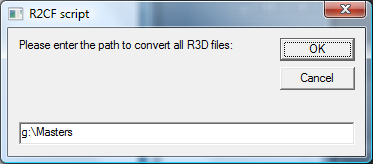
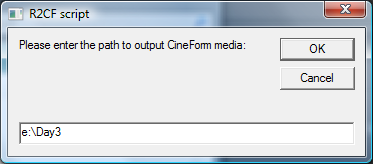
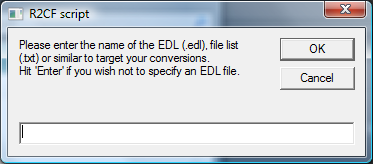
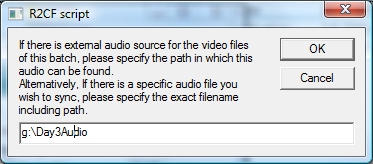
Quite simply, during the transcode process, the program will ask you if you have any external audio (up to two tracks... 48khz stereo) and the directory they are being held in. It will then SCAN THE TIMECODE of both your audio files AND the new Cineform files, and SYNC and ATTACH the new audio to the Cineform AVI... DONE.
This saves a step for those of you using FCP, and it saves your ass for those of you using Premiere!!
So far this program has been tested with Cantar and Fostex BWF .wav sources. I'm sure Newman will get on here soon with details on where to go and how to find this.
I want to say that it's very rare that a company like Cineform, who's bread and butter is VIDEO would take the time and MONEY to develop something for audio. It shows that they are doing two things:
1: They are trying to look at the WHOLE PICTURE and realize that a good workflow is about more than just real-time playback and pretty pictures. They understand what a lot of us have lived with for a long time, that sound is usually the more difficult, and time consuming part of a motion picture, commerical, short, etc.
2: They listen to their customers, and they really do want them to be happy. I have been bugging the holy living crap out of both David Newman, and David Taylor for over a year on this thing, and they kept telling me "Jay, just hang in there, we will find a way to get to this". Well, they did it.
If enough of you show some real interest, and if this feature results in additional seats of Cineform being sold, you will see additional features added in the future.. Yes, I am already on them about it.. In fact I feel guilty saying this, but I was bugging them about additional stuff even before this version was released. But that's another post....
I also want to give a shout to Josh (Who needs to get on here by the way) who actually did the grunt work in coding this little gem.. He's DA MAN!
Good job guys... Very good job.
Jay
Adobe Premiere
Final Cut Pro &
Sound Section...
Well, I've been on Cineform for what feels like forever, and I am thrilled to have the honor of announceing that Cineform's new External Audio feature is HERE!!!
So here's the skinny:
This feature is designe for those people who are recording SEPARATE audio and want to avoid the hassle of manually syncing it up in post.
Quite simply, during the transcode process, the program will ask you if you have any external audio (up to two tracks... 48khz stereo) and the directory they are being held in. It will then SCAN THE TIMECODE of both your audio files AND the new Cineform files, and SYNC and ATTACH the new audio to the Cineform AVI... DONE.
This saves a step for those of you using FCP, and it saves your ass for those of you using Premiere!!
So far this program has been tested with Cantar and Fostex BWF .wav sources. I'm sure Newman will get on here soon with details on where to go and how to find this.
I want to say that it's very rare that a company like Cineform, who's bread and butter is VIDEO would take the time and MONEY to develop something for audio. It shows that they are doing two things:
1: They are trying to look at the WHOLE PICTURE and realize that a good workflow is about more than just real-time playback and pretty pictures. They understand what a lot of us have lived with for a long time, that sound is usually the more difficult, and time consuming part of a motion picture, commerical, short, etc.
2: They listen to their customers, and they really do want them to be happy. I have been bugging the holy living crap out of both David Newman, and David Taylor for over a year on this thing, and they kept telling me "Jay, just hang in there, we will find a way to get to this". Well, they did it.
If enough of you show some real interest, and if this feature results in additional seats of Cineform being sold, you will see additional features added in the future.. Yes, I am already on them about it.. In fact I feel guilty saying this, but I was bugging them about additional stuff even before this version was released. But that's another post....
I also want to give a shout to Josh (Who needs to get on here by the way) who actually did the grunt work in coding this little gem.. He's DA MAN!
Good job guys... Very good job.
Jay
 The two David's at CineForm confuse a lot of people. You must have spoken to David Taylor, CEO.