Welcome to our community

Be a part of something great, join today!

  • Hey all, just changed over the backend after 15 years I figured time to give it a bit of an update, its probably gonna be a bit weird for most of you and i am sure there is a few bugs to work out but it should kinda work the same as before... hopefully :)

Need help grading Epic clip

Elvis, now we're talking. That's more in the ballpark. Obviously the yellow blew out because of saturation, but that's getting closer to what I had in mind, and what the place actually looked like to my eyes.

Don't give me too much credit, guys. My main thing is using Adobe Camera RAW in After Effects. Unfortunately, the Grad ND in ACR is static and only works in straight lines -- very limited. It can be nice for stills, but once you get uneven horizons and motion, it's not very useful at all. I do not know how to use power windows or masks in AE. Those are only working in an RGB space, I assume? What I really would love is the ability to do these dramatic things in the "RAW" stage.

I wonder if a Grad ND could be added to RCX? Or Storm? I already talked this over at length with Adobe, and they seemed very responsive to the idea of adding a key-frameable, shape-shifting Grad ND to AE, PP, etc. I think it's going to be fairly low on their priority list, though.

Bruce, I have AE but don't have the Epic code yet.
 
Some Quick & Dirty Attempts:

gradethisf.0000000.jpg


gradethise.0000000.jpg


gradethisa.0000000.jpg


I like the first one best myself and it's closest to what I was aiming for.

Done with two straight RCX grades combined with a straight mask on the horizon in PS (I know the mask is a little off but hey it's late and I'm just having a quick play!)

It'll be nice if you can eventually do this kind of stuff in Storm, I'm sure it's the kind of really useful feature they could actually see a reason for adding. As it was I had to sort of guess at how the two grades would combine and it took a few attempts to get it how I wanted it, as you can see in the last example the sky & foreground didn't quite gel (a first attempt), if I could see & control both with a live mask in one app it would be great. I'll add it to the request list for next time I speak to the foundry guys.

I love what you can get out of RED footage with landscapes, simply awesome. I wanna do stuff like this in 3D next!
 
Wow!

Nice grade Jean Pierre!

Did you get this straight out of RCX in one pass?

Shame about the yellow blowing out but otherwise stunning!
 
Wow!

Nice grade Jean Pierre!

Did you get this straight out of RCX in one pass?

Shame about the yellow blowing out but otherwise stunning!

Yes, I used only RCX...
...you are right, the sky can be improve it, but it can be done with more time :-)
 
Final one before bed!

gradethisg.0000000.jpg


A border definitely helps. Upped the contrast further still and warmed it a bit more. (Hopefully not too much, it's so easy to get carried away! ;-) )
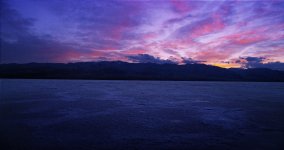
 
OK. Couldn't resist the challenge.

One pass in RCX. Pretty much done with fiddly curves.

gradethisonepass.jpg


A bit pinky purple again but I like those tones at the moment and it's really, really time for bed! Almost 2 am here and a feature film to conform tomorrow for Cannes and a new family car to find and buy!

And with a tad more saturation & contrast: ((orange popping out a bit :-( ))

gradethisonepassb.jpg
 
Tom, a good trick for doing something like this is to start by putting the ISO back to 320, and then use RedGamma2 or RedLogFilm to work from (hint, shadow and contrast controls are your friend). Results like what Jean Pierre did are possible fairly quickly from this point.

Thats the way I usually start with images that contain a lot of higlight info I want to keep. Other than that, you're trying to make two objects of the same density move differnt ways, so you'll need a mask to do that.

Tim

Edit: I had attached an image, but after a second look, I can't do this on a laptop, and my cart is on a camera truck right now. I will also say that I too only use RCX for baking in ISO, FLUT, Shadow, Kelvin, Tint, Gamma, and Color space.
 
I love how you all can't resist helping Tom out!

As others have said, my first thought was curves.

My second thought is that I hate RCX, I only ever try to get an approximation of the look I want - a "first light" sort of thing. I do all my real work in Color, but I'm moving to Resolve for my next project if the next version of Color doesn't have radical performance and capability enhancements.

Sorry, off topic ... my point was that the curves implementation in Color is so much easier to fiddle with than RCX IMO.

Now I have to go do this for paid work ... otherwise I'd join you in playing on this beautiful source!
 
This looks like fun. Is there a prize?
 

Attachments

  • gradethis_05.jpg
    gradethis_05.jpg
    99.2 KB · Views: 0
I presume that you have made progress on this yourself Tom?

If you want I can give you some of my rough grades for sky & ground as a starting place. I'm sure tracking a straight line mask onto the horizon should be fairly simple in AE, especially since you will be dealing with smooth motion controlled footage. You could probably animate it by hand fairly quickly if necessary... I'm sure you've probably found your own way by now though..

I like the sky in your example Ian. No fair though, you're like a proper colorist and everything! ;-)
 
Back
Top