Welcome to our community

Be a part of something great, join today!

  • Hey all, just changed over the backend after 15 years I figured time to give it a bit of an update, its probably gonna be a bit weird for most of you and i am sure there is a few bugs to work out but it should kinda work the same as before... hopefully :)

Need Advice on Mac Pro

Dan McCain

Well-known member
Joined
Jan 2, 2007
Messages
344
Reaction score
1
Points
0
Location
Lagos Nigeria/Atlanta GA
I need a Mac Pro but am looking to save money. I can buy a used Mac Pro for between $2000 and $2300 with the specs below. I am planning on running a Red Rocket card and perhaps running Premiere Pro. Does anyone have experience with the performance of the machines listed below?

Option 1
----
Used Mac Pro Quad Core/3.0 GHz

4.1 GB of RAM
500 GB internal drive
Internal 2 Ea. SuperDrives
No keyboard
Bluetooth installed
NVIDIA GeForce 7300 GT Video

Option2
------
Used Mac Pro Quad Core/3.0 GHz

8 GB of RAM
500 GB internal drive
Internal SuperDrive
No keyboard
Airport Extreme and Bluetooth installed
ATI x1900 128MB Video


Thanks for any advice you can offer!
 
If they have the 7300gt or an x1900, they are almost definitely older models - probably first or second gen.

Go to "About this Mac..." , and then click on "More info...". The Model Identifier will be a number like "1,1", "2,1", etc. Like Tony says, you want a 4,1 at least. That's when they switched over to the Nehalem chips, and a totally different motherboard design.

I don't think these computers are worth the money. They are marginally better than the stock machines of that era. For comparison, you can get a new stock Mac Pro with 6 GB of RAM for $2700 plus tax. The new computer will have a better video card, more storage, faster processors, more hard drive space, more modern PCI connections, and compatibility with the latest hardware.
 
Thank you to everyone for the input, Ive been out of the loop on mac pros for a long time. I see a variety of refurbished macs on apple site and I think that is the way I will go.

I assume for processing Red R3Ds, two 2.66 Eight Core Xeon processors are better than 1 X 3.33 Four Core Xeon? Is the NVIDIA GeForce GT 120 or ATI Radeon HD 4870 a better graphics card?

These are the options at the moment.


Refurbished Mac Pro 2.26GHz 8-Core Intel Xeon
Two 2.26GHz Quad-Core Intel Xeon "Nehalem" processors
6GB (6x1GB) of 1066MHz DDR3 ECC memory
640GB Serial ATA 3Gb/s 7200 rpm
18x SuperDrive (DVD±R DL/DVD±RW/CD-RW)
NVIDIA GeForce GT 120 with 512MB GDDR3 memory
$2,799.00
Save $500.00
15% off


Refurbished Mac Pro 2.93GHz Quad-Core Intel Xeon
One 2.93GHz Quad-Core Intel Xeon "Nehalem" processor
6GB (3x2GB) of 1066MHz DDR3 ECC memory
1TB Serial ATA 3Gb/s 7200 rpm
Two 18x SuperDrives (DVD±R DL/DVD±RW/CD-RW)
ATI Radeon HD 4870 with 512MB GDDR5 memory
$2,849.00


Refurbished Mac Pro 3.33GHz Quad-Core Intel Xeon
One 3.33GHz Quad-Core Intel Xeon "Nehalem" processor
3GB (3 x 1GB) of 1066MHz DDR3 ECC memory
640GB Serial ATA 3Gb/s 7200 rpm
18x SuperDrive (DVD±R DL/DVD±RW/CD-RW)
NVIDIA GeForce GT 120 with 512MB GDDR3 memory
$3,139.00


Refurbished Mac Pro 2.66GHz 8-Core Intel Xeon
Two 2.66GHz Quad-Core Intel Xeon "Nehalem" processors
6GB (6x1GB) of 1066MHz DDR3 ECC memory
640GB Serial ATA 3Gb/s 7200 rpm
18x SuperDrive (DVD±R DL/DVD±RW/CD-RW)
NVIDIA GeForce GT 120 with 512MB GDDR3 memory
$3,299.00
 
Of those systems listed there, I would go with the first one -- the 8-core for $2700.

Don't buy a quad-core system. You cut your memory bandwidth in half and it's expensive to get the additional bits and pieces later from Apple parts if you want to add that second CPU, even if you buy the CPU itself on the open market.

You will really want to add more RAM, 6GB isn't going to cut it if you run CS5 at 64bit or if you run multiple apps. The multi-channel memory controller within these systems performs best when all channels are populated and with equal-spec'd RAM. Check OWC (macsales.com) for RAM. You will want more HDD space too. OWC has drives, but you can get better prices, usually, from NewEgg, MWave, Amazon, etc..

Of the two video cards, the Radeon 4870 is the better card, but won't accelerate anything within Adobe CS5. Since you mentioned Premiere Pro. I say get the GT120. Then if you want to run Premiere, swap it out for an nVidia GTX285 Mac edition to get better performance. Although, the GT120 will work there. The GT120 does have some value as some people are looking to pick them up as secondary video cards for running their UI monitors from DaVinci Resolve, while they let the GTX285 or Quadro card do the heavy lifting.

Look around, there are bound to be other deals out there. Although, I have had pretty good luck buying Apple refurbished systems in the past. That top one appears to be the same as the other 8-core for $500 more. So it does make me pause and wonder what the difference is. The cheaper one may have noticeable cosmetic damage. I still say go with the cheaper 8-core there. It's a fair price for used/refurbished and you can always return it if there's a problem.
 
3,1 not enough?

3,1 not enough?

it has to be a mac pro 4.1 minimum!

Hey Tony, thanks for those links!

Question: What if it's a mac pro 3,1? Can you not run a RedRocket in it? Would there be limitations? Same questions for Premiere, and RR+Premiere.
If there are limitations or reasons these products wouldn't work at all in a 3,1 machine, what are they exactly?

Thanks again!
 
Aaron,

the 3,1 ( early 2008 ) is the minimum configuration for red rocket.
2 PCIe x4 slots and 2 PCIe 2.0 x16 slots.
so: one 16x slot is going to speed your grafics card and the other one is running your
red rocket.
as you see it is a mix of both worlds. ( you should find it for arround $ 2.000.- )
i would not go with this one.
not talking about bus speed and the full 64bit EFI.
busspeed makes even more sense in terms of speeding your processes.

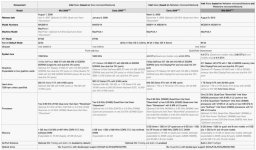
found a perfect list for you to see the different systems on one list:)
give the REDROCKET a perfect home!!
 

Attachments

  • mac_compare.jpg
    mac_compare.jpg
    102.1 KB · Views: 0
The new ones are nice, you'll like it. Much better video card indeed. just be aware that the ATI cards do not provide CUDA support (that's an nVidia only thing right now), so you won't get the extra GPU acceleration if you run Premiere CS5. It will still use all 8 CPU cores for chewing through RED footage though and it will scream in Premiere and in Redcine-X and AE if you add the RED Rocket.
 
You also won't get Resolve acceleration with an ATI card. Best to go nVidia these days if you're a pro -- CUDA is just great, and it's nVidia-only.
 
You also won't get Resolve acceleration with an ATI card. Best to go nVidia these days if you're a pro -- CUDA is just great, and it's nVidia-only.

Adobe need to start supporting open CL so we can get ati acceleration too. locking into one vendor that isn't being used by apple right now is a pain.
 
Adobe need to start supporting open CL so we can get ati acceleration too. locking into one vendor that isn't being used by apple right now is a pain.

OpenCL is not a replacement for CUDA in general. OpenCL is a least-common-denomitor spec. CUDA is for computing on the GPU; they're really quite different.

nVidia's OpenCL implementation outputs PTX, which is what CUDA compiles to. You have *way* more control with CUDA than OpenCL, and a lot of things are *only* available with CUDA.

I just don't see OpenCL catching on at this point for Pros, not because it wouldn't be nice, but because its just doesn't have the features Pros need.
 
Back
Top