Welcome to our community

Be a part of something great, join today!

  • Hey all, just changed over the backend after 15 years I figured time to give it a bit of an update, its probably gonna be a bit weird for most of you and i am sure there is a few bugs to work out but it should kinda work the same as before... hopefully :)

Mysterious Yellow Flames

Jordan Livingston

Well-known member
Joined
Feb 9, 2009
Messages
349
Reaction score
0
Points
0
Age
44
Website
www.jlpmovies.com
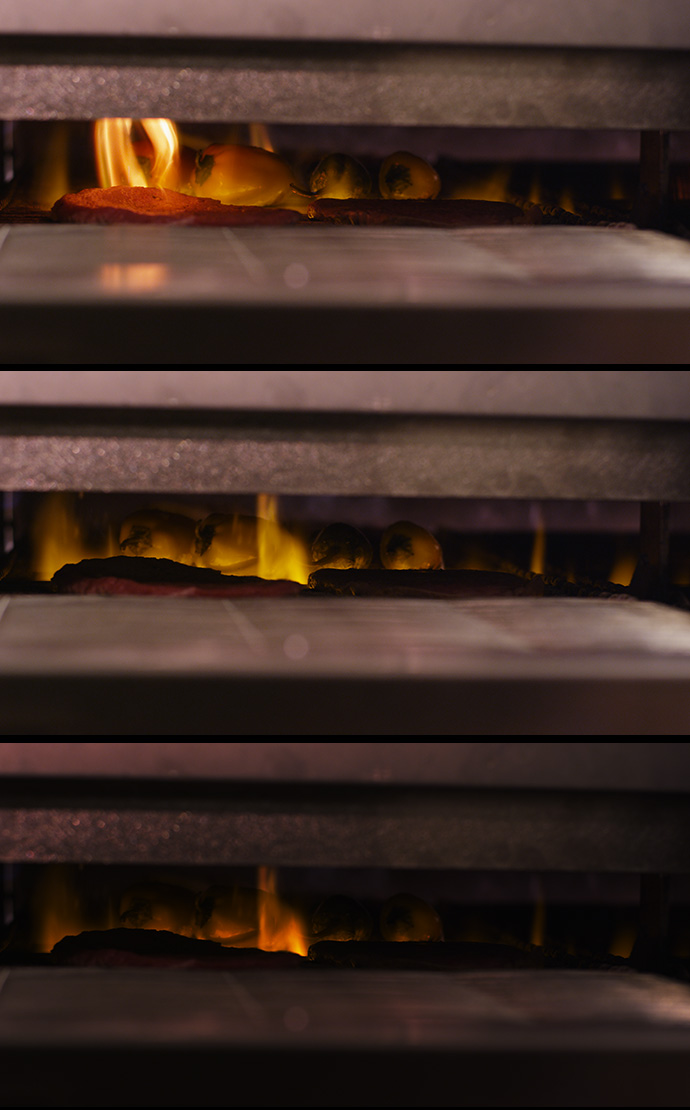
Today I shot some industrial / professional flame broilers for the manufacturers' website. I was using my Scarlet-X with the latest RELEASE firmware build version 4.0.10.

For some reason, the flames were rendered in an unreal yellow color. They appeared orange / reddish to the naked eye, and also to the iPhone camera as well as a Canon 5D camera. Only the Scarlet-X depicted them in yellow, regardless of any white balance and / or tint correction.

What's even stranger is that some of the flames were rendered in their natural reddish / orange color amidst the mysterious yellow flames.

Here's a link to two of the R3D frames:http://www.DIGILOID.com/_xfers/Mysterious_Yellow_Flames.zip

Can anybody tell me why this phenomenon is occurring, and more importantly, how I might be able to fix it in post?!

Thanks in advance,

- Jordan
 
While your ZIP file doesn't to work, I have seen that effect before. I don't know what causes it but I have removed it via HSL keying. THis may or may not work in your shot. Check the exposure on the flame, is it simply blow out but the highlights are tinted yellow?
 
I'm pretty tired right now and didn't give it my best scrutinizing look... It's hard to tell for sure from two still frames, but I definitely see IR contamination. Can you share some motion? What else can you tell us? IMO, it looks like you need some more neutral (as in full spectrum or daylight 4800-5600K) fill light and IR filtration. A fix in post is going to require a lot of re-coloring. You can probably mask for re-coloring by HSL (as mentioned above) or luma. Some hand-roto work may be necessary if you're chasing some dancing flames. Tweaking white balance and tint can fix some of it...
 
Did you use an IR filter?

I don't have a complete grasp on the subject of IR pollution, but I know that there is a thermal component. Your image is red deficient in all of the areas of the most heat, rendering them yellow. There must be a connection there, somewhere.

Oops, Jeff got the jump on me.
 
Yes, we did use an IR filter on all shots. Light sources were mixed - a combination of Tungsten and house fluorescents. White balanced in camera. For some reason only the Scarlet produced this effect, not the other two cameras we happened to have on hand to test with (5D and iPhone).

- Jordan
 
Last edited:
While your ZIP file doesn't to work, I have seen that effect before. I don't know what causes it but I have removed it via HSL keying. THis may or may not work in your shot. Check the exposure on the flame, is it simply blow out but the highlights are tinted yellow?

The greens in those highlights are blown but the red doesn't appear to be.

On the still I was able to HSL qualify an offset adjustment that seemed to do the trick. It might work for you Jordan.

Which IR filter did you use?
 
Last edited:
White balance is fubar, exposure is wonky. You used goofy light, or mixed available, can't seem to nail down an exact white balance. IR is definitely an issue, but also hard to pin that down. What filter(s) did you use? it's probably being thrown off by the goofy light conditions. To get proper color on flames, you need to be white balanced near daylight, more in the range I mentioned above. Just some quick tweaking and it doesn't seem as bad, still a hint of pink in the surrounds, that's easy enough to fix. I think the flames can be brought into check somewhat with a good luma key and an HSL qualifier or two, but I haven't actually tried it. This is just some quick Redcine-X testing here. I went a bit overboard on the lower one, but it shows you can correct the flames to orange/red and with the exposure of everything else, should be able to key pretty well. Granted, we don't know what else the shot involves. I had to dial the red up quite a bit in the images below.

All things considered, I think it's a combination of the factors we've all mentioned here -- IR, exposure, funky light and WB that doesn't match your flame subject. Not sure what's up with the IR. I see the usual effects of it, and I've shot lots of hot stuff in the form of metal casting, foundry processes, welding, etc.. Whatever the killer combination was here, it did you in good. If I only tweak color temp and tint, we have to go north of 7000K and dial tint down around -30 or lower to get the flames to start looking like flames and that kills everything else in the image. All things considered, it looks fixable, but can't say for sure without seeing the clip in motion. Ultimately, the best way to fix it would be to shoot again under proper lighting and filtration conditions. That may not be possible and may require more than <cough> "simply" </cough> fixing this in post.

flamer.jpg
 
Lighting wise we did what we could. Like I said, house fluorescents on, as well as a few Tungsten lights. Ultra-low-budget in-house project so we used what we had available. White balance was performed in camera. We used a Schneider Tru-Cut 750 IR filter.

Doesn't it seem strange that some of the flames are perfectly normal and others are yellow?

- Jordan
 

Doesn't it seem strange that some of the flames are perfectly normal and others are yellow?

It doesn't seem strange at all. Are all flames the same color and heat intensity? Note that it isn't just the flames themselves that are discolored but the peppers as well.

My guess is that those areas in your frame happen to fall exactly within the range of your IR filter and that is why those reds were so precisely eliminated with no clipping within the channel.

The fact that the remaining yellow color is so distinctive works for you. It makes it easy to key. :-)

If I HSL qualify the yellow areas and -8.6 green offset in the primary, I get a more natural result than if I just add red.

attachment.php
 
Last edited:
I'm in agreement with Scott. FWIW, I've also not had great luck myself with the Schneider TruCut IR filters. They have a rather limited range and struggle with intense IR sources. I've had much better results with Formatt and Pancro IR filters. TruCut's, as well as the Tiffen IR filters, are OK for casual outdoor use, but I found them unusable in Southern Colorado and the Arizona Desert. Sand dunes and sun-baked rocks can be murder when it comes to IR. The Formatt hot-mirror has worked very well for me shooting in both a steel foundry and a recycling facility where they were melting aluminum and glass.

Not that any of that really helps you now. I think the biggest factor affecting you here has been the mixed colors of varying light sources. If your whites are not consistent throughout the frame, then a global white balance, in camera or not, really has no bearing. Chances are the other cameras yielded better results through superior IR filtration (Something the M and MX sensors suck at), multi-point color processing/ stabilization and, ironically, less available DR. All features not inherent to shooting R3D RAW on the current RED cameras. We can fix the color processing and stabilization in post. IR has to be filtered when shooting and the DR is an advantage if you use it as such.
 
It doesn't seem strange at all. Are all flames the same color and heat intensity? Note that it isn't just the flames themselves that are discolored but the peppers as well.

Actually, there were some very bright yellow peppers in there. I don't think the peppers are discolored.

Thanks for all the tips and suggestions. It looks to me like this is going to be fixable in post. I'm just baffled by the IR explanation given we had a an IR filter and two vastly inferior cameras (with no IR filtration at all) did not exhibit this problem at all.

I should mention that we also tried shooting the Scarlet without the IR filter but the results were identical in either case.
 
I'm in agreement with Scott. FWIW, I've also not had great luck myself with the Schneider TruCut IR filters. They have a rather limited range and struggle with intense IR sources. I've had much better results with Formatt and Pancro IR filters. TruCut's, as well as the Tiffen IR filters, are OK for casual outdoor use, but I found them unusable in Southern Colorado and the Arizona Desert. Sand dunes and sun-baked rocks can be murder when it comes to IR. The Formatt hot-mirror has worked very well for me shooting in both a steel foundry and a recycling facility where they were melting aluminum and glass.

Not that any of that really helps you now. I think the biggest factor affecting you here has been the mixed colors of varying light sources. If your whites are not consistent throughout the frame, then a global white balance, in camera or not, really has no bearing. Chances are the other cameras yielded better results through superior IR filtration (Something the M and MX sensors suck at), multi-point color processing/ stabilization and, ironically, less available DR. All features not inherent to shooting R3D RAW on the current RED cameras. We can fix the color processing and stabilization in post. IR has to be filtered when shooting and the DR is an advantage if you use it as such.

Jeff - thank you so much for your assistance and explanations. I think you are correct in your assertions above. Hypothetically, if I do have the opportunity to re-shoot the flame shots one more time, what do you suggest I do? Would using daylight-only fixtures eliminate the problem?

- Jordan
 
Haha the peppers were supposed to be yellow... Well that laugh is on me then! It should be easier to target the corrections in that case. ;-) This silly feeling that I'm having leads me to a common question: Did you shoot a MacBeth?

EDIT: Actually targeting the correction isn't any easier, since (If I understand correctly) some of those peppers are and should be, very similar in color to the flames. Having all of that middle grey available, I thought I could make a solid relative adjustment, but now I'm not so sure. Once again that brings me back to reference. Reference is key.

if Scarlet did the same with or without the TruCut, then the OLPF must be catching that IR frequency.

Actually, there were some very bright yellow peppers in there. I don't think the peppers are discolored.

Thanks for all the tips and suggestions. It looks to me like this is going to be fixable in post. I'm just baffled by the IR explanation given we had a an IR filter and two vastly inferior cameras (with no IR filtration at all) did not exhibit this problem at all.

I should mention that we also tried shooting the Scarlet without the IR filter but the results were identical in either case.
 
Last edited:
Lighting wise we did what we could. Like I said, house fluorescents on, as well as a few Tungsten lights. Ultra-low-budget in-house project so we used what we had available. White balance was performed in camera. We used a Schneider Tru-Cut 750 IR filter.

Mixed lighting is never a good idea in situations like this, in my opinion. White balance can only go so far, and there's always going to be weird, unnatural "spikes" that are not going to help the image. Shooting a lot of tests can help get this right.

If it's just a question of getting the flames pushed towards red instead of yellow, that's a pretty simple secondary correction for any decent color-correction program. The question is how to approach it and blend the effect in so it doesn't look too garish and artificial, and also to prevent it from affecting anything in the scene that's in the same ballpark.
 
Back
Top