Nawaf AL-Wahaib
Well-known member
- Joined
- Apr 26, 2010
- Messages
- 68
- Reaction score
- 0
- Points
- 0

Follow along with the video below to see how to install our site as a web app on your home screen.

Note: this_feature_currently_requires_accessing_site_using_safari


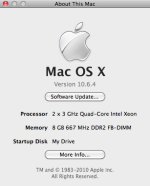
What Mac?
How much RAM?
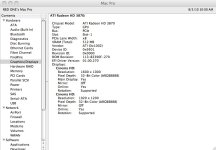
GPU?
Which system version?
What RR firmware?
Redcine X? What RCX?
RocketcineX? What Rocketcine X?
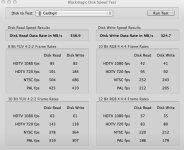
From what I can see. the disk is not the issue... -
Cheers!

thanks for respond
does redroket support playing full 4k in computer monitor ??????
now i do not know what should i do ??? thinking too much...
red company ... i need solution !!!
Hello,
What slot is your Rocket in? Is it in Slot-2 next to the video card?
ATF
It works but where it can hit bottlenecks is the generation mac, graphics card, and slot location/configuration.
What we use:
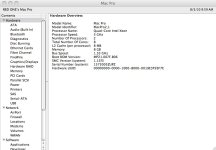
mac pro 4,1
2.66ghz 4 core
nvidia 120 GT or 285 or a recent ATI (nvidia is needed for 4.5k)
Graphics card should have at least 512MB of memory.
In your machine, you may need to rearrange the pcie config to have the graphics card in a x16 slot and rocket in a x8 slot.
Hello,
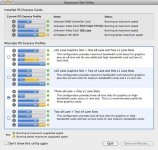
What card is in your slot-3? I noticed you had a "CalDigit" drive listed in the hard drive test (good choice! I use two of the HDOne's myself). That generation of Mac (the first one) may configure the default Slot-3 to a 1x lane speed. Can you run the Expansion Slot Utility.app (located in Macintosh HD/System/Library/CoreServices) and take a screen shot for us?
Also if you are streaming the video off a CalDigit HDOne or HDPro, what RAID configuration do you have the drive set to? If your system is in a stock config, that Slot-3 maybe be at 1x instead of at least 4x. The HDOne PCIe bridge card needs 4x (if you have the double card for two HDOne or HDPros - obviously it's 8x).
The fellow I work with, who primarily edits RED footage, had to bump his HDOne to RAID 5 from RAID 6 and disable Cache Synchronization (located in the CalDigit Raid Utility.app) as well as disabling Active Sustained Transfer Technology (also in the Raid Utility.app). Odd that CalDigit had him turn that off when having some drive speed issues.
Send us a screen shot of the Expansion Slot Utility so we can see how you have the lanes configured.
I just received our Rocket about two weeks ago. It has no problem playing footage at 4k from the HDOne but will hiccup on any internal SATA 7200rpm 32MB-64MB cache drives.
You definitely have to plan around hard drive speeds, video card, and memory.
My Mac Pro config;
Mac Pro (2008)
16GB OWC FB-DIMM 800MHz ECC Memory
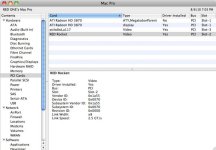
ATI 3870 512mb Video Card (Slot 1 - 16x)
Red Rocket (Slot 2 - 8x)
CalDigit HDOne 8 TB RAID-6 HD Array (Slot 3 - 4x)
LSI SAS Controller (Slot 4 - 4x)
(4) 1 TB 7200rpm 64mb cache Western Digital Caviar Black HDs - Internal SATA
Best!
ATF
Hello,
Others should weigh in, but I would pick the option above the current option you are using.
Give your video card back it's full 16x lane in slot-1, move slot-2 down to a 8x speed for the Rocket, and the other two lanes at 4x.
ATF
Hello,
Maybe I read the graph wrong. I was trying to see if you could get your slot 1 back to 16x, slot 2 to 8x and the other two to 4x.
What drive are you trying to play footage off? Your external Cal Digit or the internal SATA drives? What kind of drives are you
using internally? Which Cal Digit model is it?
Thanks!
ATF