Welcome to our community

Be a part of something great, join today!

  • Hey all, just changed over the backend after 15 years I figured time to give it a bit of an update, its probably gonna be a bit weird for most of you and i am sure there is a few bugs to work out but it should kinda work the same as before... hopefully :)

MXF files problems

Christoffer Glans

Well-known member
Joined
Jun 11, 2007
Messages
4,993
Reaction score
36
Points
48
Age
42
Location
Stockholm, Sweden
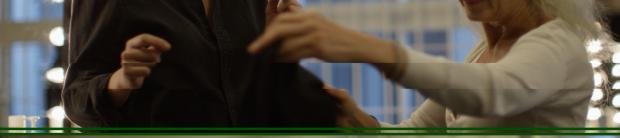
I did a shoot where I used Avid MXF DNxHD SQ as my proxy editing format. When playing the files in Avid, it plays really slow. I also encountered several artifacts that aren't present on the R3D files. Attached an example.
What is going on here? I already sent the camera in for a checkup where they changed the board because the timecode and date reset itself too much. Red assured that the camera has gone through checkup. I've also noticed the sound to be way off, the input channel generate some kind of noise and are too loud even when the mixer is at their lowest. We couldn't get any sound into the camera because of this.

If this is another problem that need me to send in the camera I seriously need to question if the cameras actually get a proper checkup or not.
 

Attachments

  • Ska?rmavbild 2016-11-18 kl. 22.27.17.jpg
    Ska?rmavbild 2016-11-18 kl. 22.27.17.jpg
    11.2 KB · Views: 0
I gave up on mxf on avid. A client I work for couldn't get it to work. So Now I shoot proress for them. Yaah it takes a while to process for AVID but hey it works.
 
Codec Wrapper

DNxHDsq MXF
ProResHQ MOV

Have you tried a different codec in an MXF wrapper to test that Christoffer?
 
Codec Wrapper

DNxHDsq MXF
ProResHQ MOV

Have you tried a different codec in an MXF wrapper to test that Christoffer?

The MXF wrapper cannot be shot in any other codec on Red. This is not transcoded material, it's what's being recorded in camera as proxies with the R3Ds. This issue is on the current job I did. I did a ProRes only interview before this job which doesn't seem to have any problems, but these errors occur on many of the MXF proxy-clips shot on this day.

The green line and broken image isn't happening on the entire clips, they pop up randomly.
 
Bump

So are these kinds of artifacts normal or not? Because they are burned into the MXF files. It's good that these are just proxies, but what if you shot MXF only? If these ends up on the final material it's going to ruin the shot.
 
What happens if you take the R3D files and reoutput them from any conversion program as DNxHD or DNxHR? Resolve could do it for free, if you're just doing HD.

I don't dispute that there are issues with several camera companies in creating QuickTime or Avid files in camera.
 
What happens if you take the R3D files and reoutput them from any conversion program as DNxHD or DNxHR? Resolve could do it for free, if you're just doing HD.

I don't dispute that there are issues with several camera companies in creating QuickTime or Avid files in camera.

That's not the issue, the issue is if I'm were to shoot without R3Ds and only MXF. If these artifacts show up then, the entire shot is ruined. There's plenty of times I've been shooting R3D and in situations with interviews we've switched to ProRes or MXF to save up space. If something like this happen on an interview then there's no way around it.

The Alexa and Red native onboard MXF files are not the Avid MXF format, you'll have to coordinate the correct avid codec to the version of Avid MC being used to edit, then transcode from Redcine-X or Resolve with the correct settings and/or codec, it's a pain but Redcine works best if you get all your ducks in a row. The proxy/in-camera MXF files recorded by Red and Arri cameras will work with anything except Avid and fcp7.

Not only are there a few different flavor of MXF, Avid alone has several different MXF types or flavors that are not cross compatible with every version of MC, you have to track down which Avid codec package goes with which version of Avid MC.

You are wrong. The MXF files are exactly the correct OPAtom MXFs used by Avid's media structure. You put them in the MediaFiles MXF folder and import the database file and they show up. I've only had problems with the absolute latest Avid, but the codec and MXF type is correct. I'm not sure what you are referring to when saying it's wrong for Avid. FCP7 however is irrelevant since the MXF format is aimed for Avid editorial primarily.
However, this has nothing to do with the problem presented, which is an encoding error creating visual artifacts.

I would like Red to chime in on this issue though.
 
Then it would seem like your not actually having any issues at all, other than trying to pass off lower quality segmented proxy files as master quality. And it might be an Avid codec compression issue or segmented file issue, though you'd have to run a few transcoding comparison sessions of different debayer quality settings (1/2 or 1/4) and assorted Avid presets to see if that's the culprit.

I'm not sure I understand what you are referring to. This error happens in-camera when shooting with MXFs. Right now this isn't an issue since they are only for offline editing, but if I were to shoot MXF only in high quality and these show up it's definetely gonna be a problem and something I want to fix before that happens. The errors aren't seen on the R3D footage, only the proxies.

Look at the image, at the woman's hand, it's cut off and the green lines are what's outside of the frame, now visible since parts of the frame is pushed together.

I'd like a word from Red on this; if it's a problem with shooting MXF or not. Since my camera just went through a checkup, I don't understand how things like these get missed. However, this might be something everyone has a problem with and is firmware related. As figured in another thread about the LB quality setting, the Weapon isn't recording DNxHD LB correctly, making the quality extremely low compared to regular DNxHD LB coded through Redcine-X. So this might be part of that problem, part of a problem with recording MXFs as a whole. At least a confirmation that Red is looking into it would be nice.
 
Back
Top